Windows 10 allows you to set a Wifi connection as a “Metered” connection, but no such GUI option existed for Ethernet (LAN) networks. In Windows 8 and Windows 10 v1607 and earlier, you needed to apply a registry edit to set Ethernet or LAN connection as metered. Thankfully, with Windows 10 Creators Update, it’s a built-in option that can be configured using the Settings UI — no registry edit required.Read more
Windows 10
This category contains posts about Microsoft’s latest Operating System – Windows 10.Windows 10’s always been interesting, as every new major update will usually include additional features.
Change Wi-Fi Network Connection Priority in Windows 11/10
Most of us use more than one Wi-Fi network connection so that if one fails, the 2nd one is used as a fallback. With multiple Wi-Fi network sources, there comes the issue of connection priority.Read more
New Share UI in Windows 10 – How to Enable it?
Windows 10 Creators Update will have a new Share UI which Microsoft revealed in October.
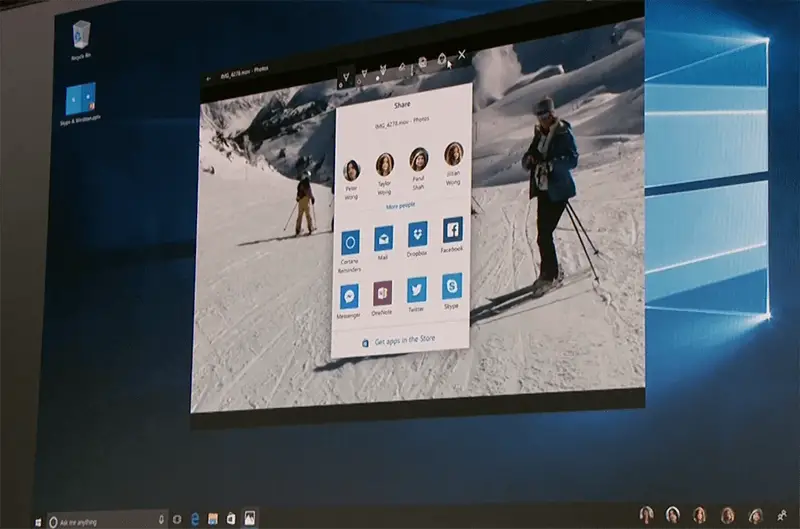
If you’re using Insider Preview Build 14972, you can enable the new Share UI which replaces the Share panel.Read more
Pin a Website Shortcut to the Windows 10 Start Menu
If you’ve been using desktop shortcuts to open your favorite websites, you can instead pin those websites to the Windows 10 Start menu to make your desktop clutter-free.
Moreover, pinning websites to the Start screen helps you get to those sites quickly especially when your Windows 10 device is in Tablet mode, where the Start screen occupies the full screen, covering your desktop. You can pin website shortcuts to the Windows 10 Start screen using Internet Explorer, Microsoft Edge, Google Chrome, or Firefox.Read more
How Windows Defender “Block at First Sight” Cloud Protection Feature works?
Windows Defender or the Microsoft anti-malware platform protects home computers, servers and online services such as Office 365. With the wealth of threat intelligence and telemetry data, Defender’s cloud backend is an astounding malware protection service.Read more
Disable Virtual Desktop Switching on Mouse Hover in the Task View Interface
Virtual Desktops feature in Windows 10 provides a nice way to keep your program windows organized. You can move a set of work-related programs to a separate virtual desktop, having your entertainment and social networking stuff in another virtual desktop. When required, you can also make a program window or all window instances of a program available on all virtual desktops.Read more
How to Change File Explorer Default Start Folder in Windows 10
The Windows 10 File Explorer opens to Quick access by default. Quick access is a section where you can place shortcuts to your favorite folders. It also displays recently viewed files and frequently used folders. If you’re not a fan of the Quick access feature and want File Explorer to default to “This PC”, Downloads or any other custom folder by default, this post tells you how to do it.
Read more
View Resources Usage by Individual Services in Windows 10
With the Windows 10 Creators Update (codenamed “Redstone 2”) Preview Build 14942, the way in which services are hosted has changed. In Windows 10 v1703 systems with more than 3.5 GB of RAM, each service would get its own service host (svchost.exe), instead of running under a shared service process. This lets you view the resources usage by each individual service. Resources here mean network, memory, disk and CPU usage.Read more
Get Notified When Windows 10 Brings a New Spotlight Image Every time [Lock Screen]
Windows Spotlight brings some amazing wallpapers for the Lock Screen, which you can save and use as your desktop background. By now, I’m pretty sure most users know how to view and store the lock screen images collection from the Assets folder.
Then I made a post on how to find the exact file name of the current lock screen wallpaper image in use, using the Registry Editor or a script to find the image file and save it to your Pictures folder automatically.Read more