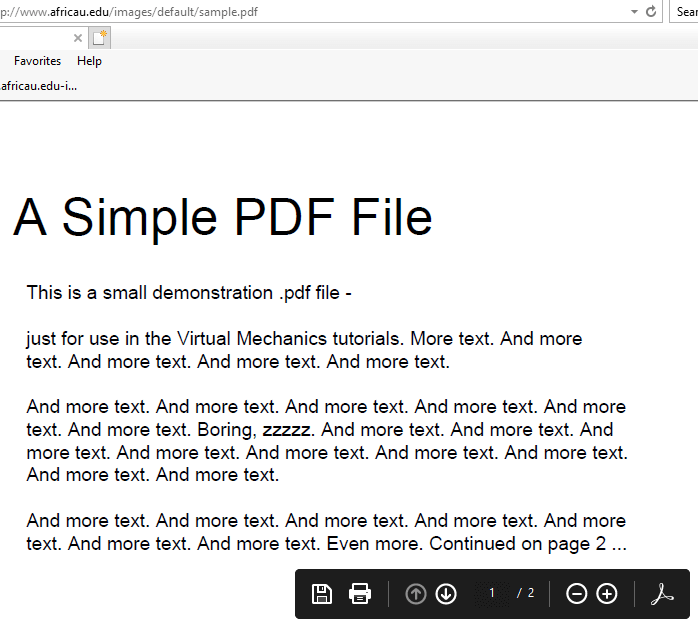
Adobe Acrobat reader adds the web browser plugin using which you can view PDFs in a web browser. After installing the Windows 10 2004 update, you may be unable to print PDF files from the web browser/frame, especially when using Internet Explorer. The print dialog box doesn’t open and nothing happens if you issue the Print command from the browser.
However, you can save the PDF file locally and open/print using Adobe Acrobat Reader without any issues.
This seems to be a bug in Windows 10 2004. Until Microsoft or Adobe issues a fix for this issue, you may disable Protected Mode in Adobe Reader as a workaround.Read more
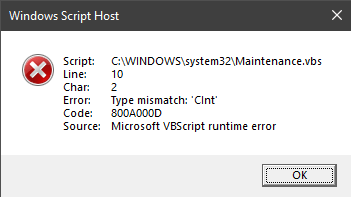
Whenever you start your computer, the following error may popup:
Windows Script Host
Script: C:\WINDOWS\system32\Maintenance.vbs
Line: 10
Char: 2
Error: Type mismatch ‘CInt’
Code: 800A000D
Source: Microsoft VBScript runtime error
However, you may find no reference to this file in MSConfig or the Task Manager Startup tab. You may be wondering how to prevent this error message dialog from appearing at startup.Read more
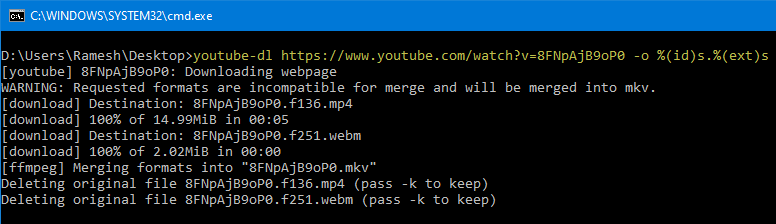
There are plenty of free online portals that help you download YouTube, Facebook, and Twitter embedded videos. These portals process the inputted video URL and make multiple resolutions of the video available for download.
However, if you want to avoid the online video download portals and wish to download YouTube, Facebook, and Twitter videos from your computer directly (without an intermediary), this post is for you.
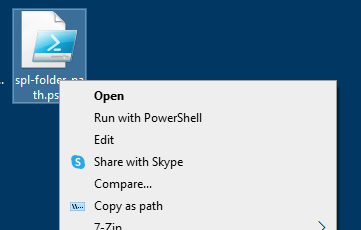
Windows 10 2004 adds the Share with Skype context menu option for all files. If you’re a person who likes to clean up the clutter and removes unused context menu items, this article is for you.
Note that third-party tools like ShellExView (v2.01) don’t seem to list this context menu item, as it’s added by a modern or UWP Microsoft Store app. Let’s see how to remove the Share with Skype right-click menu option manually in Windows 10.Read more
If your current Windows 10 installation gets corrupted, you’ll be able to use the recovery drive to reinstall Windows 10 — restoring the same build and version of Windows 10 you were using, along with the installed drivers and preinstalled customizations.
For this, you’ll need to have created a USB recovery drive beforehand — when your system was healthy. Recovery Drive can also be useful if you’ve replaced your hard drive and want to install Windows 10 on it.
Restoring from Windows 10 USB recovery drive is equivalent to using the Remove Everything option in Refresh/Reset this PC in the Windows 10 settings. The recovery drive is an alternative if Windows doesn’t boot.Read more
Domain Name System (DNS) is the address book of the Internet. Web browsers interact through Internet Protocol (IP) addresses. DNS translates domain names to IP addresses so browsers can load Internet resources.
Windows caches the DNS records for a considerable time. This cache can be cleared by running the command ipconfig /flushdns. Other than this, your web browser like Google Chrome maintains a separate DNS cache mechanism.
Why do you need to clear the browser DNS cache?
System administrators often find times where they need to redirect the domains by editing the host file, in order to override any DNS records for a domain name. However, every time you want to change a hostname to a different IP, you needed to close the browser before the change will take effect. This can get tedious if you have too many browser tabs or windows open.
When doing web development or other work that requires changing the web hosting IP in the HOSTS file for testing purposes, you needed to restart the web browser every time for the new host to IP mappings to take effect.
However, with Google Chrome, you can clear the internal DNS cache without closing and reopening the browser. This post tells you how to clear the internal DNS cache of the Google Chrome browser without restarting Google Chrome.
Youtube-dl is a command-line program to download videos from YouTube or other sites. When you run the software on some computers, you may receive the following error:
youtube-dl.exe – System Error
The code execution cannot proceed because MSVCR100.dll was not found. Reinstalling the program may fix this problem.
Let’s see how to fix the msvcr100.dll missing error.Read more
Earlier, we saw how to fix the Some required files are missing error when attempting to create a USB Recovery Drive in Windows 10. The steps involved copying the Windows Recovery Environment image Winre.wim from the Windows 10 source (DVD/ISO) and also fixing the recovery partition.
The following is a different error that appears when creating a Recovery Drive.
We can’t create the recovery drive
A problem occurred while creating the recovery drive.
There seem to be many different causes for this error, but the most prominent reason is the failure of Volume Shadow Copy Service (VSS) to generate a snapshot. For most users, the above error happens only if you enable the option Back up system files to the recovery drive.Read more
When upgrading to Windows 10 or 11 from Windows 7, 8, or 8.1, or updating Windows 10 or 11, you might encounter the error We couldn’t update system reserved partition, or error 0xc1900104, or error code 0x800f0922.
Error when updating Windows 10Error when upgrading from Windows 7, 8, or 8.1.
When this happens, the setupact.log in the Panther directory may contain the following entries:
Info CFreeSystemPartitionDiskSpaceChecker: checked InsufficientSystemPartitionDiskSpace, found HardBlock.Not enough space on partition [\\?\GLOBALROOT\Device\HarddiskVolume1\] Required: 15 MB. Available: 9 MB.
Info ConX::Compatibility::FreeSystemPartitionDiskSpaceCheckerImpl::SaveToPersistableData: Save data - FreeSystemPartitionDiskSpaceCheckerImpl = no
Info ConX::Compatibility::CCompatibilityHost::SerializeData: Provider wsc:setup: is serializing 28 bytes of data.
Info [0x090008] PANTHR CBlackboard::Open: C:\$WINDOWS.~BT\Sources\Panther\CompatScanCache.dat succeeded.
Info [0x090009] PANTHR CBlackboard::Close: c:\$windows.~bt\sources\panther\compatscancache.dat.
Info ConX::Compatibility::CCompatibilityController::ReportData: Type: [0], ID: [2], ReportOption: [2]
Info ConX::Compatibility::CCompatibilityHost::SetScanResult: Provider wsc:setup: reports HardBlock
Info MOUPG InitializeRoutine: MOSETUP_ACTION_IMAGE_EXIT
Info MOUPG ImageExit: Initializing SetupResult: [0xc1900201]
Info MOUPG ImageExit: Initializing Extended: [0x20008]
This happens if the System Reserved Partition (SRP) or the EFI partition is full. The EFI or the System Reserve Partition partition on your hard drive that stores boot information for Windows.
According to Microsoft, to upgrade your device, you’ll need to free up 15MB of space on the SRP using the appropriate method below. And then try the upgrade again. If you’re updating Windows 10, you need to free up 13MB.Read more
After installing the Windows 10 Feature Update 1903 or higher, you may have noticed that the accent color checkbox Start, taskbar, and action center is grayed out. The recent Windows 10 versions come with a new Light Theme (“Light” color mode) that displays the Taskbar, Start menu, action center, notification area pop-ups, etc., in light grey color.
When the light color mode is enabled for Windows, the Taskbar, Start menu, and the action center can’t be colorized, which is why those settings are dimmed out. This is by design. You’ll be able to show an accent color for window title bars and borders, though.
Here is how to enable the dark color mode for Taskbar, Start Menu, and the Action Center. The current version of Windows 10 is 20H2 as of this post, and the instructions apply to version 20H2 as well.