Fix: File system error (-2147416359) in Windows 10/11

File system error (-2147416359)

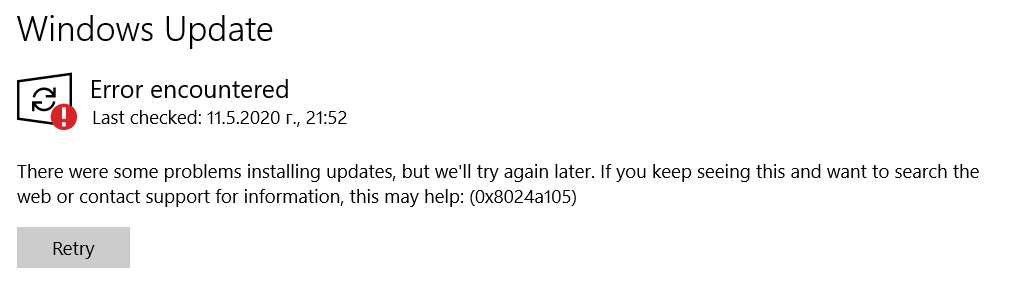
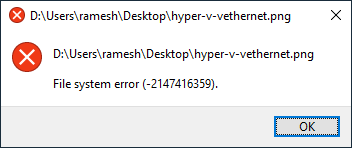
When you try to open an image file or video in a modern (UWP) app like Groove, Photos, Movies & TV, the following error may occur:

File system error (-2147416359).

File system error (-2147416359)

The error is seen only when opening files using modern apps. The classic desktop (win32) apps are not affected by this issue. For instance, you may be able to open the same image using Windows Photo Viewer or Office Picture Manager. Likewise, the same video may open fine in VLC Player, but not in Groove, or Films & TV.

Also, nothing may happen when you launch a store app. For example, nothing happens when you attempt to launch Calculator, Calendar, Mail, Movies & TV, Photos, or any other store app for that matter.Read more

How to Fix Windows Update Error 0x80073712

80073712 windows update error

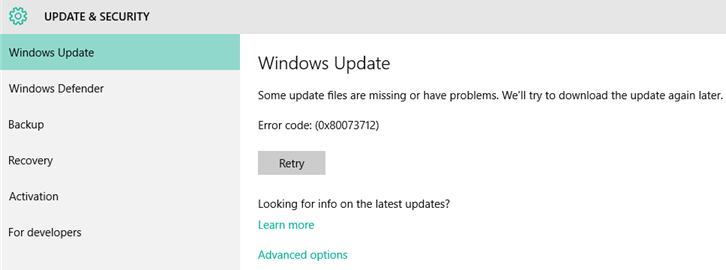
When installing a cumulative update, .NET framework update, or a feature update, the error 0x80073712 occurs and stops the installation process. Here is the full error message verbatim: Some update files are missing or have problems. We’ll try to download the update again later. Error code: (0x80073712). Cause The error 0x80073712 (ERROR_SXS_COMPONENT_STORE_CORRUPT) denotes that the … Read more

WordPad/Paint “Unable to create new document” Error

wordpad paint unable to create new document

When you start WordPad or Microsoft Paint on a Windows 10 computer, the error “Unable to create new document” occurs and the program doesn’t launch. The error occurs whether you launch WordPad by running wordpad.exe or write.exe. Workaround There are two wordpad.exe and mspaint.exe executables in a Windows 10 x64 computer. You may be able … Read more

How to View and Modify Service Permissions in Windows

service stop error 5 - view and edit service permissions

Summary: This article explains the various methods to view the permissions for any Service in Windows. It also covers the tools and methods to modify the service permissions easily.

Just as file system objects and registry keys have permissions, each service in Windows can have a set of permissions. The permission entries for a service determine who can stop the service, query its status, change the startup type, modify the service configuration, or delete the service.

You may have observed that the Start, Stop, and the Startup type controls are grayed out for some services, even when you’re logged in as an administrator.
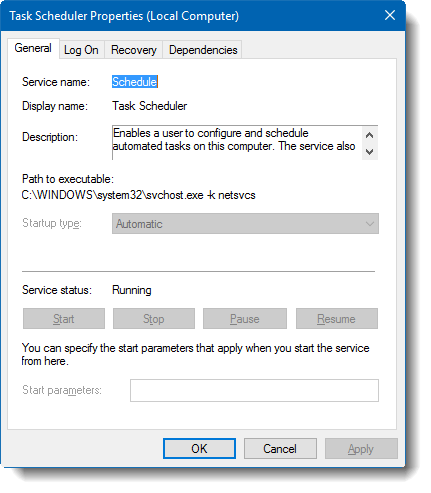
task scheduler service grayed out options

And if you attempt to stop the Task Scheduler service from admin Command Prompt, you’ll get the following error message:

System error 5 has occurred.

Access is denied
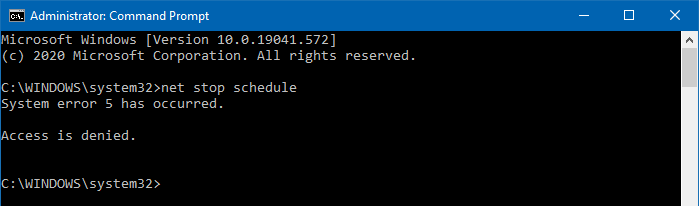
service stop error 5 - view and edit service permissions

This is because the Task Scheduler service permissions are pre-configured such that even the administrators can’t control this particular service.

In this article, we’ll see how to view service permissions and modify them if needed.

Read more
[Fix] Windows Update Error 0XC19001E1 in Windows 10

windows 10 setup error 0x19001e1

On some systems, the error 0XC19001E1 may occur when installing a Windows 10 feature update — e.g., when upgrading from version 1903 to 2004, 2004 to 20H1, etc. The 0XC19001e1 error is one of the vaguest error messages of all the Windows Update errors.

windows 10 setup error 0x19001e1

Feature update to Windows 10, version 1903 - 0xc19001e1

The Microsoft-Windows-WindowsUpdateClient event log channel may have the following entry logged:

Log Name: System
Source: Microsoft-Windows-WindowsUpdateClient
Date: 
Event ID: 20
Task: Windows Update Agent
Level: Error
Opcode: Installation
Keyword: Installation, Failure
User: S-1-5-18
User Name: NT AUTHORITY\SYSTEM
Computer: Server
Description: 
Installation Failure: Windows failed to install the following update with error 0xC19001E1: Feature update to Windows 10, version 1903.

If you run setup using the Windows 10 Update Assistant or the Media Creation Tool, you may see the following error message:

windows 10 setup error 0x19001e1

This PC can't be upgraded to Windows 10.

Your PC has hardware that isn't ready for this version of Windows 10. No action is needed. Windows Update will offer this version of Windows 10 automatically once the issue has been resolved.

Let’s see how to fix the error 0XC19001E1 when updating Windows 10.

Read more

How to Jump to a Specific Event Log (Channel) Directly in Event Viewer

event viewer jump to a log directly

The event logging service in Windows records important software and hardware events from various sources and stores them in a collection named event log. There are various event log channels in addition to the well-known built-in channels like Application, System, Security, etc. The Event Viewer (eventvwr.msc or eventvwr.exe) enables you to view these logs.

Here is a sample list of the channels or logs seen in the Event Viewer window.

  • Microsoft-Windows-Store/Operational
  • Microsoft-Windows-GroupPolicy/Operational
  • Microsoft-Windows-StateRepository/Operational
  • Microsoft-Windows-AppXDeploymentServer/Operational
  • Microsoft-Windows-EapHost/Operational
  • Microsoft-Client-Licensing-Platform/Admin
  • Microsoft-Windows-TaskScheduler/Operational
  • Microsoft-Windows-FileHistory-Engine/File History backup log

For instance, to view Microsoft-Windows-FileHistory-Engine/File History backup log, usually, one would open the Event Viewer and then navigate to the following branch manually:

Applications and Service Logs → Microsoft → Windows → FileHistory-Engine → File History backup log

event viewer jump to a log directlyRead more

Cannot import .REG file; Not all data was successfully written to registry

cannot import .reg file - error accessing registry

Sometimes, when applying the registry settings using a .reg file, you may get one of the following errors:

Cannot import file.reg: Not all data was successfully written to the registry. Some keys are open by the system or other processes, or you have insufficient privileges to perform this operation.

cannot import .reg file - error accessing registry

Cannot import file.reg: Error accessing the registry.

cannot import .reg file - error accessing registry

Registry files (or registration entries) are files that are used to deploy registry settings quickly to other computers. The registration entries have a file extension .reg that can be run by double-clicking or using the reg.exe command line. You can also manually import .reg files from the Registry Editor window.

Read more

Mouse without Borders “Connection timed out” and does not auto-connect at startup

mousewithoutborders connection timed out

Mouse without Borders is a Microsoft Garage product that lets you control up to four computers from a single mouse and keyboard. With Mouse without Borders (MwoB), you can copy text or drag and drop files across computers.

Sometimes, MwoB may not be able to establish a connection with the other computers — causing errors like “Connection timed out,” etc. This happens even though MwoB picks up the correct IP address of the other computer(s), whether or not you use the hostname-to-IP mapping option in that program.

mousewithoutborders connection timed out

In some cases, only the one-way connection (inbound or outbound) would work.

mousewithoutborders one-way connection only

As you can see in the above screenshot, the inbound connection is allowed, but the outbound connection to the other computer (e.g., OptiPlex 9020) is timed out.

The MwoB log (generated by right-clicking on the MwoB taskbar icon and clicking Generate log) would show these errors or similar:

tcpClient.Connect: 8814: A connection attempt failed because the connected party did not properly respond after a period of time, or established connection failed because connected host has failed to respond [::ffff:192.168.0.101]:15101

tcpClient.Connect: Unable to connect after a timeout: OptiPlex-9020:192.168.0.101 : An operation was attempted on something that is not a socket [::ffff:192.168.0.101]:15101
[251] The clipboard socket could have been closed. Not listening. You must call the Start() method before calling this method.

Due to the “connection timed out” error (one-way connection), Mouse without Border would fail to establish a connection to the other computer(s) automatically after every startup. To work around this issue, many users open the Mouse without Borders dashboard on the other computer (e.g., OptiPlex 9020) and click on the Apply button to establish the connection manually.

Clicking on the Apply button on the affected computers each time is not a viable option. This can be a big nuisance, especially when you have to manage 4 computers with the Mouse without Borders utility.

This article tells you how to fix the connectivity issues when using Mouse without Borders.Read more

Windows 10 forgets passwords in Outlook, Edge, Chrome, etc

v2004 credentials bug - scheduler with s4u task - wiped out credentials

After installing the Windows 10 feature update v2004, your computer may fail to remember the stored passwords in Outlook, Edge, Chrome browser, and various other programs. This is a system-wide issue rather than an application-specific problem. Here are some of the symptoms you may experience in Windows 10 v2004:

  • Windows 10 prompts for your Microsoft account password every now and then.
  • Accessing a network resource or NAS drive causes the password prompt to appear every time even though the credentials were saved earlier.
  • Microsoft Edge, Firefox, and Chrome browsers keep asking to enter the password to access a resource for which you’ve previously saved the password.
  • Forms and password autocomplete don’t work in Google Chrome and other apps.
  • Passwords stored by your web browser (e.g. Chrome) on the local computer are wiped off.
  • The synchronization is paused in the Chrome web browser.
  • Chrome web browser’s chrome://signin-internals/ page denotes the error “Load credentials failed with decrypt errors”.
  • You’re forced to sign to OneDrive every time you log in.
  • Outlook keeps asking you to log into Office 365 every few hours.
  • Passwords for email accounts in your mail client are not saved, and you need to type them every time.
  • Adobe Acrobat keeps asking for your Adobe credentials whenever you open a PDF file.
  • The Windows 10 Settings periodically wants to fix your account configuration by re-authenticating with Windows Hello.
  • Mapped Network Drives not working in Windows 10 v2004.
  • Windows Credentials (in Credentials Manager) are wiped out at every restart.
    v2004 credentials bug - scheduler with s4u task - wiped out credentials
  • In the Event Viewer, these two errors are recorded in the Applications and Services LogsMicrosoftWindowsCrypto-DPAPIOperational log.
    Log Name: Microsoft-Windows-Crypto-DPAPI/Operational
    Source: Microsoft-Windows-Crypto-DPAPI
    Date: 
    Event ID: 8196
    Task Category: Master Key Operation
    Level: Error
    Keywords: Master Key Operation
    User: SYSTEM
    Computer: Vostro-3470
    Description:
    Master key decryption in memory failed
    
    
    Log Name: Microsoft-Windows-Crypto-DPAPI/Operational
    Source: Microsoft-Windows-Crypto-DPAPI
    Date: 
    Event ID: 8198
    Task Category: Data Protection Operation
    Level: Error
    Keywords: Data Protection Operation
    User: SYSTEM
    Computer: Vostro-3470
    Description:
    DPAPI Unprotect failed .
    
    Status: 0x8009000B
    ReasonForFailure: Could not get the master key

The above symptoms denote that this is a system-wide bug in Windows 10 version 2004 that prevents the stored credentials from loading correctly.Read more