[Fix] “Windows Backup Failed to Get an Exclusive Lock on the EFI System Partition” Error

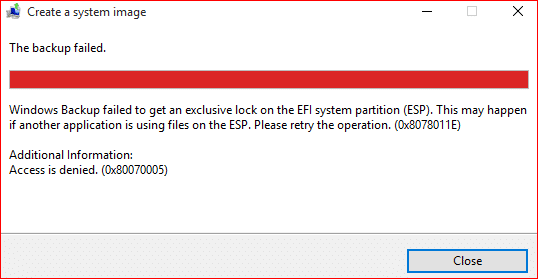
When you try to create a system image using Windows Backup on your computer, the following error occurs and backup procedure stalls.

0x8078011E avast efi system partition lock windows backup

Windows Backup failed to get an exclusive lock on the EFI system partition (ESP). This may happen if another application is using files on the ESP. Please retry the operation. (0x8078011E)

Additional information:
Access is denied. (0x80070005)

and

Check your backup. The last backup did not complete successfully.

Read more

Fix: Network Computers Not Showing up in Windows 10 File Explorer

Network Computers Not Showing up in windows 10

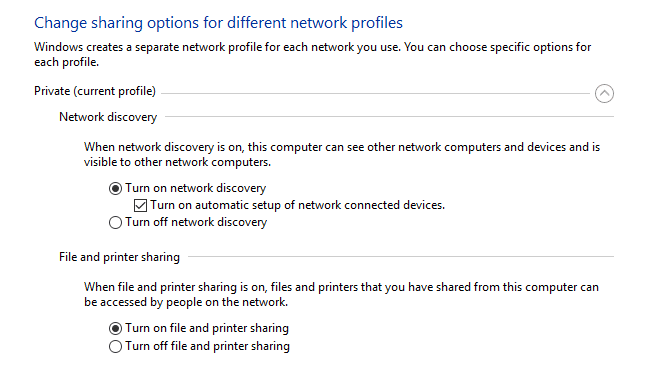
In Windows 10 Version 1803, the HomeGroup feature has been removed. We also saw how to share files and printers without HomeGroup in Windows 10. After updating to v1803, many users face a problem where the computers/devices in the home network are not seen when you open This PC -→ Network.

When you open This PC and click on Network in the left pane, none of your networked devices may show up. This article tells you how to fix network devices discovery problem in Windows 10.Read more

[Fix] Zip File Error 0x80004005 When Extracting or Copying

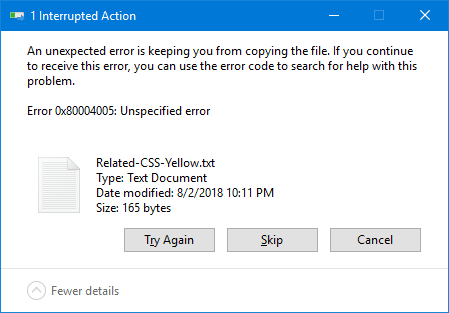
When you open a .zip file (compressed folder) in Windows and attempt to extract or copy its contents to a folder, the error 0x80004005 (“Unspecified error”) may appear. Here is the full error message verbatim:

An unexpected error is keeping you from copying the file. If you continue to receive this error, you can use the error code to search for help with this problem.

Error 0x80004005: Unspecified error

zip files error 0x80004005
Read more

How to Resize Images Using Photos App in Windows 10

The Photos app, a modern (UWP) app which replaces the classic Windows Photo Viewer, as Microsoft wanted to make the UI seamless between Windows 10 Mobile and Windows 10 for computers platforms. When Windows 10 was released, many users had to manually add the Windows Photo Viewer classic app using a registry edit, as they didn’t find the Photos app appealing at that time.

The Photos app gets new features every now and then. For instance, Photos app can edit images, split videos or merge them together. And the newest feather in its cap is the ability to resize images (although only 3 preset options are provided). This post explains how to resize images using the Photos app in Windows 10.Read more

How to Share Files and Printers Without HomeGroup in Windows 10

The HomeGroup feature in Windows made it possible for novice users to share file and printer quickly. You could share pictures, music, videos, documents, and printers with other people in your home network. However, starting with this build (April 2018 – Version 1803), the HomeGroup service is no longer operational in Windows 10. So, what’s the alternate for HomeGroup?

This post explains how to share files and printers on your home network, without using the HomeGroup feature. The HomeGroup alternate file and printer sharing Instructions in this article apply to Windows 7 through Windows 10.Read more

What is Device Census and Why is It Using My Webcam?

When your anti-virus program shows the message “Device Census is using your webcam” or “Webcam Access Blocked” (referencing DeviceCensus.exe), you are be worried if some malware has infected your system. For example, Kaspersky Total Security, ESET or any other anti-virus program you’ve installed may warn you about some program trying to access your webcam.

kaspersky device census webcam warning

This post tells you what Device Census is and how to get rid of the message.Read more

[Fix] Error “Windows cannot find taskmgr.exe” Opening Task Manager

When attempting to open the Task Manager in your Windows computer, you may receive the following error:

taskmgr.exe cannot be found - debugger

Windows cannot find ‘C:\Windows\system32\Taskmgr.exe’. Make sure you typed the name correctly, and then try again.

This error occurs no matter which method you use in order to launch Task Manager. Running taskmgr.exe with the full path via Run dialog will also not work.
Read more