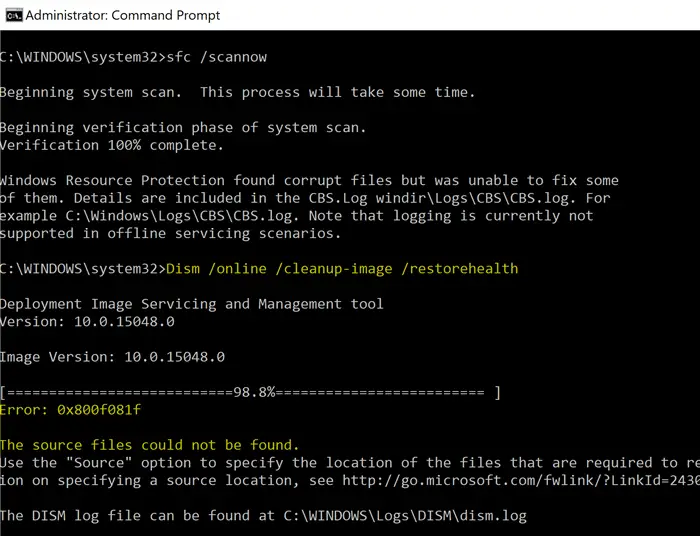
When running the following DISM command, the error 0x800F081F may appear in some systems. The same error occurs when installing the .NET Framework in Windows 10.
Dism /Online /Cleanup-Image /RestoreHealth
Error: 0x800f081f
The source files could not be found.
Use the "Source" option to specify the location of the files that are required to restore the feature. For more information on specifying a source location, see http://go.microsoft.com/fwlink/?LinkId=243077.
DISM.log
Error DISM DISM Package Manager: PID=13368 TID=5124 Failed finalizing changes. - CDISMPackageManager::Internal_Finalize(hr:0x800f081f)
Error DISM DISM Package Manager: PID=13368 TID=5124 The source files could not be found; their location must be specified using the /source option to restore the feature. - GetCbsErrorMsg
Error DISM DISM Package Manager: PID=13368 TID=5124 Failed processing package changes with session option CbsSessionOptionRepairStoreCorruption - CDISMPackageManager::RestoreHealth(hr:0x800f081f)
Error DISM DISM Package Manager: PID=13368 TID=5124 The source files could not be found; their location must be specified using the /source option to restore the feature. - GetCbsErrorMsg
Error DISM DISM Package Manager: PID=13368 TID=5124 Failed to restore the image health. - CPackageManagerCLIHandler::ProcessCmdLine_CleanupImage(hr:0x800f081f)
Error DISM DISM Package Manager: PID=13368 TID=5124 Failed while processing command cleanup-image. - CPackageManagerCLIHandler::ExecuteCmdLine(hr:0x800f081f)
CBS.log
CBS    Exec: Processing complete, session(Corruption Repairing): 30459372_734419507 [HRESULT = 0x800f081f - CBS_E_SOURCE_MISSING]
CBS    Session: 30459372_734419507 failed to perform store corruption detect and repair operation. [HRESULT = 0x800f081f - CBS_E_SOURCE_MISSING]
CBS    Session: 30459372_734419507 finalized. Download error: 0x80240022 [Unknown Error], Reboot required: no [HRESULT = 0x800f081f - CBS_E_SOURCE_MISSING]
CBS    Failed to FinalizeEx using worker session [HRESULT = 0x800f081f]
The same error (0x800F081F – CBS_E_SOURCE_MISSING) may occur when you attempt to install .NET Framework 3.5 via Optional Features.
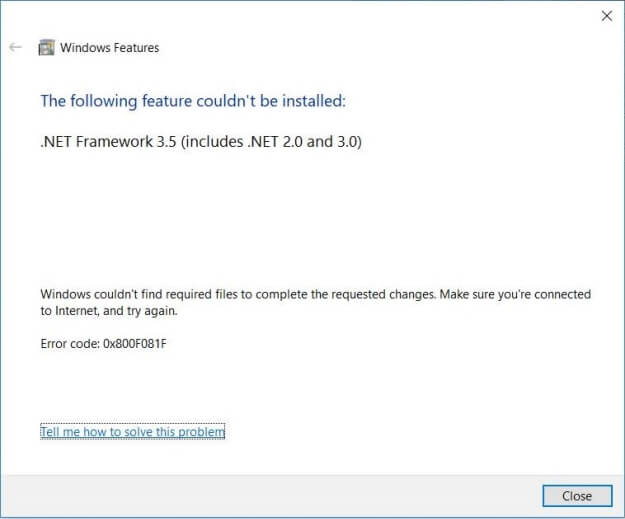
Windows couldn't find required files to complete the requested changes. Make sure you're connected to Internet, and try again:

Error code: 0x800F081F
DISM.log
The source files could not be found.
Use the "Source" option to specify the location of the files that are required to restore the feature. For more information on specifying a source location, see http://go.microsoft.com/fwlink/?LinkId=243077.
The DISM log file can be found at C:\Windows\Logs\DISM\dism.log
0x800F081F - CBS_E_SOURCE_MISSING
This post tells you how to fix the .NET Framework installation and the DISM error 0x800f081f in Windows 10.Read more