The Windows 10 File Explorer opens to Quick access by default. Quick access is a section where you can place shortcuts to your favorite folders. It also displays recently viewed files and frequently used folders. If you’re not a fan of the Quick access feature and want File Explorer to default to “This PC”, Downloads or any other custom folder by default, this post tells you how to do it.
Read more
 Ramesh
View Resources Usage by Individual Services in Windows 10
With the Windows 10 Creators Update (codenamed “Redstone 2”) Preview Build 14942, the way in which services are hosted has changed. In Windows 10 v1703 systems with more than 3.5 GB of RAM, each service would get its own service host (svchost.exe), instead of running under a shared service process. This lets you view the resources usage by each individual service. Resources here mean network, memory, disk and CPU usage.Read more
How to Reset Windows Firewall Settings to Defaults
You may want to occasionally reset Windows firewall settings or rules to clear any unused entries there in the aftermath of malware attack and removal, or when some of the networking features don’t work due to misconfiguration of the Windows Firewall.Read more
Get Notified When Windows 10 Brings a New Spotlight Image Every time [Lock Screen]
Windows Spotlight brings some amazing wallpapers for the Lock Screen, which you can save and use as your desktop background. By now, I’m pretty sure most users know how to view and store the lock screen images collection from the Assets folder.
Then I made a post on how to find the exact file name of the current lock screen wallpaper image in use, using the Registry Editor or a script to find the image file and save it to your Pictures folder automatically.Read more
Why doesn’t Disk Cleanup Clear the Temp Folder Contents Completely
Disk Cleanup (Cleanmgr.exe) is a built-in tool in Windows that offers some useful cleanup options not available in other 3rd party cleanup tools. It can remove superseded device drivers, Temporary Files, Internet Explorer cache, obsolete Windows Updates, Previous Windows Installation (Windows.old) folder, and much more.Read more
How to Install CAB and MSU Updates from Windows Update Catalog
Installing updates via Windows Update can be problematic sometimes. For example, downloads may stall at a specific stage due to problems with the Windows Update server or the Content Delivery Network (CDN) that hosts the update in your region. It could also be possible that the Windows Update or BITS Services configuration on the local computer is at fault.Read more
Why Is Windows Defender Running Alongside my Antivirus Program?
Is Windows Defender running alongside their main antivirus program, as the icons for both programs are visible in the Notification area? Isn’t Windows Defender supposed to turn itself off when it detects a third-party antivirus program?Read more
Make Action Center Always Remain Open on the Screen in Windows 10
The Windows 10 Action Center displays app & system notifications and provides quick actions buttons so that users can get to the commonly used settings pages easily.
By default, the Windows 10 Action Center panel closes automatically once it loses the active window focus — when the user clicks a program window or anywhere else. Here is a registry hack which makes the Action Center panel always remain on the screen until you close it manually.Read more
How to Find Which Process has Locked a File in Windows
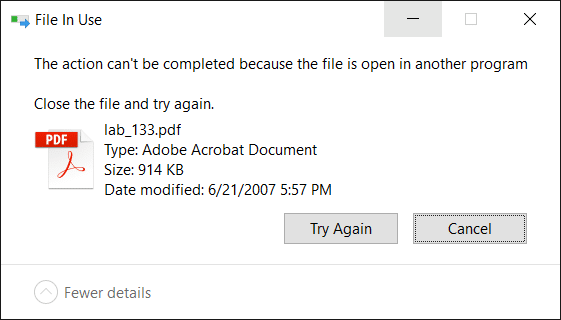
When you attempt to delete a file or folder which is in use by a process, the File In Use dialog appears showing the name of the program that has locked the file.
However, there are cases where the “File In Use” dialog doesn’t show the name of the process that has a lock on the file you’re trying to delete. In some cases, the dialog will show “the action can’t be completed because the file is open in another process“.
For investigating processes and locked files, Windows Sysinternals Process Explorer is probably the first option that comes to mind for most users. However, there are two built-in solutions to display the current open files list along with corresponding process names.Read more
Set Custom icon for PDF Files with Chrome or Firefox as the Default PDF Viewer
If you’ve associated PDF files with Google Chrome or Mozilla Firefox to make use of browser’s built-in PDF viewing capability, the PDF and HTML files would show up with the same Chrome or Firefox icon in File Explorer. This post tells you how to set a custom different icon for PDF files, with Chrome or Firefox as the default PDF viewer.Read more