Mouse without Borders is a Microsoft Garage product that lets you control up to four computers from a single mouse and keyboard. With Mouse without Borders (MwoB), you can copy text or drag and drop files across computers.
Sometimes, MwoB may not be able to establish a connection with the other computers — causing errors like “Connection timed out,” etc. This happens even though MwoB picks up the correct IP address of the other computer(s), whether or not you use the hostname-to-IP mapping option in that program.
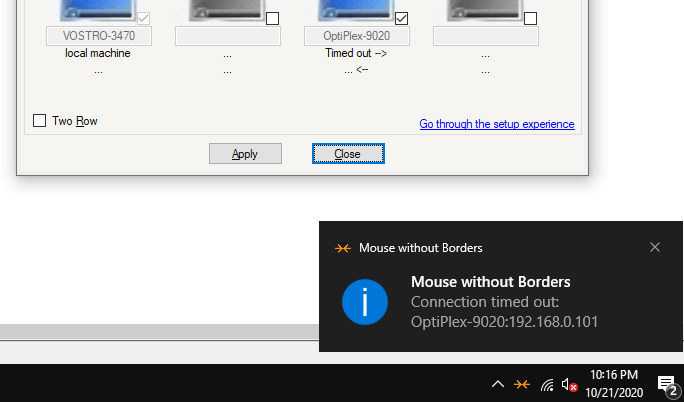
In some cases, only the one-way connection (inbound or outbound) would work.
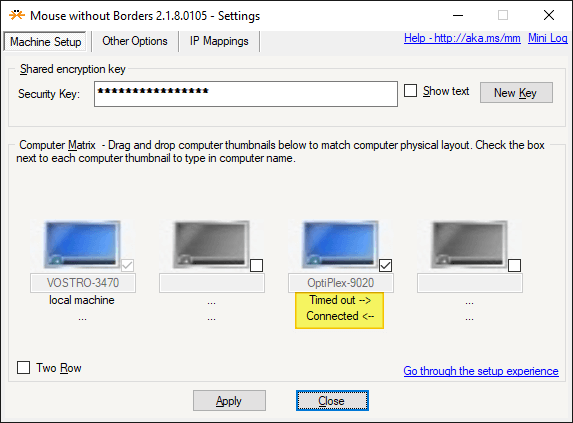
As you can see in the above screenshot, the inbound connection is allowed, but the outbound connection to the other computer (e.g., OptiPlex 9020) is timed out.
The MwoB log (generated by right-clicking on the MwoB taskbar icon and clicking Generate log) would show these errors or similar:
tcpClient.Connect: 8814: A connection attempt failed because the connected party did not properly respond after a period of time, or established connection failed because connected host has failed to respond [::ffff:192.168.0.101]:15101

tcpClient.Connect: Unable to connect after a timeout: OptiPlex-9020:192.168.0.101 : An operation was attempted on something that is not a socket [::ffff:192.168.0.101]:15101
[251] The clipboard socket could have been closed. Not listening. You must call the Start() method before calling this method.
Due to the “connection timed out” error (one-way connection), Mouse without Border would fail to establish a connection to the other computer(s) automatically after every startup. To work around this issue, many users open the Mouse without Borders dashboard on the other computer (e.g., OptiPlex 9020) and click on the Apply button to establish the connection manually.
Clicking on the Apply button on the affected computers each time is not a viable option. This can be a big nuisance, especially when you have to manage 4 computers with the Mouse without Borders utility.
This article tells you how to fix the connectivity issues when using Mouse without Borders.Read more