
Even in a fresh Windows 10 installation, you might see some DistributedCOM (DCOM) errors Event ID: 10016 in the System event log. Here are some sample events:Read more
Windows
You’re browsing the “Windows” parent category, which lists articles on every Windows Operating System.
Black Screen and Command Prompt Open at Logon – No Explorer Shell
Due to a crypto-malware infection in the computer, after logging in to your user account, a black screen appears with a Command Prompt window open. Your desktop, taskbar, and the wallpaper (explorer shell) don’t get loaded unless you type explorer.exe in the Command Prompt window manually. This problem may continue even in the aftermath of malware or crypto-miner removal.
Read more
Slipstream Windows 10/11: Integrate Updates into ISO/WIM
Situations such as system file corruption and unexplained or erratic system behavior require you to repair or reinstall your Windows installation by running Setup.exe from a mounted Windows ISO or DVD/USB flash drive. However, it’s always possible that the current Windows installation’s build or the Service Pack level is higher than that of the ISO or your setup media.
In order to repair Windows, you must first make sure that the version and build number of the source is higher than that of your current installation of Windows. But how to keep the installation media updated?Read more
[Fix] Thumbnail Cache Auto Deletion Problem in Windows 10
When you browse a folder containing media files, Windows generates thumbnail images of your image and video files if the folder view is set to thumbnail view (medium, large or extra large icons.) The generated thumbnail is cached and written to database so that the system need not regenerate the miniature thumbnail images every time you open the folder.Read more
[Fix] Cannot View Homegroup Password or Create New Homegroup
The Homegroup feature makes life easy for small business users, as it helps create a home network easily without the hassles of changing the permissions and setting the shares manually. BY automating the tasks, you can easily share files and printers on a home network. Homegroup feature is available in Windows 7 and higher.
This post tells you what to do when the options View or print the homegroup password, Change the password and Leave the homegroup are missing, and you’re unable to create or join a homegroup.Read more
Pin Any File or Folder to the Taskbar in Windows 10
Windows 8 and Windows 10 lets you pin folders to the Start screen, but pinning data files and folders to the taskbar is not allowed. The context menu entry Pin to Taskbar never exists for data files and folders. However, here is a neat little trick that lets you pin any file or folder (directory) to the taskbar.Read more
Fix: Start Menu Cortana Search Not Finding Apps – Search Results Blank
When you use Cortana search to find an installed program, the program may not appear in Start menu search results although the shortcut exists in the Start menu folder. For example, with Word 2016 installed and its shortcut present in the Start menu folder, when you type in “word”, the search results will display WordPad … Read more
Windows 10 Generic Products Keys for Various Editions
Sometimes you may need to install Windows 10 in a virtual environment like Hyper-V or VirtualBox for evaluation purposes, and don’t want to activate Windows. In most cases, you should be able to skip the product key page during setup and complete the installation successfully. However, in some cases although the reason is not clearly known, Windows 10 Setup won’t allow you to skip the Product keys page.Read more
How to Replace Notepad With Notepad++ or Other Editor
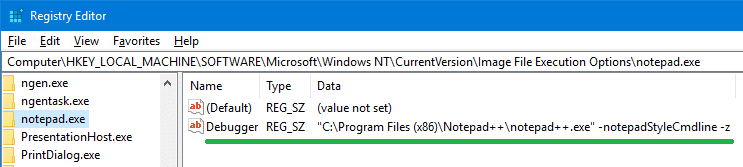
If you’re looking at how to replace Notepad with Notepad++ or any third-party editor, this post explains how to do it. Notepad++ is a free source code editor and Notepad replacement that supports several languages. Let’s see how you can replace Notepad with Notepad++ without replacing any system files.Read more