Windows 10 allows you to set a Wifi connection as a “Metered” connection, but no such GUI option existed for Ethernet (LAN) networks. In Windows 8 and Windows 10 v1607 and earlier, you needed to apply a registry edit to set Ethernet or LAN connection as metered. Thankfully, with Windows 10 Creators Update, it’s a built-in option that can be configured using the Settings UI — no registry edit required.Read more
Windows
You’re browsing the “Windows” parent category, which lists articles on every Windows Operating System.
Change Wi-Fi Network Connection Priority in Windows 11/10
Most of us use more than one Wi-Fi network connection so that if one fails, the 2nd one is used as a fallback. With multiple Wi-Fi network sources, there comes the issue of connection priority.Read more
New Share UI in Windows 10 – How to Enable it?
Windows 10 Creators Update will have a new Share UI which Microsoft revealed in October.
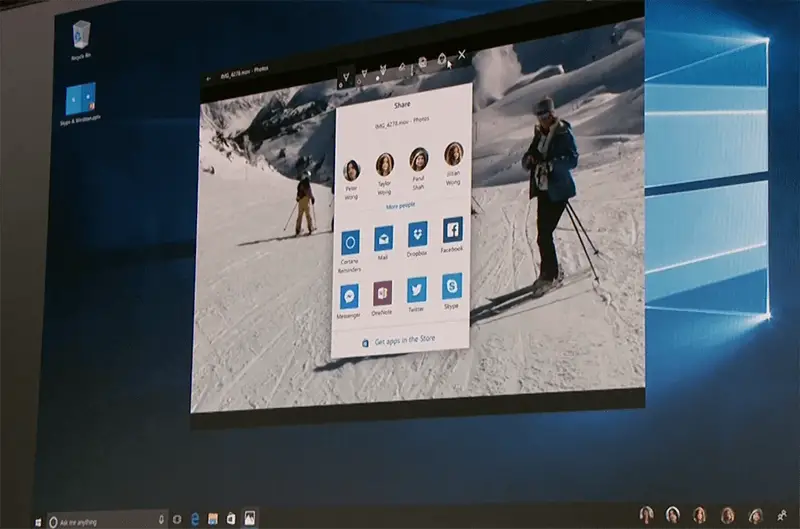
If you’re using Insider Preview Build 14972, you can enable the new Share UI which replaces the Share panel.Read more
Start Disk Cleanup With All Checkbox Options Enabled by Default
When you open the Disk Cleanup tool, most if not all of the cleanup options are unchecked by default. Disk Cleanup doesn’t remember the options you enabled the last time when you used it.Read more
Pin a Website Shortcut to the Windows 10 Start Menu
If you’ve been using desktop shortcuts to open your favorite websites, you can instead pin those websites to the Windows 10 Start menu to make your desktop clutter-free.
Moreover, pinning websites to the Start screen helps you get to those sites quickly especially when your Windows 10 device is in Tablet mode, where the Start screen occupies the full screen, covering your desktop. You can pin website shortcuts to the Windows 10 Start screen using Internet Explorer, Microsoft Edge, Google Chrome, or Firefox.Read more
Automatically Clear Temp Files Using Disk Cleanup, Storage Sense or Batch file
The TEMP directory (%temp%) gets bloated over time as applications store data over there and don’t always remove the files and folders they created. And, software installers extract the contents of the setup packages to the %temp% folder and fail to do the cleanup act when the installation is complete.Read more
How Windows Defender “Block at First Sight” Cloud Protection Feature works?
Windows Defender or the Microsoft anti-malware platform protects home computers, servers and online services such as Office 365. With the wealth of threat intelligence and telemetry data, Defender’s cloud backend is an astounding malware protection service.Read more
Switch Program Windows Quickly Without Clicking on Taskbar Thumbnails
When Taskbar icons are set to “Combine,” which is the default setting, to switch windows within a Taskbar group, you need to click or hover your mouse pointer over the group icon and then click on the appropriate taskbar thumbnail image. This can be inconvenient especially if you have too many instances of a program running.Read more
Disable Virtual Desktop Switching on Mouse Hover in the Task View Interface
Virtual Desktops feature in Windows 10 provides a nice way to keep your program windows organized. You can move a set of work-related programs to a separate virtual desktop, having your entertainment and social networking stuff in another virtual desktop. When required, you can also make a program window or all window instances of a program available on all virtual desktops.Read more
Create Shortcut to Launch the Alt-Tab Switcher (for Mouse users)
The most useful and frequently used Alt + Tab keyboard shortcut has been there since the Windows 3.1 era. If you’re are primarily a mouse user and want to open the Alt + Tab switcher screen using shortcut or script, this post tells you how to do that in Windows 7 and higher, which includes Windows 10.Read more