Reset WinHTTP Proxy Settings in Windows 10 or 11

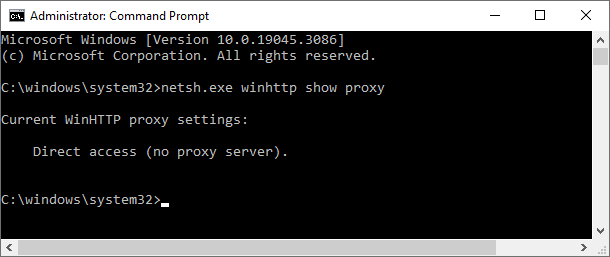
netsh view winhttp proxy

Sometimes, you may have to reset the WinHTTP proxy, firewall or network settings to fix connectivity issues when using Windows Update, Microsoft Store, or other apps. WinHTTP provides the HTTP client APIs, which are used by desktop applications and Windows services.

This article tells you how to disable or reset the WinHTTP and WinINET proxy settings using Netsh.exe and Internet Options, respectively.Read more

Error 0x80070570: The file or directory is corrupted and unreadable

0x80070570 file or directory corrupted

When you install a program or delete a file or folder, error 0x80070570 may appear. The following is the error message verbatim:

An unexpected error is keeping you from deleting the folder. If you continue to receive this error, you can use this error code to search for help with this problem.

Error 0x80070570: The file or directory is corrupted and unreadable.

Read more

Windows Script Host error in AppData\Local\Updates\Run.vbs. The System cannot find the file specified

programdata run.vbs

When you login to your account, you may see a Windows Script Host error similar to the following: Windows Script Host Script: C:\Users\{username}\AppData\Local\Updates\Run.vbs Line: 31 Char: 1 Error: The system cannot find the file specified. Code: 80070002 Source: (null) Additionally, on some systems, you may see a WindowsService.exe popup window that appears briefly at logon. Cause … Read more

SecurityHealthSystray.exe – Bad Image 0xC000012F Error

securityhealthsso.dll 0xc000012f

You may be unable to access the Windows Security app on your Windows 11 computer. And when you login to your account, the following error message appears:

SecurityHealthSystray: SecurityHealthSystray.exe - Bad Image

\?\C:\Windows\System32\SecurityHealth\1.0.2303.27001-0\SecurityHealthSSO.dll is either not designed to run on Windows or it contains an error. Try installing the program again using the original installation media or contact your system administrator or the software vendor for support. Error status 0xc000012f

Read more

How to Set the Default Terminal Application in Windows 11

set default terminal settings

The Windows Terminal becomes the default terminal. This means, all command line applications, such as Command Prompt and PowerShell, will open in Windows Terminal automatically. This article tells you how to change the default terminal to Windows Console Host or revert to Windows Terminal as the default host. Set the default Terminal app in Windows … Read more