You may be wondering if Windows 10 can be configured to logoff users (instead of locking the workstation) after inactivity with the help of a screen saver. Screen savers kick in after the user remains idle or inactive for the specified time. When you resume from screen saver, you’re prompted for credentials to get back to your desktop.
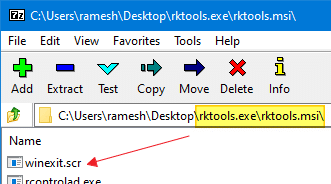
The Windows 2003 Resource Kit Tools has a screen saver file winexit.scr, known as Windows Exit Screen saver or Logoff screen saver that does exactly that. However, the WinExit.scr screen saver throws the following error when you try to run it on Windows Vista and higher, including Windows 10.
How to make a program which was developed 16 years back, work on Windows 10? This article tells you how to use the winexit.scr screen saver to log off a user account after the idle timeout in Windows 10.Read more