Switching power plans require you to open Power Options applet from Control Panel, or from the Start button’s right-click menu which can also accessed by pressing Win + X. This post tells you how to switch power plans using command-line or shortcut, which you can also implement in the context menu if you use it frequently.Read more
registry
Increase Lock Screen Display Off Timeout in Windows 10 and 11
The lock screen which exists in Windows 8 and higher is an additional screen with a background image. The lock screen, which conceals the login screen, shows the time and date, quick status of running apps and the current Windows Spotlight image details.

After 60 seconds of no user activity, the lock screen display turns off to conserve power. This timeout applies when you lock the device or workstation, as well as during startup.Read more
Cannot Install Windows Store Apps and Edge Extensions in Windows 10
If you’re unable to download, install or update the extensions for Microsoft Edge and other Apps available at the Windows Store in Windows 10, this post helps you how to fix those issues.Read more
Restore Missing “Extract All” Option to Zip Right-Click Menu
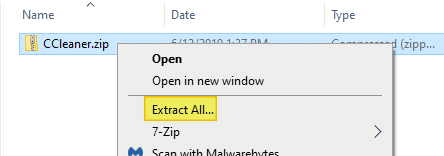
When you right-click on a .zip file (Compressed Folder) and click “Extract All”, it extracts the contents of the .zip file to a folder, and automatically opens the folder. Extract All option may be missing because of incorrect .zip file association setting, especially after installing and uninstalling a 3rd party archive utility.
This article tells you how to get back the Extract All option to the right-click menu for Zip files.Read more
Switch between HKCU and HKLM quickly in Registry Editor
Registry Editor in Windows 10 has a useful option that allows you to switch quickly between a registry key in HKEY_LOCAL_MACHINE and HKEY_CURRENT_USER when an identical branch exists under both.Read more
How to Rename Quick Access Shortcuts in Windows 10 File Explorer
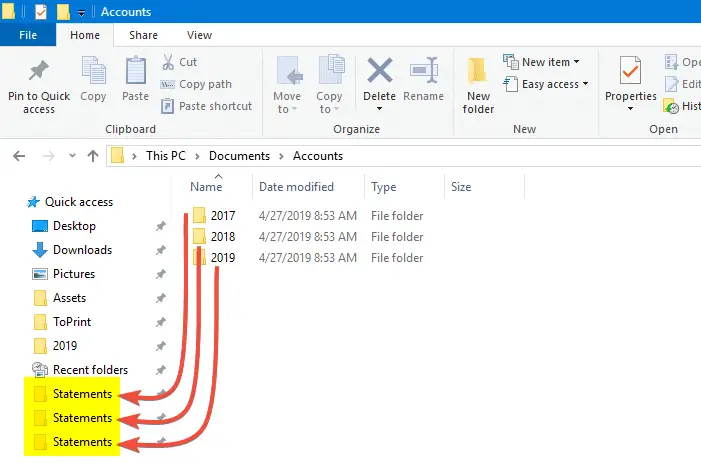
Quick access is a handy feature in Windows 10 that lets you pin your frequently used folders. But it has its drawbacks. One of the biggest hindrances is that Quick access doesn’t let you rename the pinned items. There are situations especially in a production environment where you want to rename links in the Quick access without changing the name of the target folder.
This article tells you how to change the name of pinned Quick access shortcuts/folders.Read more
How to Remove Invalid Entries from Task Manager Startup tab
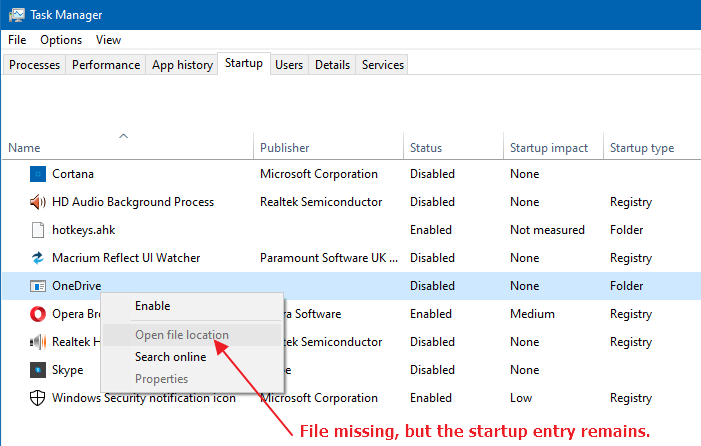
Managing startup entries was possible using the System Configuration Utility (msconfig.exe), in Windows 7 and earlier. This functionality is now provided by the Task Manager in Windows 8, Windows 10, and Windows 11, which features a new “Startup” tab that lists all auto-start entries in the system.
Fix .themepack and .deskthemepack file association. Cannot install themes
If you’re unable to install themes shipped as .themepack or .deskthemepack files on your Windows computer, the file association settings may need to be fixed. Broken file association for theme pack file types causes one the following problems.Read more
How to Customize the Quick Access icon in Windows 10 or 11
Quick access is a Windows 10 feature that shows you the list of frequently accessed folders and recent files. Also, under the Quick access section in the File Explorer navigation pane, you can pin your favorite folders.
This post tells you how to change the Quick Access icon from the default slanted blue star icon (in Windows 10) or yellow star (in Windows 11 v21H2 and earlier) to something else of your choice.Read more
Remove Open PowerShell window here from Right-Click Menu in Windows 10
With the Windows 10 Creators Update, the context menu option “Open command window here” is hidden by default, and is replaced by the “Open PowerShell window here” entry.
Not just that. PowerShell replaces Command Prompt in the Win+X (Power User) menu as well. In an earlier post, we saw how to get Command prompt option back in the right-click menu.Read more