Process Monitor is an advanced monitoring tool for Windows that shows real-time file system, Registry and process/thread activity. It can also trace the entire boot process and save to a PML log file. When enabling the setting “Enable Boot Logging” from the Options menu in Process Monitor, the following error may pop up:Read more
How to Configure Controlled Folder Access to Stop “Unauthorized changes blocked” Notifications
Windows 10 and 11 include a beneficial security feature named Controlled folder access, which is part of the Microsoft Defender Exploit Guard. You may have noticed the Unauthorized changes blocked notifications. Microsoft Defender’s Controlled folder access feature is the one behind those notifications. Controlled folder access helps you protect valuable data from malicious programs, such as ransomware.
This article explains how to configure CFA and prevent Unauthorized changes blocked notifications when running a program.
How to Split or Trim Videos Using Windows 10/11 Photos App
The Windows 10/Windows 11 Photos app lets you trim videos and save the selected portion of the video clip to a new file. You don’t have to rely upon a third-party program, as the Photos app does the task perfectly — suitable for quick trims.Read more
Photos App Mouse Wheel Settings: Scroll to Zoom or View Prev/Next [Windows 10]
When viewing a single photo in Windows Photo Viewer and Windows Picture and Fax Viewer (Windows 7), rotating the mouse scroll button used to zoom the image, and most people expected the same with new Photos app in Windows 10.
In early builds of Windows 10, the Photos app included the behavior of scrolling prev/next photos with the mouse wheel. Then in one of the interim builds, the functionality was changed, where mouse wheel started zooming. Some users were not happy with this inconsistency.Read more
How to Download Windows 10 or 11 ISO
This article explains how to download the official Windows 10 or Windows 11 ISO from Microsoft servers using different methods. The Media Creation Tool downloads the latest version of Windows 10/11 by default. You can also use Rufus or other third-party tools to accomplish the task.Read more
Limit Windows Update Bandwidth for Background Downloads in Windows 10
Windows 10 Fall Creators Update introduces a new delivery optimization setting wherein you can throttle the Windows Update background downloads. Windows 10 by default dynamically optimizes the amount of bandwidth used to download (and upload) Windows and App updates. You can see the report on the Windows Update Activity Monitor page.Read more
OneDrive Files On-Demand Downloads – Block and Unblock Apps via Settings
OneDrive Files On-Demand, a new feature which is essentially like OneDrive placeholders, has been made available with the release of Windows 10 Fall Creators Update. OneDrive Files On-Demand feature which is enabled by default, allows you to set a file or folder available “online only”. These “online” files in your OneDrive folder are shown with the blue cloud icon, indicating that they’re just placeholders where the real files exist only in the cloud.Read more
Remove 3D Objects Folder from This PC in Windows 10
Windows 8 and Windows 10 come with a set of folders (6) shown in This PC view. With Windows 10 Fall Creators Update, a new folder has been added to list of folders in This PC; it’s the 3D Objects folder where the Paint 3D app saves files by default.Read more
How to Enable or Disable OneDrive “Files On-Demand”
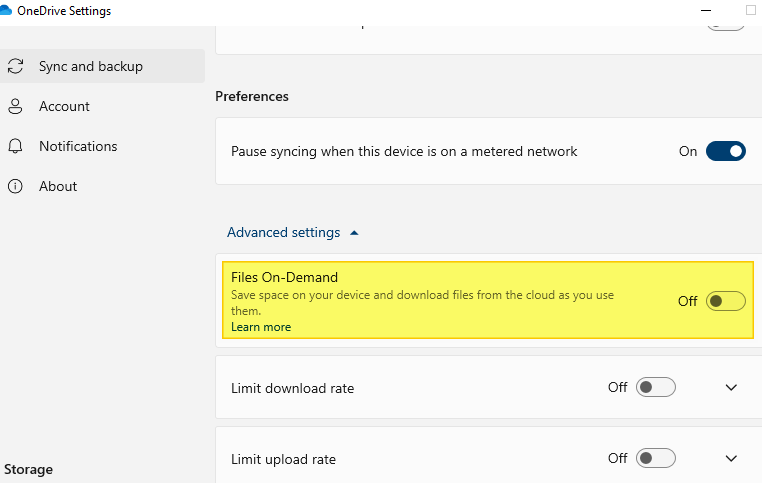
OneDrive Files On-Demand helps you access all your files in OneDrive without having to download all of them and use disk space on your device. We’ll see how to enable or disable the Files On-Demand option in OneDrive in this article.Read more