After buying a brand-new Windows 10 or 11 computer, double-clicking a video file opens it in Films & TV (or Movies & TV), and the Windows Media Player shortcut is nowhere to be found. This makes one wonder if Windows Media Player has been removed in Windows 10 and 11. The good news is that the classic Windows Media Player program is included in Windows 10 and Windows 11.Read more
Windows 10
This category contains posts about Microsoft’s latest Operating System – Windows 10.Windows 10’s always been interesting, as every new major update will usually include additional features.
How to Remove Old Lock Screen Images From Settings Page in Windows 10?
When you open the Lock Screen Settings page, it shows the thumbnail images of last five lock screen images used. This post tells you how to remove old lock screen picture thumbnails from the history.Read more
Google Chrome Start Screen Tile Icon Large (Fix)
Based on the fix posted at Krusted.com for the Google Chrome tile icon size issue in the Windows 10 Start screen, I wrote a small VBScript to automate the process. This script might come in handy as you need to repeat the fix again every time after updating Google Chrome.Read more
How to Set User Environment Variable Using Setx
You probably know how to add or remove environment variables using GUI in Windows. It can be done by launching sysdm.cpl → Advanced → Environment Variables. Alternatively, one can run the following command in the Run dialog to launch the Environment Variables dialog directly: rundll32 sysdm.cpl,EditEnvironmentVariables (To set per-system environment variables, the above command needs … Read more
How to Add Google Drive to Explorer Navigation Pane
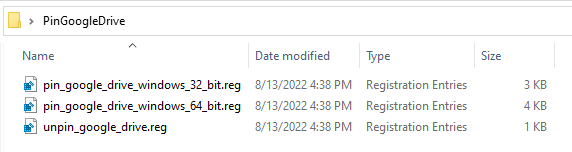
When you install the Google Drive Sync client, the Google Drive folder is pinned to the Quick Access area, but it isn’t shown as a separate category.Read more
Reinstall or Repair stuck Windows 10 Start Menu & Taskbar, and Fix “Critical Error”
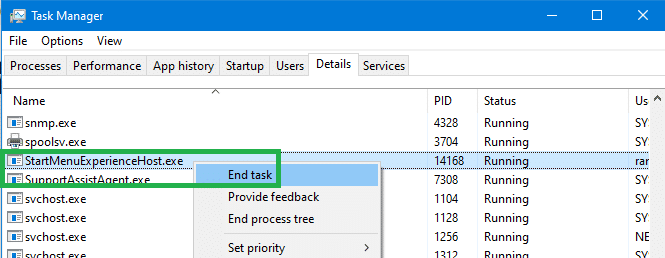
Occasionally, the Start button, Taskbar, and the Notification area icons may get stuck or frozen; clicking them does nothing. When the items in the Notification area are frozen, you wouldn’t be able to access Action Center, Wi-fi network settings, etc.
If the Windows 10 Start Menu is frozen or non-responsive and does not work, or shows the Critical Error message, here is the list of troubleshooting steps you can follow. The fixes involve running the Start menu Troubleshooter or manually registering the ShellExperienceHost & StartMenuExperienceHost packages using PowerShell or restoring the default Start menu by rebuilding the Start menu database.
This article explains how to repair, reset, or reinstall the Start menu in Windows 10.Read more
How to Completely Uninstall and Reinstall the Photos App

If the Photos app does not start or causes an error and the reset and repair method hasn’t helped, you can completely uninstall and reinstall the app using PowerShell. Here are the steps for Windows 10 and 11.Read more
Cascading Menu and File Explorer Jump Lists Issue in Windows 10
When you implement Cascading Menus in File Folders (Directory) using the SubCommands or ExtendedSubCommands registry keys in Windows 10, an interesting thing happens. The last item in your Cascading menu gets executed when you right-click Pinned File Explorer shortcut in the Taskbar, and click on a folder in the Jump List, instead of a folder window opening.Read more
How to Fix the Gap that Appears at the Bottom of Taskbar Icons?
If an extra padding space or gap appears underneath the Taskbar icons, even when the Taskbar is in single row (default width), this has to do with the icon size for the custom toolbar in the Taskbar. This image better illustrates this.Read more