Snipping Tool Error “The snip could not be sent” Sending Snip to Email

After taking a screenshot using the Snipping Tool, when you attempt to send the snip to email by clicking on the Send Snip (email recipient) button on the toolbar, the following error messages appear:

Either there is no default mail client or the current mail client cannot fulfill the messaging request. Please run Microsoft Outlook and set it as the default mail client.
The snip could not be sent. Check that an email program is installed and then try again.
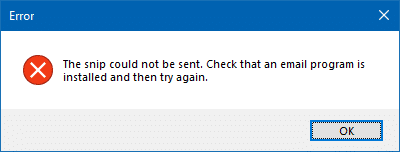
snipping tool send mail error

Cause

The above errors occur if there is no MAPI-compliant mail client installed in the system. The modern Mail app won’t support the MAPI or the Send To → Mail operation; you’ll need to install a mail client like Microsoft Office Outlook, Mailbird, Mozilla Thunderbird, or other mail clients with MAPI support.

Some users observed that this happened especially after installing the Windows 10 Fall Creators Update (v1709). If you already have a compatible mail client installed and yet the error appears when sending snips to email, follow the instructions in this article.Read more
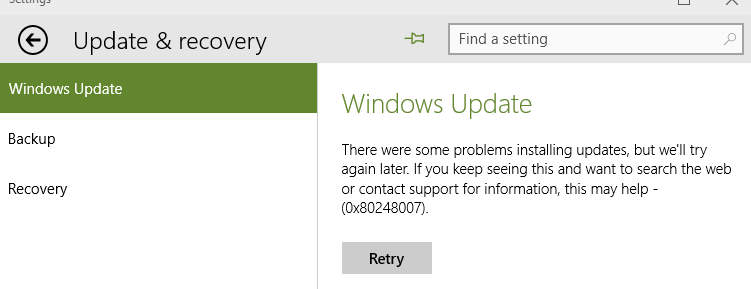
Error 0xc000012f “Bad Image” When Running a Program

When you run a program in Windows, error 0xc000012f may pop up, mentioning that the binary you’re trying to run is corrupted. Here are some examples, with the full error message verbatim:

<filename> is either not designed to run on Windows or it contains an error. Try installing the program again using the original installation media or contact your system administrator or the software vendor for support. Error status 0xc000012f

Read more

Windows 10 Media Creation Tool Error 0x80072f76 – 0x20017

When you run the Media Creation Tool (MCT), you may see the error 0x80072f76 - 0x20017:

There was a problem running this tool.
We’re not sure what happened, but we’re unable to run this tool on your PC. If you continue experiencing problems, reference the error code when contacting customer support. Error code: 0x80072F76 – 0x20017

Read more

Process Monitor “Unable to write PROCMON23.SYS” Enabling Boot Logging

Process Monitor is an advanced monitoring tool for Windows that shows real-time file system, Registry and process/thread activity. It can also trace the entire boot process and save to a PML log file. When enabling the setting “Enable Boot Logging” from the Options menu in Process Monitor, the following error may pop up:Read more

Error “Cannot find your camera” 0xC00DABE0 or 0xA00F4244 in Windows 10

If your webcam or Camera app in Windows 10 won’t open and you get an error message saying that we can’t find or can’t start your camera (including error codes 0xA00F4244 or 0x200F4244), the cause might be antivirus software that’s blocking the webcam or camera, or it could be an outdated webcam driver.Read more

Error 0x80070091 “The directory is not empty” When Deleting or Copying a Folder

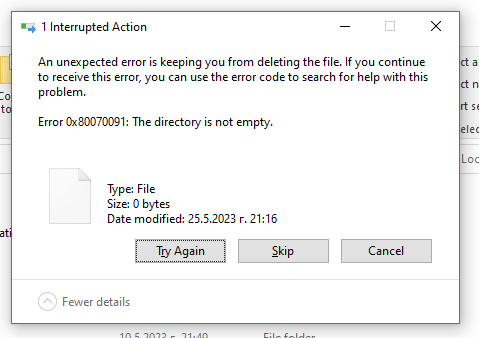
0x80070091 directory not empty

When you attempt to delete a folder or copy it to another location or drive, the following error may pop up:

Interrupted Action.

An unexpected error is keeping you from deleting the folder. If you continue to receive this error, you can use the error code to search for help with this problem.

Error 0x80070091: The directory is not empty.

0x80070091 directory not empty

0x80070091 (ERROR_DIR_NOT_EMPTY) – Decimal 145 – The directory is not empty.

Read more