How to Run a Program as SYSTEM (LocalSystem) Account in Windows

Many Windows system files, registry keys, and services are owned by the SYSTEM (a.k.a LocalSystem) account, which has a high privilege level. If you need to modify a registry key owned by the SYSTEM account, there are at least two options.

The first option that comes to your mind is to take ownership of the corresponding registry key, assign yourself Full Control permissions. Once the registry key or the values are updated, revert the permissions and ownership to SYSTEM.

There is, however, an easier option. You can run the program — e.g., the Command Prompt or the Registry Editor under the SYSTEM account directly and update the registry values.

This article lists 7 different methods using which you can run programs under the SYSTEM or LocalSystem account in any version of Windows, including Windows 10. You can also add a Run as SYSTEM right-click menu option for .exe files.

Read more

How to Batch Convert Word Documents into PDF Files

batch convert word documents to pdf

Microsoft Word is a top-notch word processor using which you can save documents in .doc, .docx, and different other formats. When you need to send a document to someone who doesn’t have Office Word installed, you usually convert the document to PDF and send it.

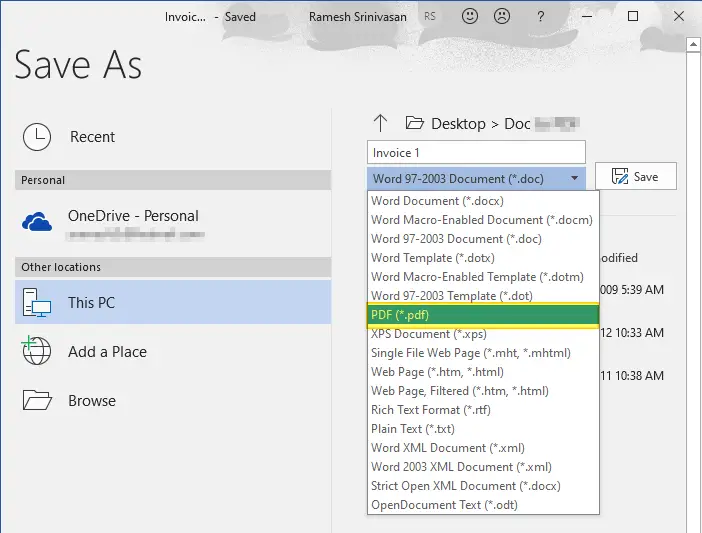
As you may have known, Microsoft Word lets you convert or save a document (.doc or .docx file) as a PDF file using the Save As dialog.
batch convert word documents to pdf

Open the document, and launch the Save as dialog. Select PDF (*.pdf) from the list and save the file.

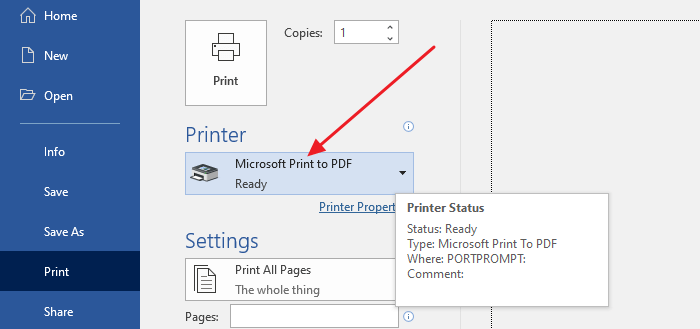
Another option would be to use the Microsoft Print to PDF driver in Windows 10 to output the .doc or .docx file to a .pdf document. For this, you’d use the Print option (instead of Save as) to print the document to PDF.
batch convert word documents to pdf

Pre-Windows 10 systems don’t have the Microsoft Print to PDF driver. In those systems. you can use the free CutePDF Writer or Foxit PDF Printer (part of Foxit PDF Reader software.)

But, if you have tens or hundreds of Word documents that you want to convert to PDF, using the GUI option would be a time-consuming and tiring task.

This article tells you how to batch convert multiple .doc or .docx files to PDF files using Windows Script and other methods.
Read more
Error 0x80070422 in Windows Update and Store

windows update error error 0x80070422

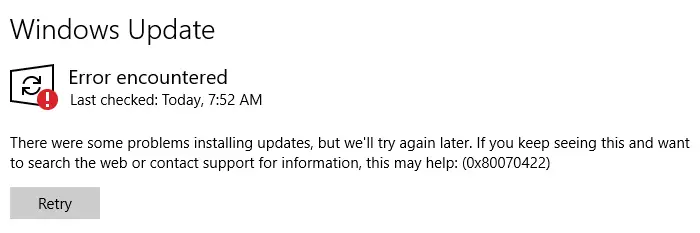
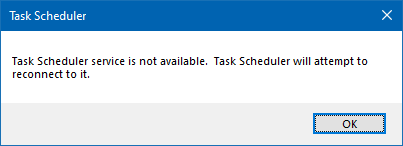
When you open Settings and check for updates on your Windows 10 or 11 computer, the error 0x80070422 appears. Here is the entire error message:

There were some problems installing updates, but we'll try again later. If you keep seeing this and want to search the web or contact support for information, this may help: (0x80070422)

Read more

How to Assign the Same Drive Letter for USB Drive in Windows

assign same drive letter for a external drive - windows

When you insert a USB flash drive, external hard disk, or an SD card, Windows allots the first available drive letter. If drives C, D, E are already used, when you insert an external drive, it allocates drive letter F: for the external drive.

If you’re wondering how to assign the same drive letter for an external drive, then this article has the info you need.Read more

What is PortableBaseLayer Partition in Windows 10 Disk Management

what is PortableBaseLayer in disk management

After upgrading to Windows 10 version 1903 (Codenamed “19H1”), the Disk Management window may show an additional drive named PortableBaseLayer of size 8191 MB (8 GB) When the PortableBaseLayer drive is right-clicked, all the options (except Properties) are grayed out. PortableBaseLayer also shows up in the defragmenter (“Optimize drives”) window as a virtual hard disk. … Read more

Find the IP address of a Mapped Network drive in Windows

find ip address of mapped network drive

Network shares are accessed using their UNC paths (begin with \\). For frequently accessed network shares, the UNC path can be mapped to a drive letter in Windows. You may be wondering how to find out the IP address of a mapped network drive — i.e., the IP of the network computer that hosts the shared folder. This post tells you how to find it.Read more

Fix: Can’t delete Avast Software Registry Key in Windows

delete avast software registry key

Last week when I installed CCleaner on my system, it also installed Avast antivirus software stealthily, in the background. After I uninstalled Avast, a registry key named AVAST Software still remained in the registry, but it couldn’t be opened. When the AVAST Software branch was selected, it threw the following error:

Error Opening Key
AVAST Software cannot be opened.
An error is preventing this key from being opened.
Details: The system cannot find the file specified.

delete avast software registry key

When I opened the Properties of the AVAST Software key, the Security tab was blank, showing the message: The requested security information is either unavailable or can’t be displayed.

delete avast software registry key

I tried running Sysinternals RegDelNull to nuke the keys, but that didn’t help.

The same error can occur for AVG antivirus users.

Error Opening Key
AVG cannot be opened.
An error is preventing this key from being opened.
Details: The system cannot find the file specified.

Registry Reparse Point

Later I realized that the HKEY_LOCAL_MACHINE\Software\AVAST Software is a reparse point or registry link that links to the following key on Windows 64-bit systems:

HKEY_LOCAL_MACHINE\Software\WOW6432Node\AVAST Software

But, since the Avast uninstaller had wiped out the above key, the reparse point still remains but is orphaned.

On Windows 32-bit systems, the reparse point and the target key paths are reversed.

However, once I knew it’s only a reparse point, the fix turned out to be very simple; you don’t need to tinker with the registry key permissions or ownership.Read more

How to Auto Logoff Idle Users in Windows 10

winexit logoff screensaver in windows 10

You may be wondering if Windows 10 can be configured to logoff users (instead of locking the workstation) after inactivity with the help of a screen saver. Screen savers kick in after the user remains idle or inactive for the specified time. When you resume from screen saver, you’re prompted for credentials to get back to your desktop.

The Windows 2003 Resource Kit Tools has a screen saver file winexit.scr, known as Windows Exit Screen saver or Logoff screen saver that does exactly that. However, the WinExit.scr screen saver throws the following error when you try to run it on Windows Vista and higher, including Windows 10.

Error encountered while creating registry section.

How to make a program which was developed 16 years back, work on Windows 10? This article tells you how to use the winexit.scr screen saver to log off a user account after the idle timeout in Windows 10.Read more