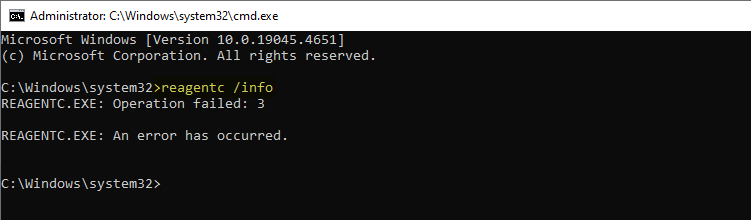
REAGENTC.EXE: Operation failed: 3

reagent error 3 - list disk - diskpart

When you attempt to enable Windows RE by running the reagentc /enable command, the following error may be shown: REAGENTC.EXE: Operation failed: 3 REAGENTC.EXE: An error has occurred. When you attempt to create a USB recovery drive, the following error occurs: We can’t create a recovery drive on this PC Some required files are missing. … Read more

How to Fix Windows Firewall Errors 0x8007045b and 0x8007042c

firewall error 0x8007045b or 0x8007042c

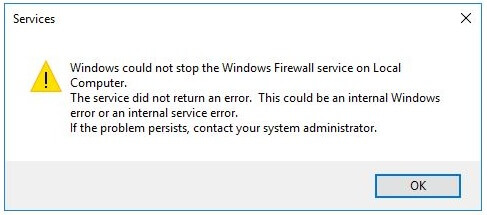
When you attempt to start, stop, or reset the Windows Defender Firewall, the error code 0x8007045b or 0x8007042c may appear: Windows could not stop the Windows Firewall service on Local Computer. The service did not return an error. This could be an internal Windows error or an internal service error. If the problem persists, contact … Read more

How to Remove “Restore Previous Versions” from Context Menu and Properties

The previous versions feature in Windows allows you to restore a previous version of files. It sources the files from Restore Points, File History, and Windows Backup. When you right-click on a file, folder, or drive, you’ll see the “Restore Previous Versions” option. This article tells you how to remove “Restore Previous Versions” from the right-click menu and the file/folder properties.Read more
How to Enable Windows Installer in Safe Mode

msiserver safe mode error 0x80070641

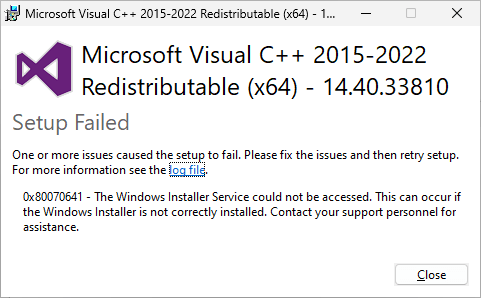
When you attempt to run an installer package in Safe Mode or Safe Mode with networking, one of the following errors may occur: 0x80070641 – The Windows Installer Service could not be accessed. Please fix the issues and then retry setup. (or) The Windows Installer Service could not be accessed. This can occur if you … Read more

Fix: System Image Backup Error 0x80780119

error 0x80780119 during system image backup

When you create a system image using the built-in System Image Backup tool in Windows 10 or 11, the error code 0x80780119 may appear.

The backup failed.

There is not enough disk space to create the volume shadow copy on the storage location. Make sure that, for all volumes to be backed up, the minimum required disk space for shadow copy creation is available. This applies to both the backup storage destination and volumes included in the backup. Minimum requirement. For volumes less than 500 megabytes, the minimum is 50 megabytes of free space. For volumes more than 500 megabytes, the minimum is 320 megabytes of free space. Recommended: At least 1 gigabyte of free disk space on each volume if volume size is more than 1 gigabyte (0x80780119)

Read more

PC Health Check app Error “Your organization manages updates”

pchealth check app organization manages updates

When you run Microsoft’s PC Health Check app to check if your system is compatible with Windows 11, the following message appears: Your organization manages updates on this PC Also, when you open Windows Update in Settings, the error “Some settings are managed by your organization” appears. Clicking “View configured update policies” shows the list … Read more

MBR2GPT | Cannot find OS partition(s)

mbr2gpt- Cannot find OS partition

MBR2GPT.EXE is a built-in console tool that converts a disk from the Master Boot Record (MBR) to the GUID Partition Table (GPT) partition style without modifying or deleting data on the disk.

When you run MBR2GPT to validate the disk before converting it to GPT, the following error may occur:

Cannot find OS partition(s) for disk 0

Read more