Restore “Import pictures and videos” AutoPlay Option in Windows 10/11

import pictures and videos autoplay windows 10

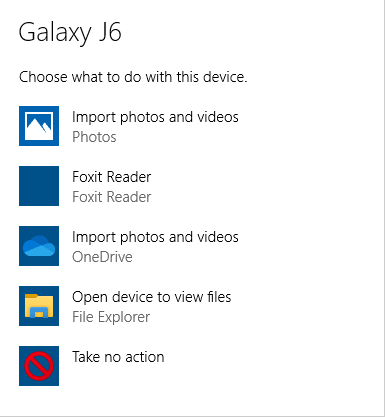
Windows 10 has the Import photos and videos option in the AutoPlay dialog which helps you import photos and videos from your phone, SD card, camera, etc. The option uses the built-in Photos app to import photos and media from the device into your Pictures folder.

However, many users would like to have the classic “Import pictures and videos” import wizard (powered by the Windows Photo Viewer) instead.Read more

Fix: Command Prompt Tab to Autocomplete not working

autocomplete path characters in command prompt

The Command Prompt has a handy little feature that lets to change directory paths using autocomplete. To change to a directory or type a directory name, you can type the starting letters of the directory and press the TAB key to autocomplete the file or folder path.

(To learn how to use TAB autocomplete in Command Prompt, check out the examples provided at the end of this article.)

File and folder paths autocomplete feature is enabled by default in Windows 10. But if it stops working for some reason, this article tells you how to fix it.Read more

VSS Event Log Errors: Event IDs 8193 and 13

event viewer error - event id 8193

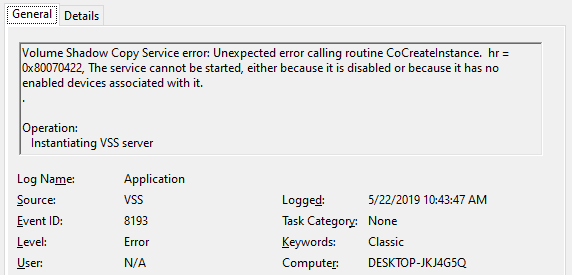
After upgrading to Windows 10 v1903, two VSS error entries appear in the Application event log during every shutdown. The Event IDs are 8193 and 13 with the event source as VSS. Along with the two error logs, an informational event (ID: 8224) is also recorded during the user session instead of shutdown. Here are the sample events:

Log Name:      Application
Source:        VSS
Date:          5/22/2019 10:43:47 AM
Event ID:      13
Task Category: None
Level:         Error
Keywords:      Classic
User:          N/A
Computer:      DESKTOP-JKJ4G5Q
Description:
Volume Shadow Copy Service information: The COM Server with CLSID {4e14fba2-2e22-11d1-9964-00c04fbbb345} and name CEventSystem cannot be started. [0x8007045b, A system shutdown is in progress.


Log Name:      Application
Source:        VSS
Date:          5/22/2019 10:43:47 AM
Event ID:      8193
Task Category: None
Level:         Error
Keywords:      Classic
User:          N/A
Computer:      DESKTOP-JKJ4G5Q
Description:
Volume Shadow Copy Service error: Unexpected error calling routine CoCreateInstance.  hr = 0x8007045b, A system shutdown is in progress.

Log Name:      Application
Source:        VSS
Date:          5/22/2019 11:14:56 AM
Event ID:      8224
Task Category: None
Level:         Information
Keywords:      Classic
User:          N/A
Computer:      DESKTOP-JKJ4G5Q
Description:
The VSS service is shutting down due to idle timeout. 

Read more
Install-Module command was found in the module PowerShellGet

install-module command not found

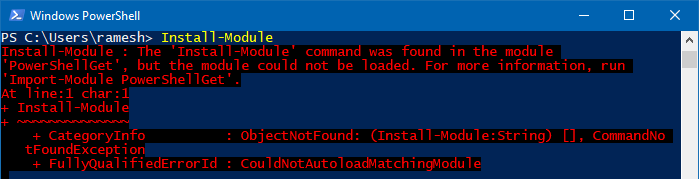
PowerShell’s Install-Module cmdlet downloads one or more modules from a repository and installs them on the local computer. But, when you run Install-Module, you may get the following error: Install-Module : The ‘Install-Module’ command was found in the module ‘PowerShellGet’, but the module could not be loaded. For more information, run ‘Import-Module PowerShellGet’. At line:1 … Read more

Take Ownership of Registry Key & Assign Permissions Using Command-line

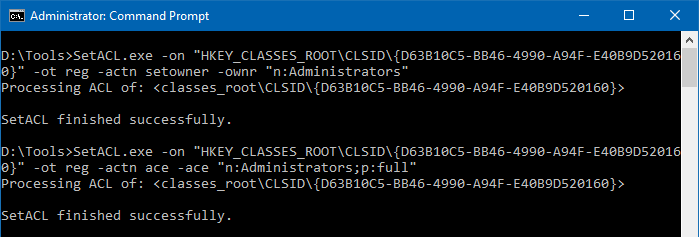
take ownership registry command-line - setacl

We’ve seen how to use the Registry Editor (regedit.exe) to change ownership of a registry key and subkeys. This article tells you how to change registry key ownership and grant permissions using the command-line.

Windows has the takeown.exe and icacls.exe console utilities to change file/folder ownership and permissions, but there are no such built-in tools for changing the registry key ownership using command-line. You’ll need a third-party tool named SetACL for the task.

Read more

Add registry values with double quotes or expandable variable data using Reg.exe

reg.exe pass double quotes in data and expandable strings

The built-in reg.exe console tool lets you add, delete, export or save (as hive) registry keys and values. When adding registry values using the reg.exe tool, you may be wondering how to pass data with double-quotes or environment variables and add it to the registry literally.

This article tells you how to create registry values passing double-quotes and environment variables (without expanding or resolving the folder path) using the reg.exe console tool.Read more