[Fix] Cannot Delete WindowsApps folder on Non-System Drives

cannot delete windowsapps folder

If you have changed the default app save location to an external hard drive or secondary drive, Windows will create three folders, namely, WpSystem, WindowsApps, and WUDownloadCache on the target drive.

You may later change your mind and revert the default save location to C:. But you may be unable to delete the leftover WindowsApps folder on your secondary drive due to tight NTFS permissions assigned to the folder. The other two folders, WpSystem and WUDownloadCache can be deleted easily.

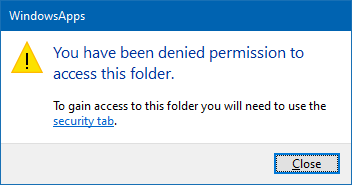
When you access the WindowsApps folder on your secondary drive, you may see the following message:

You have been denied permission to access this folder.

And the Advanced Security Settings dialog shows the error:

Can't open access control editor. Unable to perform a security operation on an object that has no associated security.

This article explains how to properly delete the leftover WindowsApps folder on your secondary or external hard disk drive(s).Read more
Copy Folder Structure without Copying Files in Windows

copy directory structure without files

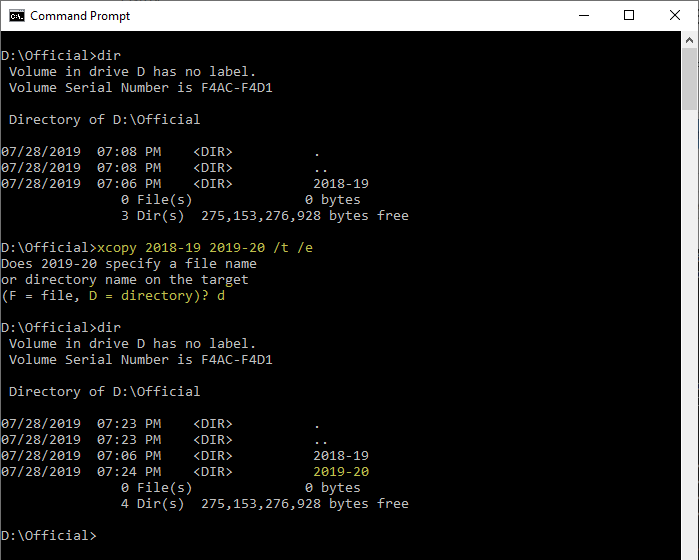
There are situations where you want to copy a folder structure without copying the files in that folder and sub-folders. For instance, you may want to replicate the directory structure of your expenses or accounting folders in order to organize them year-wise.

I have the following directory structure to store the documents pertaining to the financial year 2018-19. For the next financial year, I would want to copy the directory structure (without files) to the parent folder named 2019-20 to maintain uniformity.Read more

How to Change the Office 365/2016 Default Save Folder

office documents default save location

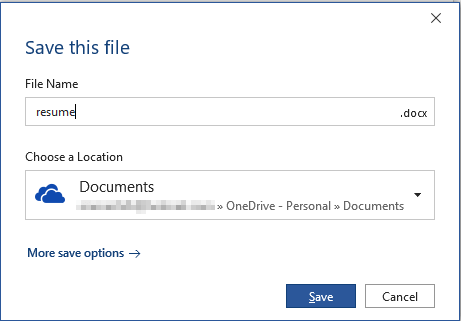
Office programs save your files to OneDrive by default since the February 2019 Office 365 update. Microsoft suggests that the users store files in OneDrive to protect against device loss or damage and to provide anywhere access to files.

Quoting Microsoft:

Today we are announcing a new capability that makes it easier for you to create and save your Word, Excel, or PowerPoint document directly to the cloud. When you go to save an Office 365 document using Ctrl+S (Windows), Cmd+S (macOS), or the Save button, the new dialog box will default to OneDrive or SharePoint Online. And if you forget to save a new document before exiting, you will also see this updated save experience.

In case you want to change the default save location in Word, Excel, PowerPoint, etc., there are multiple ways to do it. Instructions below apply to Office 2016 standard installation as well as Office 365.Read more

Bypass SmartScreen even if its Enabled through Group Policy

When you download a file you downloaded from the internet, Windows adds the zone identifier or Mark of the Web as NTFS stream to the file. So, when you run the file, Windows SmartScreen checks if there is a zone identifier alternate data stream attached to the file. If the ZoneId=3 data ADS is present, Windows identifies that the file was downloaded from the internet, and the SmartScreen does a reputation check when you run the file.Read more

Stop Excel from Converting Text to Number or Date format when Opening a CSV file

A comma-separated values (CSV) file is a delimited text file that uses a comma to separate values. Each line in a .csv file is a data record consisting of one or more fields, with each field separated by a comma. A .csv file can be imported to and exported from programs that store data in tables, such as Microsoft Office Excel, LibreOffice, or OpenOffice. When you open a .csv file in a spreadsheet, the spreadsheet uses the comma as the field separator (delimiter).Read more

Windows Logs Off when Shutdown or Hibernate is used

windows logs off when shutdown or hibernate is used

Over these years, at least since the Windows 7 era, we’ve seen several cases where the system logs you off when clicking on the Shutdown or Hibernate option in the Start menu. The problem may be seen in Windows 8, Windows 10, or 11 systems as well.

What causes Windows to log off the account instead when the shutdown or hibernate option is used?Read more

How to Auto Shutdown after Installing Updates in Windows 10

install updates and shut down windows 10

On patch Tuesdays, you’ll see a bunch of updates such as Adobe Flash Player Security Update, Servicing Stack update, and/or the Cumulative Update showing up in the queue when you open Windows Update settings page. For Asian countries, the updates arrive at night or late night.

Installing a Feature Update or Cumulative Update always requires a restart. Once done, you then have to shut down the device manually if you don’t prefer leaving the computer in sleep or hibernation mode overnight. This means your sleep schedule gets delayed as you’ll have to be awake until the Cumulative Update is fully downloaded and installed.

You may be wondering how to automatically shut down your Windows 10 computer after the updates are installed.Read more

How to Flip or Reverse a Text File Using Different Ways in Windows

reverse lines in a text file windows

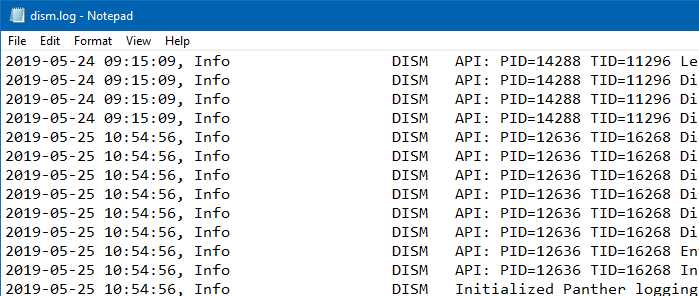
When analyzing plain-text log files such as the Web server logs or the Sfc, or DISM log files, you may sometimes prefer the most recent items appearing at the top. However, most of the log files that Windows generates would have the oldest entries listed first — entries listed in chronological order. You may be … Read more