This category contains posts about Microsoft’s latest Operating System – Windows 10.Windows 10’s always been interesting, as every new major update will usually include additional features.
If the keyboard input doesn’t work in modern (Store) apps like Microsoft Store, OneNote for Windows, Start menu search, Lock screen, etc, this article tells you how to fix the issue. Cause When you type something in those modern apps, nothing may happen. This happens if a built-in Scheduled Task is disabled accidentally. Despite this … Read more
Once you run the Sticky Notes app, the app may automatically run at every startup although the Task Manager’s Startup tab or the Startup folders don’t show the entry. If the Sticky notes app is auto-starting after every reboot and you want to disable the app from running at startup, use these steps:Read more
Some users are facing a weird problem wherein the “Yes” button in User Account Control (UAC) dialog is disabled or grayed out. As a result, you’ll be unable to launch any program under elevated privileges (run as administrator).Read more
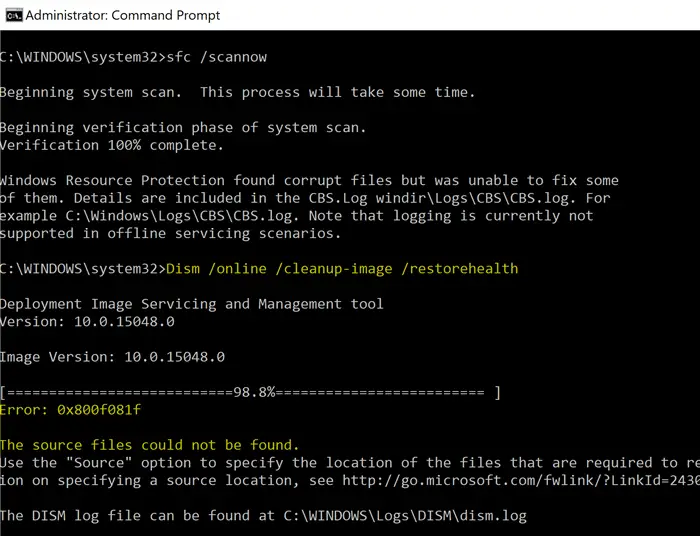
When running the following DISM command, the error 0x800F081F may appear in some systems. The same error occurs when installing the .NET Framework in Windows 10.
Dism /Online /Cleanup-Image /RestoreHealth
Error: 0x800f081f
The source files could not be found.
Use the "Source" option to specify the location of the files that are required to restore the feature. For more information on specifying a source location, see http://go.microsoft.com/fwlink/?LinkId=243077.
DISM Error: 0x800f081f — The source files could not be found DISM.log
Error DISM DISM Package Manager: PID=13368 TID=5124 Failed finalizing changes. - CDISMPackageManager::Internal_Finalize(hr:0x800f081f)
Error DISM DISM Package Manager: PID=13368 TID=5124 The source files could not be found; their location must be specified using the /source option to restore the feature. - GetCbsErrorMsg
Error DISM DISM Package Manager: PID=13368 TID=5124 Failed processing package changes with session option CbsSessionOptionRepairStoreCorruption - CDISMPackageManager::RestoreHealth(hr:0x800f081f)
Error DISM DISM Package Manager: PID=13368 TID=5124 The source files could not be found; their location must be specified using the /source option to restore the feature. - GetCbsErrorMsg
Error DISM DISM Package Manager: PID=13368 TID=5124 Failed to restore the image health. - CPackageManagerCLIHandler::ProcessCmdLine_CleanupImage(hr:0x800f081f)
Error DISM DISM Package Manager: PID=13368 TID=5124 Failed while processing command cleanup-image. - CPackageManagerCLIHandler::ExecuteCmdLine(hr:0x800f081f)
CBS.log
CBS Exec: Processing complete, session(Corruption Repairing): 30459372_734419507 [HRESULT = 0x800f081f - CBS_E_SOURCE_MISSING]
CBS Session: 30459372_734419507 failed to perform store corruption detect and repair operation. [HRESULT = 0x800f081f - CBS_E_SOURCE_MISSING]
CBS Session: 30459372_734419507 finalized. Download error: 0x80240022 [Unknown Error], Reboot required: no [HRESULT = 0x800f081f - CBS_E_SOURCE_MISSING]
CBS Failed to FinalizeEx using worker session [HRESULT = 0x800f081f]
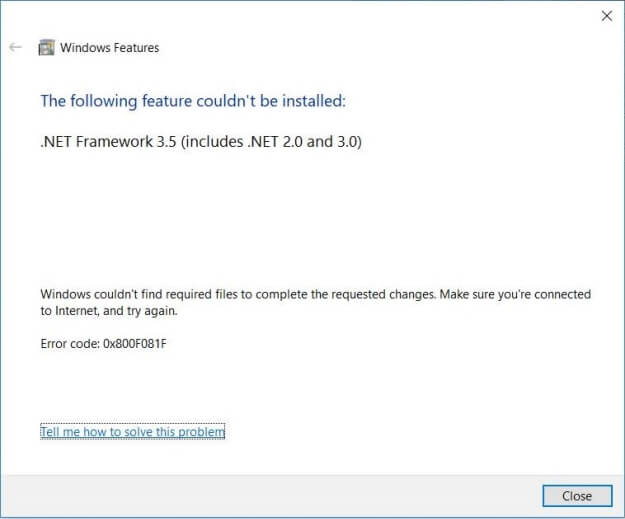
The same error (0x800F081F – CBS_E_SOURCE_MISSING) may occur when you attempt to install .NET Framework 3.5 via Optional Features.
Windows couldn't find required files to complete the requested changes. Make sure you're connected to Internet, and try again:
Error code: 0x800F081F
DISM.log
The source files could not be found.
Use the "Source" option to specify the location of the files that are required to restore the feature. For more information on specifying a source location, see http://go.microsoft.com/fwlink/?LinkId=243077.
The DISM log file can be found at C:\Windows\Logs\DISM\dism.log
0x800F081F - CBS_E_SOURCE_MISSING
This post tells you how to fix the .NET Framework installation and the DISM error 0x800f081f in Windows 10.Read more
WiFi disconnection can occur due to many factors, such as incompatible device driver, incorrect settings, sleep timeout, or maybe it’s a Windows 10 Fall Creators Update bug. Some WiFi network adapters are incompatible with the recent implementation of the Microsoft Wi-Fi Direct Virtual Adapter driver.Read more
When you open the Microsoft Store app, one of the errors 0x80072EFD (“The server stumbled”), 0x80072EE7, 0x80131500 or 0x80072EFF may show up, and you can’t use the Store app. Resetting the Store app by running the wsreset.exe command or reinstalling Store using PowerShell also may not help.Read more
The “Security and Maintenance” Control Panel applet or the Action Center in Windows 10 may warn you that Windows Defender is disabled and no anti-virus is protecting your system. If you open the Windows Defender interface, it offers to Turn On protection, but the button doesn’t work.Read more
After installing Malwarebytes Premium 14-day trial or licensed product, your anti-virus software (e.g., Microsoft Defender Antivirus) may get disabled automatically. In this scenario, when you attempt to start the Microsoft Defender Antivirus Service (WinDefend) via the Services console, it shows the following error, and the service wouldn’t start.Read more
When you run the DISM tool (with the /online switch) to scan or restore the health of the operating system components, the tool may throw up Error 50. Here is the full error message verbatim:Read more
The new Settings interface in Windows 10 doesn’t allow selecting multiple files at once as the desktop slideshow. You can only select one folder at a time. Also, the images in the subfolders are not utilized for the slideshow.Read more