WiFi disconnection can occur due to many factors, such as incompatible device driver, incorrect settings, sleep timeout, or maybe it’s a Windows 10 Fall Creators Update bug. Some WiFi network adapters are incompatible with the recent implementation of the Microsoft Wi-Fi Direct Virtual Adapter driver.
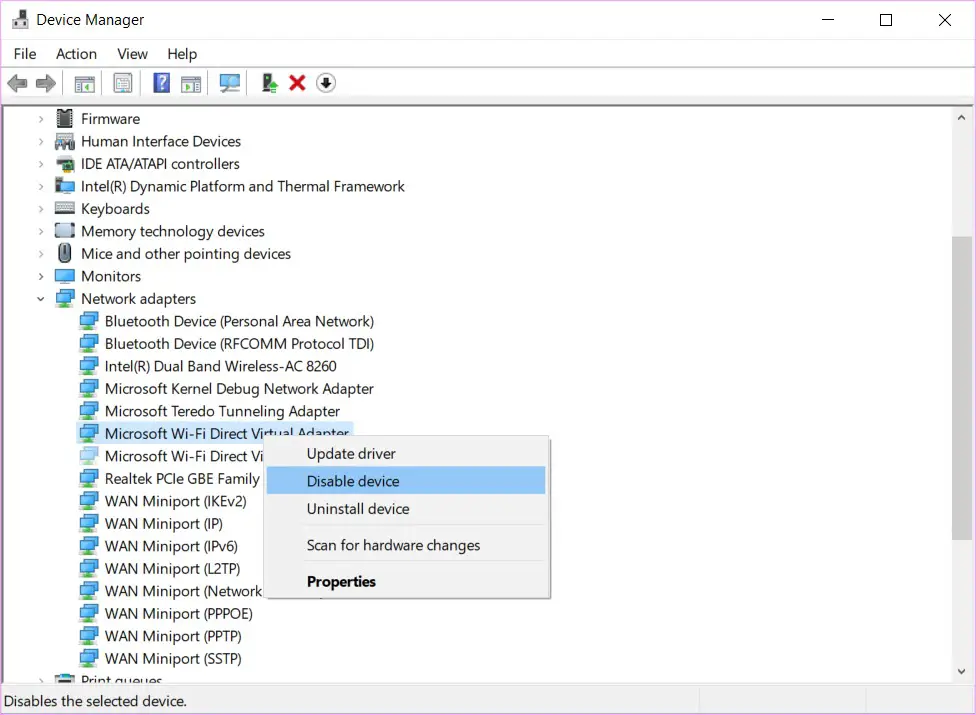
If your wireless network connection keeps disconnecting especially after upgrading to Windows 10 Fall Creators Update, here is a workaround that helps most users. Assuming that your device drivers are current and reinstalling the wireless hardware doesn’t help, try disabling the “Microsoft Wi-Fi Direct Virtual Adapter” device. This seems to fix the problem for most users who have upgraded to the Fall Creators Update.
Caveat: Disabling this device/driver also disables the Wi-Fi Direct functionality on your Windows 10 computer. Also, the “Projecting To This PC” feature would stop working if the Wi-Fi Direct Virtual Adapter is disabled.
Fix WiFi Disconnection by Disabling Microsoft Wi-Fi Direct Virtual Adapter
- Right-click Start, and click Device Manager
- From the View menu in Device Manager, click Show hidden devices
- Right-click “Microsoft Wi-Fi Direct Virtual Adapter” and click Disable device.
- Restart Windows.
One small request: If you liked this post, please share this?
One "tiny" share from you would seriously help a lot with the growth of this blog. Some great suggestions:- Pin it!
- Share it to your favorite blog + Facebook, Reddit
- Tweet it!
