You can now configure Windows 10 or 11 to display seconds in the taskbar’s notification area clock without using a third-party program. This is possible using a hidden registry setting in Windows 10, and it’s a built-in GUI option in Windows 11.Read more
 Ramesh
Registry Editor Gets the Address Bar Feature in Windows 10
Windows 10 Insider Preview 14942 has a interesting new feature which Microsoft didn’t document. Registry Editor (Regedit.exe) in Insider Preview build 14942 gets the super useful Address Bar feature.Read more
Display has gone Upside Down or Turned 90 Degrees in Windows (with Intel or Nvidia Graphics)
If your display has gone upside down or turned right (awkwardly) by 90 degrees in Windows, you may have accidentally hit a hotkey combo. Here is how to revert the display back to normal.Read more
How to Reset OneNote 2016 Toolbar and Ribbon Settings to Defaults?
If you had customized OneNote Ribbon and Quick Access Toolbar settings and need to revert back to the default settings, here are a couple of ways to do that.Read more
[Fix] Search Results defaults to Content View in Windows 10
When you search for files using Windows 10 File Explorer, the search results page may default to “Content” view every time which some users don’t like. Although you can change the view to Details, or any other view setting manually, the change affects only that folder. Sometimes, search results view settings may not stick at all.
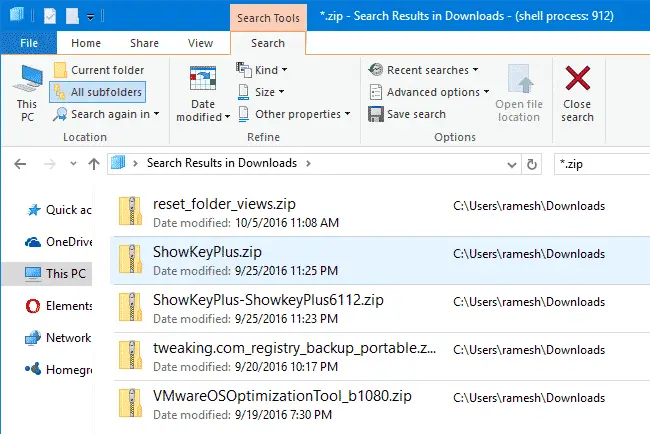
This happens when searching for files in a folder optimized for “General items”. Whereas when you search for files in the Pictures and Videos folders, the search results view defaults to icons view.
This article tells you how to set the Search Results folder default view mode to Details, for all folder types.
How to Print Directory Contents Using Different Methods
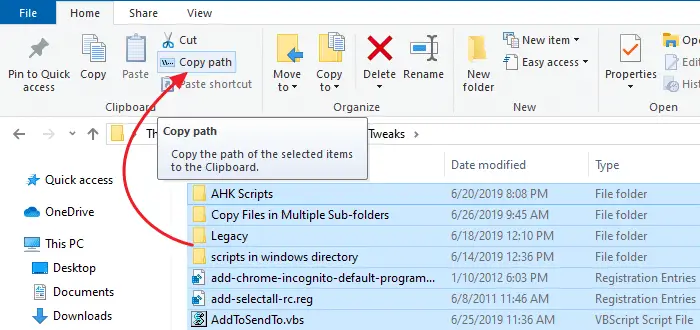
You can copy folder contents by selecting all items in a folder, pressing Shift key and clicking the Copy as Path command in the right-click menu. Then open Notepad or any other text editor and paste the contents from the clipboard.Read more
Show Process ID in File Explorer Title Bar in Windows 10
There is a hidden registry setting in Windows 10, which when enabled shows the explorer.exe Process ID (PID) in File Explorer title bar, and tells if a folder window is running under the shell process, or as a separate process.Read more
Use Word 2016’s “Researcher” to Complete Your Research Papers Faster (Office 365)
If you have a Office 365 subscription, then take a look at the nice little new feature “Researcher”, available in Word 2016. Researcher uses Bing Knowledge Graph to pull appropriate content from the web and provide structured, safe and credible information which you can include in your research paper.Read more
Add Windows Backup and Restore Options to Desktop Right-click (Cascading) Menu
Windows Backup and Restore tool supports certain command-line arguments using which you can automate certain backup and restore tasks. You can quickly start a backup (full/create new backup set or create a differential backup in the existing backup set), or open a Windows Backup and Restore user interface window without having to open Control Panel every time.Read more
Windows 10 Mail App Background Color or Image – How to Change?
Windows 10’s Mail app comes with some stock images and preset solid colors from which you can choose one for the background. However, if you want to set a custom background color, such as plain white, you can do so by creating an image file using Paint.Read more