When you open Command Prompt and position it on your preferred location on the screen, the setting is not retained. Also, when you resize the Command Prompt window and close it, the setting is not saved. This system managed positioning annoys many users who prefer uniformity in every aspect of the user interface. This post tells you how to customize the default Command Prompt window size (width & height) and set its default position in terms of screen coordinates.Read more
registry
Remove 3D Objects Folder from This PC in Windows 10
Windows 8 and Windows 10 come with a set of folders (6) shown in This PC view. With Windows 10 Fall Creators Update, a new folder has been added to list of folders in This PC; it’s the 3D Objects folder where the Paint 3D app saves files by default.Read more
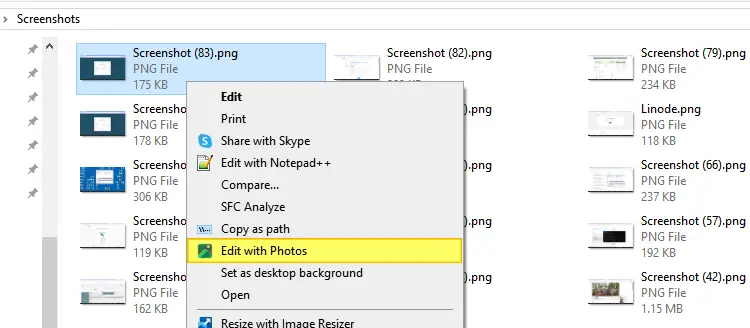
How to Remove “Edit with Photos” from Right-click Menu
For image files, the entry Edit with Photos option appears in the right-click menu. This article tells you how to remove Edit with Photos from the right-click menu.Read more
Recover Registry Keys from a System Restore Point in Windows
System Restore snapshots or volume shadow copies contain registry hives as well as critical system files. Sometimes you may need to extract individual registry keys from an earlier restore point but don’t want to do a complete System Restore rollback.Read more
Microsoft Defender: “Managed by your administrator” or “Your IT administrator has limited access”
In the aftermath of a malware attack, the Windows Defender Security settings page may show the message Some settings are managed by your organization or This setting is managed by your administrator. The real-time protection and cloud-based protection options may remain disabled or grayed out.
Here is what the Windows Defender Settings page might look like. The controls for real-time protection, cloud-based protection, and Automatic sample submission options may be disabled and locked down or grayed out.Read more
Default Sign-in Option Changes to Password from PIN Automatically in Windows 10
When you sign-in to your user account or unlock the workstation, the last used sign-in method (PIN, Password or Windows Hello) is saved to the registry, and the same will be used the next time. However, you may notice that the default sign-in option reverts to password at every restart, even though you used PIN sign-in the last time to unlock the computer.Read more
Microsoft fixes Eventvwr.exe UAC Bypass Exploit in Windows 10 Creators Update
In Windows 10 Creators Update preview build 15007, Microsoft seems to have fixed the UAC bypass method involving eventvwr.exe. First, how does this bypass work?Read more
Customize and Backup Quick Access Toolbar Settings in File Explorer
The Quick Access Toolbar (QAT), part of the Ribbon framework, is located in the title bar of File Explorer and Office applications. You can add your frequently used ribbon commands to the Quick Access Toolbar for easy access — so that you don’t need to switch tabs each time to use a particular command.Read more
Get Old Registry Editor in Windows 10 Creators Update
In Windows 10 Creators Update, the Registry Editor status bar has been removed, as it now has an address bar at the top. The status bar doesn’t appear even if you turn off the address bar in Regedit. Another change is that you can modify the default font face, weight and style in the new the Registry Editor.Read more
Enable Warning on Closing Multiple Tabs in Microsoft Edge
By default, Microsoft Edge doesn’t issue a warning if you close your Microsoft Edge browser window with multiple tabs open. Sometimes we may accidentally close the browser window and wondering how to restore the session back.
You can press Ctrl + Shift + T to reopen the tabs closed during the last browser session.
Additionally, you can force Microsoft Edge to warn you when you attempt to close the browser window accidentally with multiple open tabs. Here’s how to do that.Read more