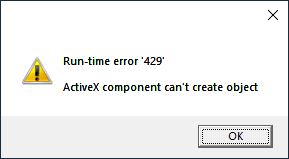
Error message dialog boxes usually have title bar text containing the application or process name that generated the error. However, you may sometimes encounter a pop-up window with no text in the title bar, making you guess which program has caused the error.Read more
[Fix] Favorites File Download Security Warning
Double-clicking a .URL file in your user profile’s Favorites or Favorites\Links folder may show a “Do you want to open this file?” file download security warning, as shown below, after installing the latest quality updates.Read more
How to Backup and Restore Pinned Taskbar Shortcuts in Windows 10
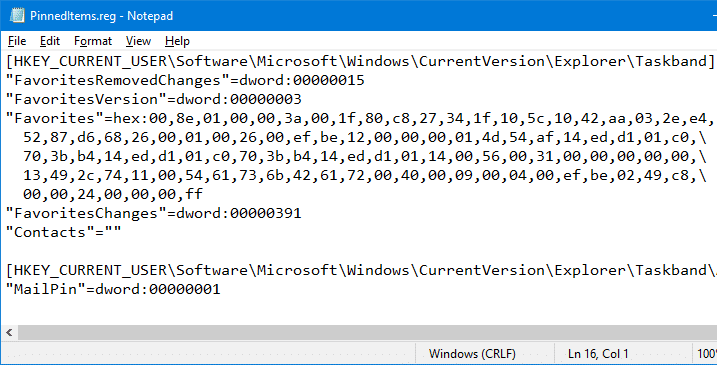
When you install Windows on a new computer, customizing Windows takes a lot of time and effort. One such thing is the taskbar. You may have to redo the procedure of pinning the applications which you frequently use. If you’re planning to move to a new Windows PC or a new user profile on the same computer, and wondering how to transfer the pinned taskbar items, then this article is for you.
This post explains how to backup and restore the pinned Taskbar items in Windows 10 and earlier.Read more
How to Backup the Pinned Start Menu Shortcuts in Windows 7/Vista/XP
The Pinned items listing which you see at the top of the Start menu is stored in the registry as a REG_BINARY value, and Windows provides no GUI to backup and restore the Pinned items configuration. In case you want to transfer the Pinned items configuration to another user profile, you need to use the Registry Editor and backup the settings in the source profile.Read more
RegFileExport Helps you Export Data from Offline Registry Hives
RegFileExport is a useful console application from NirSoft, which helps you extract data from offline Registry hives that are not currently in use by the Operating System. RegFileExport reads the registry hive and then exports the specified branch or the entire branch to a .reg file.
Regedit.exe can do this too. What’s different?
We know that the Registry Editor in Windows lets you load a registry hive via the File menu – “Load Hive…” command, and extract data offline from the registry hive.
The advantage of RegFileExport over Regedit.exe is that RegFileExport can export data quickly using a single command-line, without needing to load the hive, export the branch, update the paths in the REG file using a text editor, and unload the hive manually… which you would otherwise do if you use Regedit.exe or Reg.exe.Read more
Internet Explorer 9 Lets You Pin Website Shortcuts to the Taskbar in Windows 7
Internet Explorer 9 lets you Pin websites directly to the Taskbar so that you can launch your favorite websites in a single click. To Pin a website to the taskbar, click and drag the Website’s favicon shown in the left of the Address bar onto the Taskbar.
“Pin to Taskbar” and “Pin to Start Menu” Missing in Windows 7
After deleting the IsShortcut registry value to remove the shortcut arrow overlay in shortcuts (.lnk) files, you may notice that the “Pin to Taskbar” and the “Pin to Start Menu” context menu items go missing when you right-click on a shortcut. Also, one or more of the context menu items may appear twice, as in the image below.Read more
How to Disable Auto Arrange in Folders in Windows 7?
Windows 7 doesn’t include an option wherein you can disable auto arrange in folders (icons view). Sometime back I created a magical registry hack (FFlags DWORD 43000001) that disabled the "Full Row Select" functionality in folders in Windows 7. I also posted some interesting observations in article How to Disable Full Row Select in Explorer in Windows 7 about the registry hack, which demonstrates that applying the hack also brings back the missing "Auto arrange" menu option in the View menu of folders when in Icons view.
Automate Using Script
Update: I just converted the registry edits to a Script file that does all the work. Works in Windows 7, 8, 8.1 and Windows 10.
Check out my recent post How to Disable Full Row Select and Auto Arrange in Folders in Windows 10?
To do this Manually
I hereby bring you a slightly tweaked version (sets FFlags to 43000000) of the same registry hack and provide some screenshots in this article. After applying this edit you can enable or disable auto arrange feature on a per-folder basis. Of course, an "Undo" REG file is provided in case you want to revert back to the factory default setting.Read more

How to Find the Last Logon Date/Time for Local User Accounts in Windows
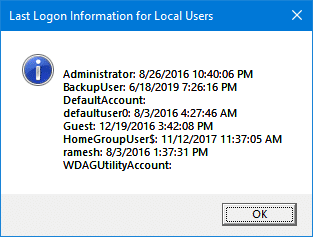
In response to a script request recently from one of our readers, here is an article that tells you how to find the last logged in date and time for all user accounts on the computer.