Double-clicking a .URL file in your user profile’s Favorites or Favorites\Links folder may show a “Do you want to open this file?” file download security warning, as shown below, after installing the latest quality updates.
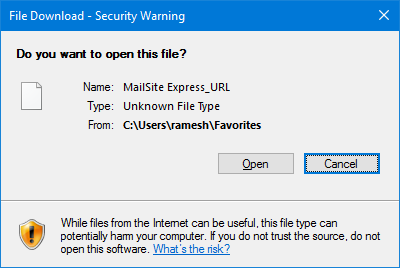
URL “File Download” Security Warning
To remove the Favorites File download security warning, do the following:
- Set the integrity level (IL) for Favorites and its sub-folders to Medium (from the default “Low” IL).
- Set the integrity level for independent *.URL files in the Links folder.
Set Favorites Integrity Level to Medium
Open an elevated Command Prompt window and type:
ICACLS "%userprofile%\favorites" /SETINTEGRITYLEVEL M

ICACLS "%userprofile%\favorites\links" /SETINTEGRITYLEVEL M

CD /d %userprofile%\Favorites

ICACLS *.URL /L /T /SETINTEGRITYLEVEL M
That’s it. The above commands will set the Medium integrity level for the Favorites and the Links folders and the files in those folders.
One small request: If you liked this post, please share this?
One "tiny" share from you would seriously help a lot with the growth of this blog. Some great suggestions:- Pin it!
- Share it to your favorite blog + Facebook, Reddit
- Tweet it!
