Is Windows Defender running alongside their main antivirus program, as the icons for both programs are visible in the Notification area? Isn’t Windows Defender supposed to turn itself off when it detects a third-party antivirus program?Read more
Windows
You’re browsing the “Windows” parent category, which lists articles on every Windows Operating System.
Make Action Center Always Remain Open on the Screen in Windows 10
The Windows 10 Action Center displays app & system notifications and provides quick actions buttons so that users can get to the commonly used settings pages easily.
By default, the Windows 10 Action Center panel closes automatically once it loses the active window focus — when the user clicks a program window or anywhere else. Here is a registry hack which makes the Action Center panel always remain on the screen until you close it manually.Read more
How to Find Which Process has Locked a File in Windows
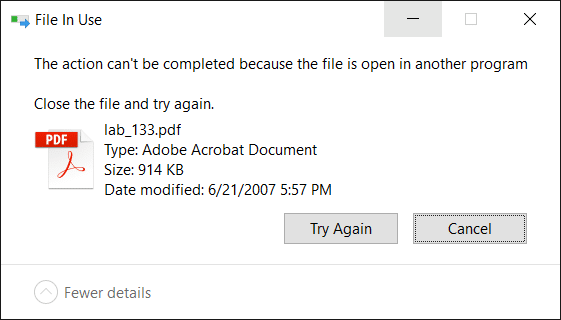
When you attempt to delete a file or folder which is in use by a process, the File In Use dialog appears showing the name of the program that has locked the file.
However, there are cases where the “File In Use” dialog doesn’t show the name of the process that has a lock on the file you’re trying to delete. In some cases, the dialog will show “the action can’t be completed because the file is open in another process“.
For investigating processes and locked files, Windows Sysinternals Process Explorer is probably the first option that comes to mind for most users. However, there are two built-in solutions to display the current open files list along with corresponding process names.Read more
Set Custom icon for PDF Files with Chrome or Firefox as the Default PDF Viewer
If you’ve associated PDF files with Google Chrome or Mozilla Firefox to make use of browser’s built-in PDF viewing capability, the PDF and HTML files would show up with the same Chrome or Firefox icon in File Explorer. This post tells you how to set a custom different icon for PDF files, with Chrome or Firefox as the default PDF viewer.Read more
How to Copy Command Prompt Output Text to Clipboard or File
Windows Command-line tools are great for troubleshooting, as well as automation. But, if you’re stumped when a tech support guy on the phone asks you to run a built-in console command and copy the output displayed for diagnosing a problem, these Command Prompt basics will come in handy.
This post explains how to copy or redirect Command Prompt output to a file or the clipboard.Read more
Find the Amount of Words, Chars and Lines in a Text File Using PowerShell
If you’re still using the good, old Notepad to craft essays or content for your Website, and want to know the number of characters used in a text file, here is a PowerShell cmdlet that will help.Read more
How to Find the RAM type (DDR2, DDR3, DDR4, DDR5), Speed, etc
This post explains two different ways to find full information about the Memory module installed in your system, without using 3rd party tools. You may need the existing Memory module information such as the type, part number, number of available slots, capacity, and speed if you plan to upgrade the RAM.Read more
Pin any file to Windows 10 Start Screen (Registry Tweak)
Windows 10 lets you Pin folders, apps and shortcuts to executable files to the Start screen using the “Pin to Start” context menu. Using a registry tweak discussed in this post, you can pin any file (of any type) to the Start screen in Windows 10.Read more
Change the Default Image Editor Linked to Edit command in Right-click Menu for Image Files
Image file types such as JPG, PNG, BMP and others have an “Edit” command in the right-click menu which when clicked, opens Microsoft Paint by default. If you have a third-party image editor and want to set it as the default editor when invoked from the right-click menu, this post is for you.Read more
Cortana Search Registry Tweaks in Windows 10
In Windows 10 Redstone 2 build and higher, you can move the Cortana search text box to the top, change the text box border color and thickness. Also, you can add a search glyph and submit button near the text box with some registry tweaks.Read more