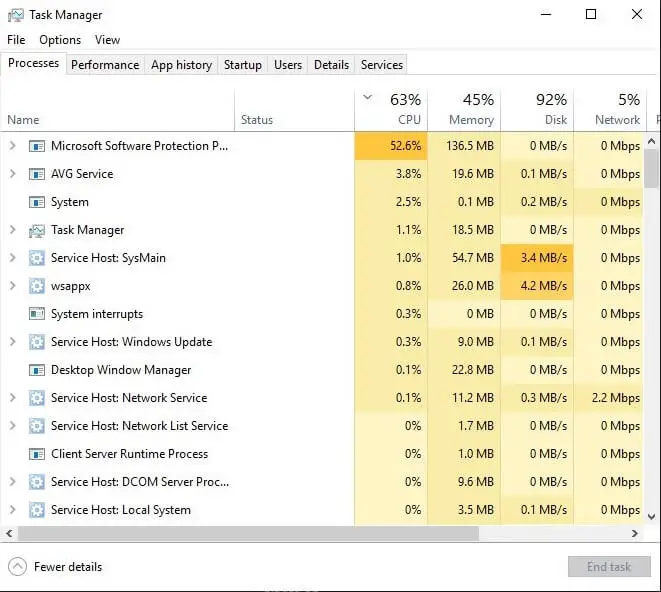
Your system may slow down to a crawl, and when you open Task Manager, you may find the Microsoft Software Protection Platform Service (sppsvc) utilizing very high CPU (ranging anywhere from 30% to 75%) for a considerably long time. You may be wondering why the Software Protection service is consuming enormous resources.
Windows 10
This category contains posts about Microsoft’s latest Operating System – Windows 10.Windows 10’s always been interesting, as every new major update will usually include additional features.
Windows 10 forgets passwords in Outlook, Edge, Chrome, etc
After installing the Windows 10 feature update v2004, your computer may fail to remember the stored passwords in Outlook, Edge, Chrome browser, and various other programs. This is a system-wide issue rather than an application-specific problem. Here are some of the symptoms you may experience in Windows 10 v2004:
- Windows 10 prompts for your Microsoft account password every now and then.
- Accessing a network resource or NAS drive causes the password prompt to appear every time even though the credentials were saved earlier.
- Microsoft Edge, Firefox, and Chrome browsers keep asking to enter the password to access a resource for which you’ve previously saved the password.
- Forms and password autocomplete don’t work in Google Chrome and other apps.
- Passwords stored by your web browser (e.g. Chrome) on the local computer are wiped off.
- The synchronization is paused in the Chrome web browser.
- Chrome web browser’s
chrome://signin-internals/page denotes the error “Load credentials failed with decrypt errors”. - You’re forced to sign to OneDrive every time you log in.
- Outlook keeps asking you to log into Office 365 every few hours.
- Passwords for email accounts in your mail client are not saved, and you need to type them every time.
- Adobe Acrobat keeps asking for your Adobe credentials whenever you open a PDF file.
- The Windows 10 Settings periodically wants to fix your account configuration by re-authenticating with Windows Hello.
- Mapped Network Drives not working in Windows 10 v2004.
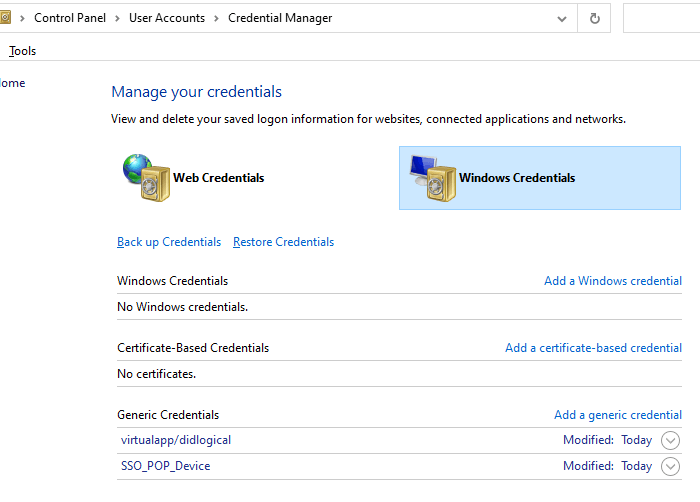
- Windows Credentials (in Credentials Manager) are wiped out at every restart.

- In the Event Viewer, these two errors are recorded in the Applications and Services Logs → Microsoft → Windows → Crypto-DPAPI → Operational log.
Log Name: Microsoft-Windows-Crypto-DPAPI/Operational Source: Microsoft-Windows-Crypto-DPAPI Date: Event ID: 8196 Task Category: Master Key Operation Level: Error Keywords: Master Key Operation User: SYSTEM Computer: Vostro-3470 Description: Master key decryption in memory failed Log Name: Microsoft-Windows-Crypto-DPAPI/Operational Source: Microsoft-Windows-Crypto-DPAPI Date: Event ID: 8198 Task Category: Data Protection Operation Level: Error Keywords: Data Protection Operation User: SYSTEM Computer: Vostro-3470 Description: DPAPI Unprotect failed . Status: 0x8009000B ReasonForFailure: Could not get the master key
The above symptoms denote that this is a system-wide bug in Windows 10 version 2004 that prevents the stored credentials from loading correctly.Read more
“Users must enter a user name and password” option missing
When you open the User Accounts dialog by running control userpasswords2 or netplwiz.exe to configure automatic login to your user account, the Users must enter a user name and password to use this computer option may be missing in that dialog.

As a result, you’re unable to configure auto-login to your user account. This post tells you how to bring back the option in Windows 10 or 11.Read more
Remove “Share with Skype” from Right-click Menu in Windows 10
Windows 10 2004 adds the Share with Skype context menu option for all files. If you’re a person who likes to clean up the clutter and removes unused context menu items, this article is for you.

Note that third-party tools like ShellExView (v2.01) don’t seem to list this context menu item, as it’s added by a modern or UWP Microsoft Store app. Let’s see how to remove the Share with Skype right-click menu option manually in Windows 10.Read more
How to Create Recovery Drive in Windows 10
If your current Windows 10 installation gets corrupted, you’ll be able to use the recovery drive to reinstall Windows 10 — restoring the same build and version of Windows 10 you were using, along with the installed drivers and preinstalled customizations.
For this, you’ll need to have created a USB recovery drive beforehand — when your system was healthy. Recovery Drive can also be useful if you’ve replaced your hard drive and want to install Windows 10 on it.
Restoring from Windows 10 USB recovery drive is equivalent to using the Remove Everything option in Refresh/Reset this PC in the Windows 10 settings. The recovery drive is an alternative if Windows doesn’t boot.Read more
[Fix] “Start, Taskbar, and Action Center” Accent Color Setting Greyed Out
After installing the Windows 10 Feature Update 1903 or higher, you may have noticed that the accent color checkbox Start, taskbar, and action center is grayed out. The recent Windows 10 versions come with a new Light Theme (“Light” color mode) that displays the Taskbar, Start menu, action center, notification area pop-ups, etc., in light grey color.
When the light color mode is enabled for Windows, the Taskbar, Start menu, and the action center can’t be colorized, which is why those settings are dimmed out. This is by design. You’ll be able to show an accent color for window title bars and borders, though.

Here is how to enable the dark color mode for Taskbar, Start Menu, and the Action Center. The current version of Windows 10 is 20H2 as of this post, and the instructions apply to version 20H2 as well.