.NET Framework is a software framework used by many Windows applications. Some programs developed on a specific version of Visual Studio require a particular version of the .NET Framework. Many companies develop their apps to run using the .NET Framework, and these apps target a specific version. If you see this pop-up, you’re trying to run an application that requires the .NET Framework version 3.5, but that version is not installed on your system.Read more
Windows 10
This category contains posts about Microsoft’s latest Operating System – Windows 10.Windows 10’s always been interesting, as every new major update will usually include additional features.
How To Merge Videos In Windows 11/10 Using the Built-In Photos App
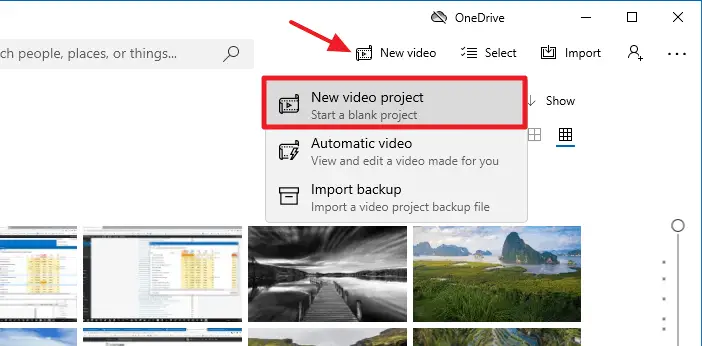
Want to merge videos in Windows 10 or Windows 11 but don’t have any idea how to proceed? Here we will explain to you how to merge videos with Windows’s built-in Photos app in a step-by-step manner.
You must be knowing that Windows Movie Maker (Windows Essentials 2012) has been retired by Microsoft and the download links have been taken offline officially though you can download Windows Essentials 2012 from some independent or third-party sites like ours.
Leaving Windows Movie Maker aside, still, you have something best in-built with Windows 10 and Windows 11 that helps you merge your videos. That’s the built-in Photos app. With its simple and user-friendly interface, the Photos app allows a user to merge videos effortlessly.
Fix: Timeline Feature is not working in Windows 10
Windows 10 Timeline, part of Windows 10 Task View, shows the list of (history) of activities you’ve performed on your computer during the past weeks. Also, you can sync activities across your Windows 10 devices. You can then easily pick up where you left off. The ‘Timeline’ feature is part of Windows 10 April 2018 Update (aka. Spring Creators Update). When sync is enabled, Timeline can also work with your mobile apps (Microsoft account sign-in required). For example, an Office document you viewed on your mobile would show up in the Timeline on your Windows 10 computer.Read more
[Fix] Battery Icon Missing in the Taskbar in Windows 10
The battery icon in the Taskbar notification area helps you quickly check the battery charge level and also to switch between the battery saver and “best performance” settings. If the battery icon is missing from the notification area in your Windows 10 computer, here is a couple of recommendations to resolve the problem.Read more
Replace Default User Account Avatar in Windows 10
Windows 10, by default uses a simple user picture with a grey background and the persona image represented by white curves. The user picture is visible during sign in, as well as in the Start menu as a small rounded thumbnail image. This post explains how to replace the simple user avatar/image with any other image of your choice. After completing the procedure below, new accounts use this image by default.Read more