If folder names containing one or more dot (.) in the name are truncated in Explorer, this may have to do with third-party shell extensions or corrupted folder view settings.
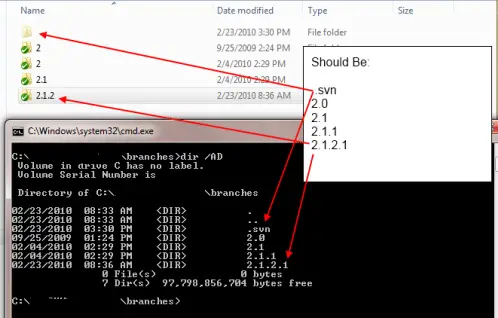
For example, if you have folders like the ones below, with one or more dots or periods ( . ) in the folder name, as below:
- Project.5.0_Branch
- Project.5.1_Branch
- Project.5.2_Branch
- Project.5.3_Branch
- Project.5.4_Branch
File Explorer may display it as:
- Product.5
- Product.5
- Product.5
- Product.5
- Product.5
The last dot and the character(s) after the last dot are cut off. Note that this happens regardless of your Hide extension for known file types choice in Folder Options → View tab.Read more