When you open File Explorer and double-click a folder, it may open a new Explorer window rather than showing the folder contents in the existing window.
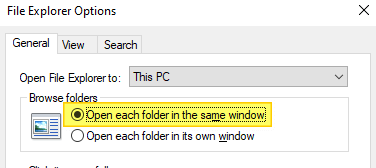
This issue may occur even though the “Open each folder in the same window” setting is selected in Control Panel → Folder Options.
Cause
Folders may always open in a new window due to the wrong folder association settings in the registry. For example, the (default) registry value data in the following key may be incorrectly set to “opennewwindow”
HKEY_CLASSES_ROOT\Folder\shell
Or, an unwanted registry value named LaunchExplorerFlags may be present in the following registry location:
HKEY_CLASSES_ROOT\Folder\shell\open
If the LaunchExplorerFlags value exists and its data is a non-zero value (i.e., not equal to 0x0), then this value overrides the “Open each folder in the same window” setting. Due to the incorrect registry setting, the default double-click action folders is set to “Open in new window”.

Another possible cause is that the “DelegateExecute” registry value may be missing in the above location.
These incorrect registry settings force Windows to open folders in a new window when you double-click on them. Let’s see how to fix this problem.
The fixes #1 and #2 below apply to all versions of Windows, including Windows 11.Read more