The Copy To Folder and Move To Folder options found in Explorer menu bar or ribbon helps you move or copy a file or folder easily to a different location. This functionality can also be added to the right-click menu.Read more
Mapped drives not seen from elevated Command Prompt and Task Scheduler
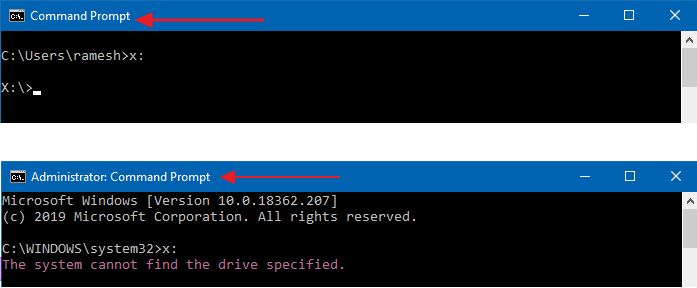
When you attempt to access a mapped network drive from an elevated or admin Command Prompt or Task Scheduler (with the highest privileges), the mapped drive won’t be available. Attempting to use the mapped network drives causes the error The system cannot find the path specified (Error code: 0x80070003).
Here are the screenshots from a computer running Windows 10.
However, the mapped network drive is accessible from File Explorer and regular (non-elevated) Command Prompt.Read more
How to Add “Copy as Path” to Right Click Menu in Windows XP
Windows Vista and higher already include the useful Copy as Path option in the context menu, which helps you quickly copy the complete path of the selected file(s) or folder(s) to the Clipboard. Here is how to add “Copy of Path” feature in Windows XP.Read more
How to Recover Deleted Files Using Previous versions (Shadow Copy) in Windows
If you accidentally delete a file or folder, you can restore a shadow copy of that file or folder using the Previous Versions feature in Windows Vista and higher. Shadow Copy, a useful innovation included first in Windows Vista, automatically creates point-in-time copies of files as you work, so you can quickly and easily retrieve versions of a document you may have accidentally deleted.Read more
How to Add “Open File Location” Right-Click Option in Windows XP
Windows Vista and Windows 7 include the Open file location context menu item for Shortcuts, which helps you quickly open the target folder of a shortcut. In Windows XP, it takes four mouse clicks to accomplish the task.
To open the target folder of a shortcut in Windows XP, you need to right-click on the shortcut file, click Properties and click the Find Target button to open the parent folder of the target file or folder. And an additional mouse click is needed to close the Shortcut Properties dialog.Read more
Copy Title and URL Extension for Internet Explorer
Here is a nice Internet Explorer extension which copies the current webpage title and address to the Windows clipboard.Read more
Calendar Gadget in Windows Sidebar is Blank with Orange Background
The Calendar gadget in the Windows Sidebar may display blank content, showing only the plain orange background. Also, the Stocks Gadget may not show up when you add it to the Sidebar. A missing scripting run-time registration usually causes this problem. Registering VBScript.DLL Registering the vbscript.dll file from an admin Command Prompt fixes the problem. … Read more
Change Ownership of a File or Folder Using Takeown Command-Line Tool
Every file or folder in an NTFS volume has an owner. Certain system files are owned by TrustedInstaller, some by SYSTEM account, and others by the “Administrators” group. If a user creates a file or folder, that user is usually the owner of the file or folder. The owner is the one who can assign permissions (Allow or Deny) to other users for that object.Read more
File Explorer “Working on it” Showing Green Progress Bar
Summary: Windows 10’s File Explorer stalls saying “Working on it…” during the folder type automatic discovery process. And in earlier versions of Windows, Windows may sometimes assign incorrect template for folders if the content discovery or sniffing goes wrong or the folder view settings in the registry are messed up.Read more