By default, users can insert a USB disk in the system and read from, or write to it without limitation. There is a policy setting that helps system administrators to restrict the ability of users to write to USB storage devices.Read more
How to Change the Default Folder Icon in Windows
Customizing and hacking the user interface (“Shell”) in Windows is fun. If you want to change the default folder icon with your custom .ico file, this article tells you how. Instructions apply to all versions of Windows, including Windows 10. Change the Default Folder icon in Explorer Launch Regedit.exe and navigate to the following location: … Read more
[Fix] PDF Thumbnail and Preview Not Showing Up in File Explorer
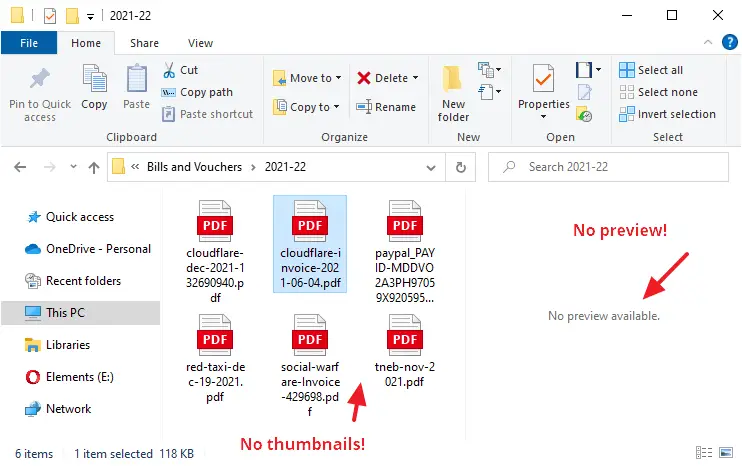
In your Windows computer, File Explorer may not display PDF thumbnails, and instead, show only the default icon assigned for PDF files. This might happen even if you have the option Always show icons, never thumbnails unchecked in the View tab of the Folder Options dialog.
Also, in Microsoft Outlook you’ll see the error when viewing emails that contain PDF file attachments:
The file cannot be previewed because there is no previewer installed for it
This article tells you how to enable PDF thumbnails as well as the PDF preview capability (for the Preview pane) in File Explorer and Microsoft Outlook. The first method (PowerToys) works whether or not you’re using a third-party PDF viewer (e.g., Adobe PDF Reader or Foxit Reader).
How to Fix the Corrupted Recycle Bin Store Folder
There are situations where you need to reset the Recycle Bin store folder to fix problems such as Recycle Bin not showing the files that have been deleted. In some cases, you may be unable to completely empty the Recycle Bin. Each drive has a hidden and protected folder named $Recycle.bin, which is where the Recycle Bin stores files that you and other users on the computer delete. Windows creates a fresh $Recycle.bin folder automatically after you reset it.Read more
Shortcuts to Eject and Close CD/DVD Drive in Windows
Windows already includes the Eject command in the context menu for optical drives. If you want to add the Close Tray option in the context menu for optical drives, then this article is for you.Read more
Prevent Internet Explorer Toolbar Layout from being Reset
Every once in a while, Internet Explorer resets the toolbar layout and I need to customize them the way I want, every time this happens. I have Google Toolbar and the default Links toolbar enabled, which I have docked to the extreme right, showing only the chevron.
Occasionally Internet Explorer (or probably one of the browser add-ons) resets the toolbar positions, pushing the Links toolbar to a separate line and thus occupying additional screen real estate. This happens even though the toolbars are in a locked state.Read more
Fix: Accidentally Moved Videos or other Shell folders to D:\ root
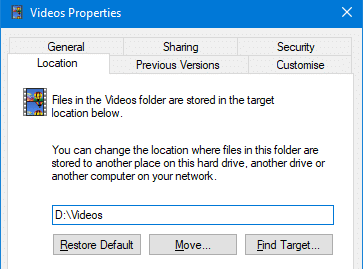
When you relocate a special folder: Music, Pictures, Videos, Downloads, or Documents to a different drive using the Location tab in the Property sheet, make sure you mention the complete target path where you want to relocate the folder.
For example, to move the Videos folder of your user profile to the D:\ drive, type D:\Videos, instead of just D:\. This is because Windows does not automatically append the folder name. In case you don’t mention the complete path, the shell folder will be moved to the root of the drive.
How to Create System Restore Points using Script or Command-Line
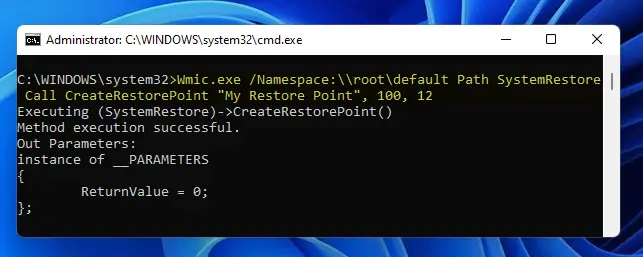
System Restore is a valuable feature in Windows that helps you easily recover the system in the event of any misconfiguration. If you’ve been using the System Restore feature regularly, then you need to know how to create System Restore Points with a single click using the command-line. You can also do this by scripting it using WMI or PowerShell.
This article discusses some methods to quickly create a System Restore point in a single click in Windows 11, Windows 10, and earlier Operating Systems.Read more