How to Disable Auto Arrange in Folders in Windows 7?

Windows 7 doesn’t include an option wherein you can disable auto arrange in folders (icons view). Sometime back I created a magical registry hack (FFlags DWORD 43000001) that disabled the "Full Row Select" functionality in folders in Windows 7. I also posted some interesting observations in article How to Disable Full Row Select in Explorer in Windows 7 about the registry hack, which demonstrates that applying the hack also brings back the missing "Auto arrange" menu option in the View menu of folders when in Icons view.

Automate Using Script

Update: I just converted the registry edits to a Script file that does all the work. Works in Windows 7, 8, 8.1 and Windows 10.

Check out my recent post How to Disable Full Row Select and Auto Arrange in Folders in Windows 10?

To do this Manually

I hereby bring you a slightly tweaked version (sets FFlags to 43000000) of the same registry hack and provide some screenshots in this article. After applying this edit you can enable or disable auto arrange feature on a per-folder basis. Of course, an "Undo" REG file is provided in case you want to revert back to the factory default setting.Read more

How to Remove Pin to Taskbar Option For a Particular Application in Windows 7?

If you have a host application that you don’t want to be pinned to the Windows 7 taskbar, you can do so by adding a registry value in the application registration area. By default Windows prevents the following host processes from being pinned to the taskbar.

  1. RUNDLL32.EXE
  2. MSHTA.EXE
  3. DLLHOST.EXE
  4. APPLAUNCH.EXE
  5. HH.EXE
  6. WINHLP32.EXE
  7. MMC.EXE

… and other file names defined in the following registry key in string values HostApps, AddRemoveApps and AddRemoveNames

HKEY_LOCAL_MACHINE \ SOFTWARE \ Microsoft \ Windows \ CurrentVersion \ Explorer \ FileAssociation

To remove the Pin to Taskbar (and "Pin this program to taskbar") context menu options for a particular application, use these steps:Read more

Error “Windows cannot access the specified device, path, or file” When Playing DVD Movies

When you insert a DVD media in the drive, right-click on the drive and choose Play from the context menu, the following error may occur. Windows cannot access the specified device, path, or file. You may not have the appropriate permissions to access the item. However, you may be able to play DVD movies via … Read more

[Fix] Currency, Stock or Weather Gadgets Not Updating in Windows 7

Did the Currency, Stock, or the Weather Gadget got stuck and stopped updating in your Windows 7/Vista computer all of a sudden? Clearing the Sidebar Gadgets cache using the following steps might help. Clear the Windows Sidebar Cache Folder Press CTRL+SHIFT+ESC to bring up the Task Manager. Exit Sidebar.exe process via Task Manager. Instructions for … Read more

Fix Libraries are Hidden and Showing Up Empty in Windows 7

When you open Windows Explorer on your Windows 7 computer, the Libraries folder may be completely empty. Also, nothing may happen when you right-click the “Libraries” link in the navigation pane, and choose Restore default libraries. This can happen if the library files are hidden inadvertently by the user. To restore/unhide the libraries, you need … Read more

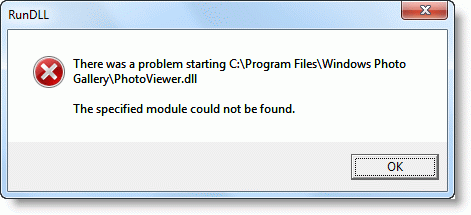
Fix Error “There was a problem starting PhotoViewer.dll” When Editing Image Files in Windows 7

After upgrading your Windows Vista computer to Windows 7, when you right-click on a JPG/JPEG image and click Edit, the following error message may appear:

There was a problem starting C:\Program Files\Windows Photo Gallery\PhotoViewer.dll

The specified module could not be found.

Read more

How to Disable Full Row Select in Explorer in Windows 7?

I’m writing this article specifically for Windows 7, because the FullRowSelect registry value that you used in Windows Vista, doesn’t work in Windows 7. (REF: Enable or Disable Full Row Select feature in Explorer in Windows Vista). After some of our readers reported that setting FullRowSelect to 0 doesn’t do anything in Windows 7, I decided to have a look at this issue. Playing with different bitmask values, I finally got what I wanted – to disable full row select feature in Windows Explorer (Details mode) in Windows 7, but with a minor side-effect which is explained in the later part of the article.Read more