Did the Currency, Stock, or the Weather Gadget got stuck and stopped updating in your Windows 7/Vista computer all of a sudden? Clearing the Sidebar Gadgets cache using the following steps might help.
Clear the Windows Sidebar Cache Folder
Press CTRL+SHIFT+ESC to bring up the Task Manager.
Exit Sidebar.exe process via Task Manager.
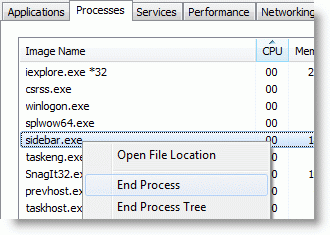
Instructions for Windows 7
1. Press WinKey+R, type the following and press ENTER:
%localappdata%\Microsoft\Windows Live\Services\
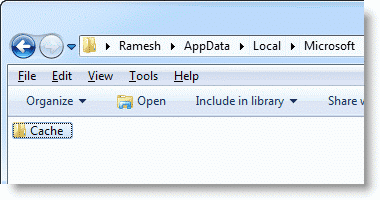
2. Right-click on the “Cache” folder, click Rename.
3. Assign a new name (e.g., cache.old) for the folder.
4.Press WinKey+R, type the following and press ENTER:
%localappdata%\Microsoft\Windows Sidebar\Cache
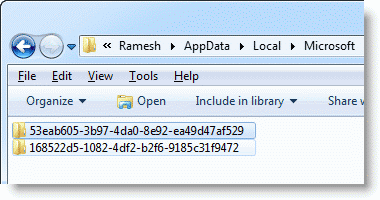
5. Delete the folder named 53eab605-3b97-4da0-8e92-ea49d47af529
The above folder is where the Currency Gadget stores some data. Likewise, Weather gadget stores the data in a folder named 168522d5-1082-4df2-b2f6-9185c31f9472.
6. Press WinKey+R type Sidebar.exe and press ENTER.
Instructions for Windows Vista
1. Press WinKey+R, type the following and press ENTER:
%localappdata%\Microsoft\Windows Live\Services\
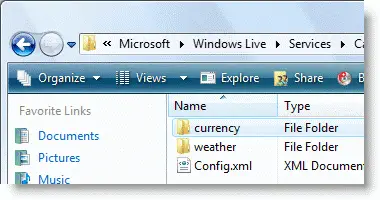
2. To reset the cache for Currency gadget, right-click the folder “currency” and choose Delete.
3. Press WinKey+R type Sidebar.exe and press ENTER.
One small request: If you liked this post, please share this?
One "tiny" share from you would seriously help a lot with the growth of this blog. Some great suggestions:- Pin it!
- Share it to your favorite blog + Facebook, Reddit
- Tweet it!
