You may have come across situations where a continuous hard disk activity taking place although your system being in an idle state. If you open Task Manager out of curiosity, you may find several processes starting and exiting of their own without you doing anything. It could be a scheduled backup task, third-party system maintenance program or anything that could be churning your hard disk. It could be even a Malware. But which application or process launches them?Read more
Windows
You’re browsing the “Windows” parent category, which lists articles on every Windows Operating System.
How to Increase Windows 7 Desktop Slideshow Transition Animation Duration
The Desktop Slideshow options lets you configure the picture position, picture change interval and turn on or off the shuffle option. Here is another hidden feature in Windows 7 configurable using the Registry Editor, that allows you increase the desktop slideshow transition animation duration. Increase Desktop Slideshow Animation Duration 1. Click Start, type Regedit.exe and … Read more
Fix Windows 7 Backup and Restore Not Launching After Uninstalling Acronis True Image
Recently one of our readers faced a problem with Windows 7 Backup and Restore after installing and then uninstalling Acronis True Image. Nothing happened except for a brief hourglass when the user double-clicked the Backup and Restore item in the Control Panel. It turned out that the user had enabled the Windows integration feature in … Read more
What Causes “Unsaved Theme” to Appear in Personalization window?
A desktop theme contains various settings such as cursors, icons, wallpaper, screensaver, and other UI settings. It’s obvious that when one of those theme parameters is changed, Windows saves the customized setting in a separate theme file named Custom.theme, which is displayed in the Personalization window as “Unsaved Theme”. RELATED: Windows can’t find one of … Read more
Wevtutil Error “The specified channel could not be found” when clearing an Event Log File
If you’re receiving the following error when trying to clear an event log file using the wevtutil.exe CLI tool, then you’re most likely using an incorrect log file name parameter: Failed to clear log <logfile>. The specified channel could not be found. Check channel configuration. For example, the event log file name and the display … Read more
How to Reset Folder View Settings in Windows 10/11 and Earlier
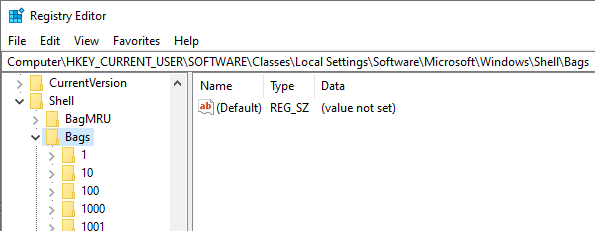
Folder view settings include column preferences, view mode (icon or thumbnail), grouping, sorting order, window size, etc. Sometimes Windows may forget your folder view settings due to corruption or if the 5000 folders limit has been reached.
For instance, Windows may keep resetting the view back to “List” even though you repeatedly choose the thumbnail view. Another example would be that the system keeps enabling the auto-align setting for your desktop icons into a grid (even when the Align icons to grid is not ticked.
Or, let’s say you had added additional columns in a folder and closed the folder. When you reopen the folder, the changes may not be retained, and it goes back to the default view and sort order settings.
In those situations, you may want to reset the views to clear out corrupt settings and start afresh. This article explains how to completely clear the saved folder views in Windows Vista, 7, 8, 10, and Windows 11.Read more
Extract Contents of .MSI File and Add “Extract All” to Right-Click Menu
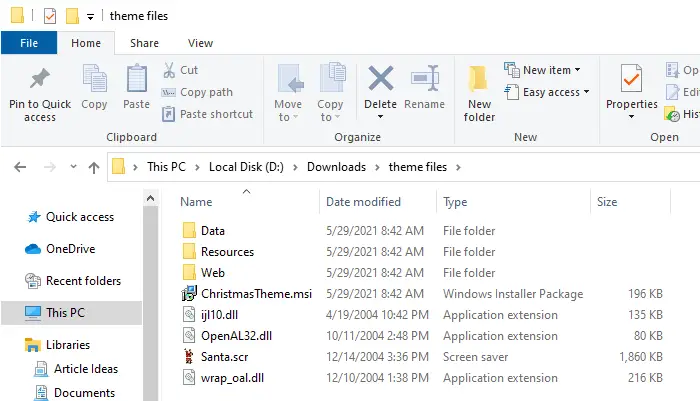
There are situations when you need to pick a single file from a .msi package without going through the installation phase. One good example is that a stand-alone or portable application wrapped in a .msi package. Or, you may need to extract a particular wallpaper image from a theme installer.
In that case, you can avoid running the setup and extract the contents of the .msi package manually. Thus there won’t be a need for a System Restore point, the addition of several registry keys, and a few temporary directories (which would be the case if you run the setup).
No third-party tools are needed; you can do this using the Windows Installer executable msiexec.exe command-line.Read more
Hidden Registry Settings for “Send To” Menu in Windows
The Send To menu in Windows allows you to quickly send a file to different locations, including a CD/DVD, USB drive, or a third-party application. We’ve covered a few articles on the “Send To” menu before, and here are the three new and undocumented registry edits that can be used in Windows 7 through Windows 10.Read more
Windows 7 Services Default Configuration Startup Type and Log On Account
Did you tweak the Services configuration incorrectly, resulting in a system slowdown or leading to other catastrophe? And you don’t remember the original configuration to revert back? You may find the Windows 7 default Services configuration table below useful.
Note that some of these services may not be found in your system, depending upon the edition of Windows 7 you’ve installed. For example, the BranchCache feature and the corresponding Service are available only in Windows 7 Ultimate and Enterprise Editions.Read more