The right-click menu in Internet Explorer may get cluttered up when you install download managers, Toolbars and other browser add-ons. The items that you seldom use can be removed to tidy up the right-click menu.Read more
Microsoft
You’re browsing “Microsoft” category, which is the top-most category which contains every thing related to Microsoft. Windows Operating Systems, News, Windows Update news and everything Microsoft!
How to Start Internet Explorer in InPrivate Browsing Mode by Default
Summary: This post tells you how to start Internet Explorer in InPrivate mode by default, using a shortcut or double-clicking a .url or .htm file. Instructions apply to all versions of Windows, up to Windows 10 as of the last revision of this post.
InPrivate Browsing mode in Internet Explorer enables you to surf the web without leaving a trace in the computer, as the cache is erased automatically when the “InPrivate Browsing” window is closed.Read more
[Tip] Change the Default View Source Editor in Internet Explorer
When you click the View Source command in Internet Explorer, it opens the html source using IE (F12) Developer Tools. If you want to change the default view source editor to a different viewer such as Notepad, Notepad++, use these steps:Read more
How to Determine the Last Shutdown Time and Date in Windows
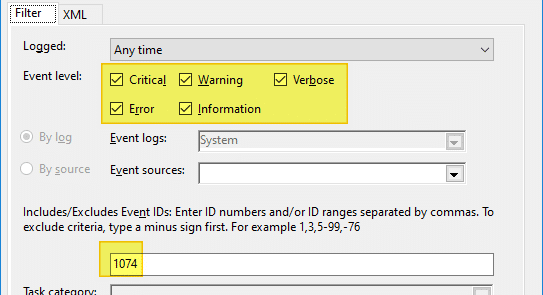
The easiest way to determine the last shutdown date and time is to check the event logs. When you shut down a computer Event ID 1074 is written to the event log which denotes a clean shutdown. The following instructions apply all versions of Windows, including Windows 10.Read more
Cannot Access “Folder Options” in Windows
The NoFolderOptions registry setting hides the Folder Options applet from the Control Panel and the Folder Options command under the Tools menu in Explorer. In Windows 10, this policy disables all the Folder Options entry points—e.g., “Change folder and search options” will be grayed out in the File menu in Explorer.
In earlier versions of Windows, if you enable this policy setting, users will receive an error message if they tap or click the Options button or choose the Change folder and search options command, and they will not be able to open Folder Options.Read more
Determine the Target Path of Windows Installer Shortcuts
When you right-click on a Windows Installer shortcut and choose Properties, the Target field does not show the path to the executable. This is because Windows Installer shortcuts work differently. When you double-click a Windows Installer shortcut, Windows reads the Product code, Component code, and other details stored in the Shortcut to determine the executable file location.Read more
Optimize the Windows Registry Regularly Using NTREGOPT With Task Scheduler
NTREGOPT is a registry optimization tool for Windows. This program compacts the registry to the minimum size possible by removing any slack space that may be left after installing or uninstalling applications in the system. Note that this program does not modify the registry contents in any way.Read more
Dragging a folder to Favorite Links moves the folder instead of creating Shortcut
 When you drag a folder to the Favorite Links area in Windows Explorer, the shortcut to the folder is placed in the Links folder. This was not the case in one of my Windows Vista systems, where the entire folder and sub-folders were moved to the Links folder when dragged to Favorite Links.Read more
Preserve the order of Internet Explorer Favorites when transferring to another PC
 The Favorites menu in Internet Explorer lets you arrange the shortcuts by dragging each shortcut to your preferred location within the Favorites menu. If you use the Import/Export Wizard in Internet Explorer or manually copy the URL favorites to another system, the favorites order is not copied to the target system. This is because Internet Explorer stores the sort order in the registry, and the Import/Export Wizard does not reference the sort order registry key.Read more
How to Email File Paths via the Send To menu
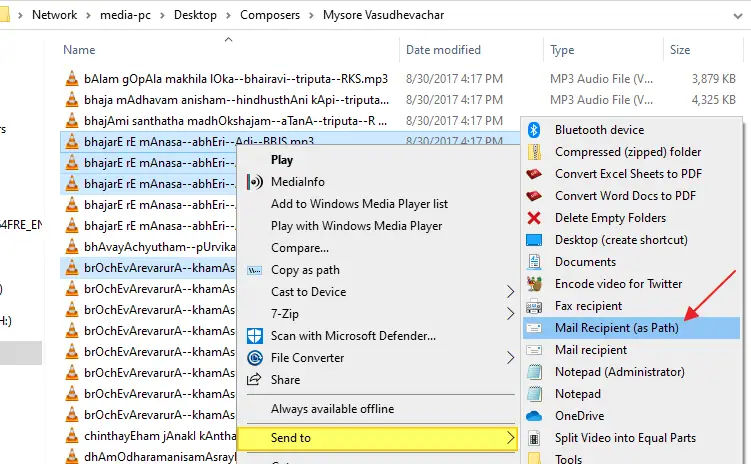
Let’s assume you’re working in the training department of a firm and need to send training materials to recruits regularly. The usual way is to right-click on the file, click Send To, and click Mail Recipient. This attaches the file to the compose window in your mail client.
How about saving bandwidth on your local network by sending the target path of documents (in a network share) instead of attaching them to mail?Read more