When you right-click on a file or folder on some computers, the context menu may take many seconds to appear. This article tells you how to fix the slow right-click issues and other context menu handler shell extension problems in Windows. Here are some of the symptoms you may be facing.
- On Windows 11, when you open the classic context menu by clicking “Show more options”, the “Print” (or “Set as desktop background”) command is shown as the default option (in bold letters). So, double-clicking on image files will either open the Print dialog or set the image file as the desktop background. The ClipChamp shell extension causes this issue.
- When you right-click a file/folder, there may be a huge delay before Windows displays the context menu.
- When you try to empty Recycle Bin, it opens another application instead.
- When you select multiple files, right-click and click Open / Print, nothing happens. Whereas it works when a single file is selected.
- Error message “Windows Explorer has encountered a problem and needs to close. We are sorry for the inconvenience” when you right-click a folder.
- Right-click is extremely slow only when the network card is enabled.
- When you right-click on a folder and choose Properties, nothing may happen.
- Right-click menu turns ugly (classic look) after installing an older version of Notepad++
- Data Execution Prevention (DEP) error occurs when Windows Explorer or Control Panel is launched.
- Nothing happens when you click Slideshow or Print in the Tasks pane or File Explorer Ribbon.
- When you click “Set up backup” or click “Change settings” in Windows 7 Backup and Restore, nothing happens, or the
System32folder opens. - When you right-click Start to access the Win+X (Power User) menu in Windows 10, none of the shortcuts work. At the same time, they work correctly from the Win+X shortcuts folder.
- Right-click context menu Run as Administrator not working.
- Folder Names Truncated after the Dot (Period) in Explorer (caused by
TortoiseSVNshell extension) - A vertical scroll bar appears in Windows 11 fast context menu; a gap appears at the bottom of the menu. This happens when text size/scaling is increased.
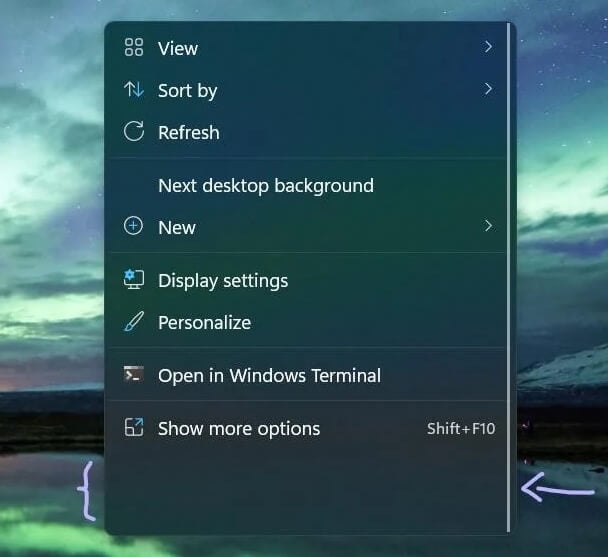
(A redditor has indicated that disabling “NVidia CPL Context menu extension” using ShellExView has solved the context menu issue.) - ESET NOD32 Antivirus context menu breaks the Windows 11 fast context menu. A portion of the menu is cut off.
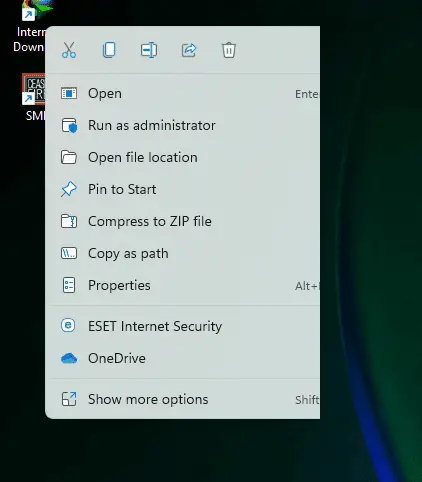
Workaround: Disable the “Integrate into the context menu” option in ESET NOD32 → Advanced Setup → User Interface → “User Interface Elements” section. ESET support says this issue has been resolved in the Windows 11 Insider Builds. (Ref: ESET forum posts #1 and #2) - Whenever you open up File Explorer, right-click on a file or folder, or copy and paste a file within File Explorer, you may see a pop-up window with the error message: “Failed to load resource DLL.”
The Ipswitch WS_FTP shell extension causes this error on some systems
Cause
A poorly coded context menu handler shell extension added by a 3rd party program may be causing any of the above symptoms.
A context menu handler is a type of shell extension that adds commands to your right-click menu. For example, the entries “Scan with Windows Defender,” “Set as Desktop Background,” etc., you see in the right-click menu are context menu handers included by default in Windows. Likewise, 3rd party programs may add their own extensions.
When Explorer shell crashes, it writes an entry to the Application event log. You can open the Event Viewer and check for recent Application log errors 1000 to find more information about the crash.
In some cases, the exact name of the offending shell extension is shown in the Application event log. Here is an example:
Log Name: Application
Source: Application Error
Date:
Event ID: 1000
Task Category: (100)
Level: Error
Keywords: Classic
User: N/A
Computer:
Description:
Faulting application name: explorer.exe, version: 10.0.10240.16405, time stamp: 0x55b455cf
Faulting module name: IDTNCPL.cpl, version: 1.0.6365.0, time stamp: 0x4e68a44d
Exception code: 0xc0000005
Fault offset: 0x00001151
Faulting process id: 0x1284
Faulting application start time: 0x01d0d2a6d2ff07fc
Faulting application path: C:\WINDOWS\explorer.exe
Faulting module path: C:\WINDOWS\system32\IDTNCPL.cpl
Report Id: 1da3cf69-34ba-4871-bb74-5bbaa97e8eb0
Here is another instance where the Foxit PhantomPDF’s shell extension ConvertToPDFShellExtension_x64.dll caused the crash.
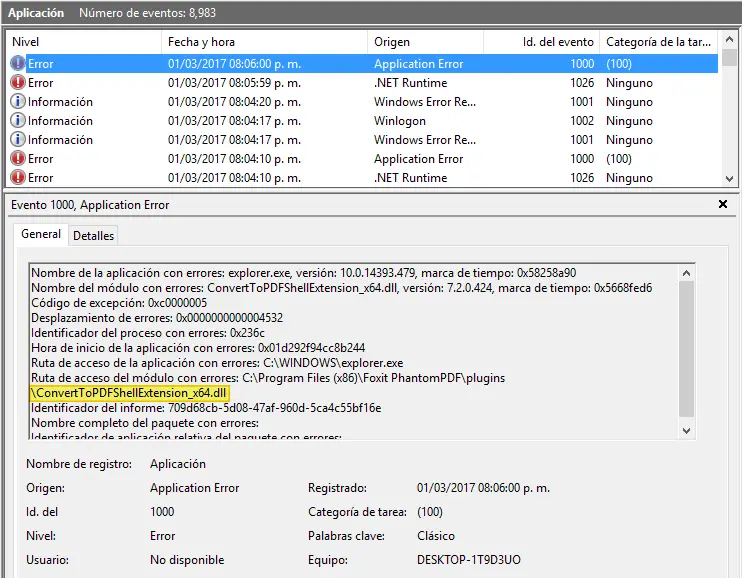
However, in some cases, the module name may show up as shell32.dll instead of the actual 3rd party module that caused the issue.
Contents
[Fix] Right Click Issues Caused by Shell Extensions
The context menu handlers can load from many different areas in the registry. It can be difficult for an end-user to pinpoint which extension is causing the problem. Let’s see how to narrow down the issue using the ShellExView utility easily.
ShellExView from Nirsoft is an excellent tool to view and manage all installed shell extensions. It displays the file description, version, company information, location, file name, and more. This tool helps you effortlessly disable an extension that you don’t need. This tool can be used to determine the problematic shell extension.
Using ShellExView to resolve right-click shell extension problems
- Download ShellExView from Nirsoft.net and run it. It scans the registry for all the shell extensions.
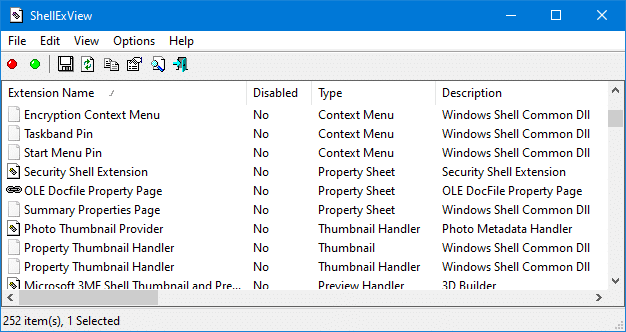
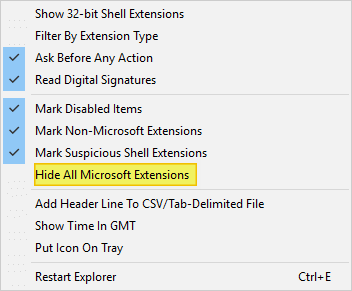
- From the Options menu, click Hide All Microsoft Extensions to enable the tick mark on it. This prevents you from accidentally disabling a built-in Windows shell extension.
This lists all the third-party shell extensions installed on your system.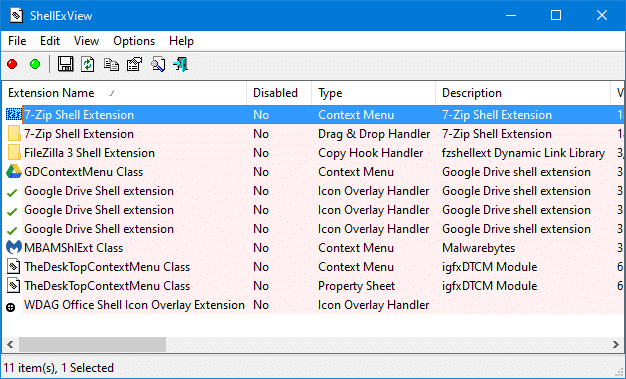 Shell extensions are of different types — e.g., icon handler, overlay handler, context menu, etc. Since we’re dealing with a right-click issue in Windows, we’re particularly interested in context menu handlers.
Google Drive Shell Extension is the culprit?
Of late, many users have indicated that the Google Drive Shell extension (“
GDContextMenu Class” – GUID:{BB02B294-8425-42E5-983F-41A1FA970CD6}as shown in the above image) is causing the lag when right-clicking on folders. Also, a noticeable lag is experienced when opening open jumplist folders from Windows Explorer Taskbar Icon. These issues have been reported by many users in the Google Drive support forums and other forums. Disabling the Google Drive shell extension fixed the problem for most users.Newer versions of Google Drive Client has a different shell extension file/GUID (
{EE15C2BD-CECB-49F8-A113-CA1BFC528F5B}). It’s mentioned below:DriveFS ContextMenu Handler C:\Program Files\Google\Drive File Stream\58.0.3.0\drivefsext.dll {EE15C2BD-CECB-49F8-A113-CA1BFC528F5B}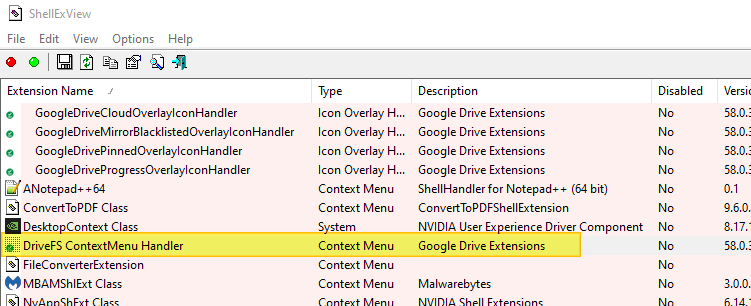
What if you need the Google Drive extension and yet avoid the lag when right-clicking?
Here’s a brilliant AutoHotKey solution that enables the Google Drive context menu options only when you press the Shift key and right-click on a file or folder. Check out the method in the following GitHub link:
patricknelson/google-drive-context-fix: Dynamically enables/disables Google Drive in context menu when right clicking in Windows Explorer:
https://github.com/patricknelson/google-drive-context-fix
- Sort the results using Type, so that the Context Menu handlers are displayed together.
- Next, disable the Context Menu handlers one at a time. Or even better, disable the first half of the items displayed.
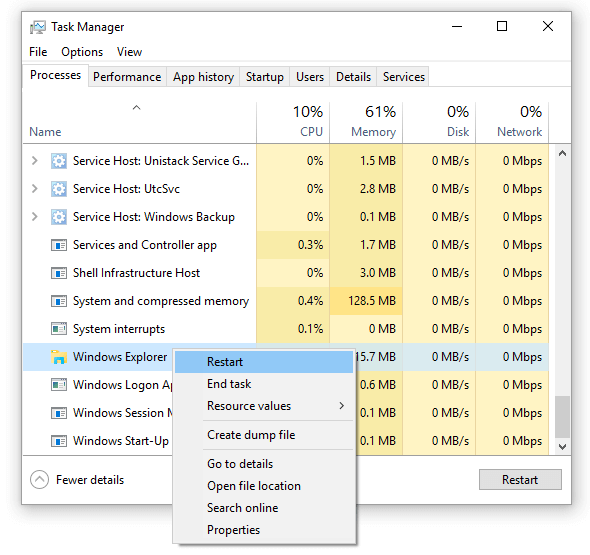
- Once disabled an item or group of items, use the Restart Explorer Ctrl + E option to restart the shell to verify if that solves the problem. Restarting the Explorer shell is an essential step. This shouldn’t be skipped.
- If disabling one or a group of items does not solve the problem, enable the item(s) back, and disable the next set of non-Microsoft context menu handlers in the bottom half, and restart Explorer. Repeat this process to turn the context menu extensions on and off and determine which is causing your problem.
 An even quicker method is to bisect the list of context menu handlers into two groups, disabling half of the entries at a stretch, rebooting, and testing the behavior again.
A Windows user named JClarke commented:
“You can disable them …they say “one at a time” and see what effect it has on the problem. I did it a lot quicker by bisecting the list, disabling half of the entries in one fell swoop, rebooting, and trying the right click. It worked, so I knew I just had to narrow it down, just as we used to do with MSConfig. Then I kept bisecting the list until it was just a few and did those one at a time. The problem is that you have to reboot between tries to get accurate testing of the results of your disabling. I didn’t find logging off to be consistent.”
Do this until the issue is resolved, and finally, you should be able to identify the offending context menu handler shell extension.
Note: It’s not always the Context menu handler, but a PropertySheet handler or an Icon Handler may be the culprit sometimes. Some readers have reported that the Property Sheet handler “IIS W3ext Module” was responsible for the folder properties issue in a computer running an older version of Windows. In another peculiar case, the system file shimgvw.dll itself was the culprit. These modules don’t exist in Windows 10, anyway.
The Explorer shell loads extensions of the following types:
- Column Handler
- Context Menu
- Copy Hook Handler
- Data Handler
- Drag & Drop Handler
- Drop Handler
- Icon Handler
- Icon Overlay Handler
- InfoTip Handler
- Preview Handler
- Property Handler
- Property Sheet
- Search Handler
- Shell Folder
- ShellExecute Hook
- Thumbnail Handler
Context menu handlers are loaded when you right-click on a file or folder, or even when you double-click on a file or folder. By disabling unwanted context menu handlers, you can avoid explorer.exe crashes and right-click delays.
Shell extensions may not be the culprit every time!
Is the Send To menu (not shell extensions) causing the delay?
[If you’ve landed on this page to troubleshoot a crash (instead of the “right-click menu delay” issue) when right-clicking, then skip this part and go to ShellExView section above.]
A third-party context menu handler shell extension may not always be the culprit for right-click menu delays. The delay can be caused by the items in your Send To menu as well — especially the external drives and network drives. When you right-click a file or folder, Windows builds the list of menu items and also enumerates the Send To items.
By enabling the DelaySendToMenuBuild and NoDrivesInSendToMenu registry settings, you can make the right-click menu appear much faster. This works fine on Windows 10 as well.
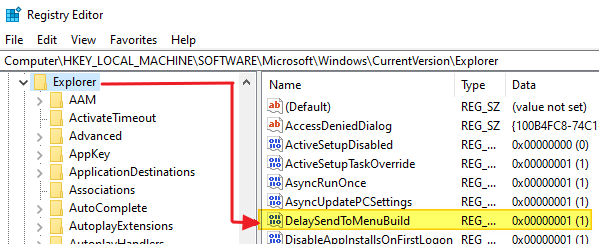
For more information, check out the article Hidden Registry Settings for the “Send To” Menu.
If that speeds up the right-click menu, then you can skip the rest of the instructions in this post.
In case the above registry settings don’t help even after a restart, then the next step is to isolate the context menu handler shell extension that may be causing the problem.
Fixing the problem manually using Registry Editor
If you decide to troubleshoot this problem without using ShellExView or similar tools, here is some background information on how to go about it. That said, this is only for advanced users who are comfortable with using the Registry Editor.
First, observe when does the problem occur — when right-clicking a particular file type? or all file types? or only when right-clicking on folders?
Context menu handlers can load from any of these areas:
| Location | Description |
|---|---|
| HKCR\*\shellex\contextmenuhandlers | Files |
| HKCR\AllFileSystemObjects\shellex\contextmenuhandlers | Files and File folders |
| HKCR\Folder\shellex\contextmenuhandlers | Folders (virtual and real) |
| HKCR\Directory\shellex\contextmenuhandlers | File folders |
| HKCR\[ProgID]\shellex\contextmenuhandlers | File class |
| HKCR\Directory\Background\shellex\ContextMenuHandlers | Desktop & Folder background |
| HKCR\SystemFileAssociations\[.file_ext]\shellex\ContextMenuHandlers | Files |
| HKCR\SystemFileAssociations\[PerceivedType]\shellex\ContextMenuHandlers | Files of a certain type (“Perceived type”) |
| desktop.ini | Folder (per-folder context menu) |
Note: HKCR is the short name for the HKEY_CLASSES_ROOT registry node.
If any of the previously explained symptoms occur when you deal with a folder, then you may need to inspect the context menu handlers loaded in these areas (AllFileSystemObjects, Folder, Directory). If it’s only for a .txt file, inspect the handlers installed for the file class of .txt (HKCR\txtfile). See how to map a file extension to ProgId.
Under the ContextMenuHandlers registry key, you may see one or more subkeys; each key represents a context menu handler shell extension. The keys may have a proper label or contain a GUID as the name.
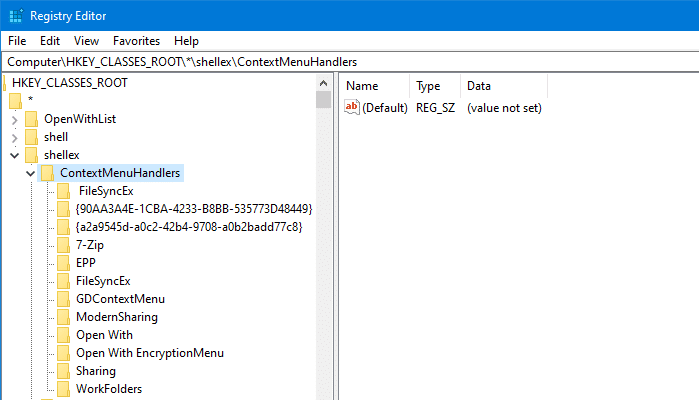
The GUIDs can be looked upon on the web or from the HKCR\CLSID\{GUID}\InProcServer32 registry location to know the corresponding program and the .dll file name.
Example: Google Drive Shell Extension locations
For instance, the Google Drive shell extensions load from the following registry locations:
[HKEY_CLASSES_ROOT\*\shellex\ContextMenuHandlers\GDContextMenu]
[HKEY_CLASSES_ROOT\Directory\shellex\ContextMenuHandlers\GDContextMenu]
[HKEY_CLASSES_ROOT\Directory\Background\shellex\ContextMenuHandlers\GDContextMenu]
[HKEY_CLASSES_ROOT\lnkfile\shellex\ContextMenuHandlers\GDContextMenu]

[HKEY_CLASSES_ROOT\*\shellex\ContextMenuHandlers\DriveFS 28 or later]
[HKEY_CLASSES_ROOT\Directory\shellex\ContextMenuHandlers\DriveFS 28 or later]
[HKEY_CLASSES_ROOT\Directory\Background\shellex\ContextMenuHandlers\DriveFS 28 or later]
[HKEY_CLASSES_ROOT\lnkfile\shellex\ContextMenuHandlers\DriveFS 28 or later]
and its GUIDs are {BB02B294-8425-42E5-983F-41A1FA970CD6} (older versions of Google Drive client) and {EE15C2BD-CECB-49F8-A113-CA1BFC528F5B} (newer versions of Google Drive client)
Open Registry Editor and backup the selected branch, delete the context menu handlers one at a time to test. After every registry change, you must restart the Explorer shell for the changes to take effect. This is where the ShellExView is handy. It includes the Ctrl + E shortcut to restart explorer.
Slow right-click only on networked computers?
In some cases, not related to shell extensions, the right-click menu may be extremely slow to appear when a system is connected to a network. And, disabling the wi-fi adapter or the ethernet connection may restore the normal right-click functionality. As said earlier, this is a non-shell extension issue usually caused by adding a context menu option pointing to a program located on a network share.
Assuming that WinZip is placed in a shared location or file server, when the user launches WinZip from the network share and enables WinZip Shell integration on their system, the registry entry will point to a file in the network location, such as:
HKEY_CLASSES_ROOT\WinZip\shell\open\command
With the (default) value assigned the following:
\\192.168.0.8\programs\winzip.exe "%1"
With the above setting, if the file server or the networked computer which hosts the program, is turned off, and when you right-click on a file on your computer, you’ll see a huge delay. And some of the following symptoms can be observed.
- Sometimes, you’ll experience a slow right-click, only for the first time after a fresh restart.
- You’ll also see some packets are transferred via the network (Taskbar notification icon.)
- You may also notice that disabling the DHCP Service speeds up the right-click menu display in some systems.
How do you find the registry entries pointing to files on a network share?
Using ShellMenuView
ShellMenuView is another tool from Nirsoft which lists the static context menu items (non-shell extensions) from the registry. This tool can help you disable/enable menu items or jump to the corresponding registry key using the Registry Editor.
Launch ShellMenuView and let it populate the items.
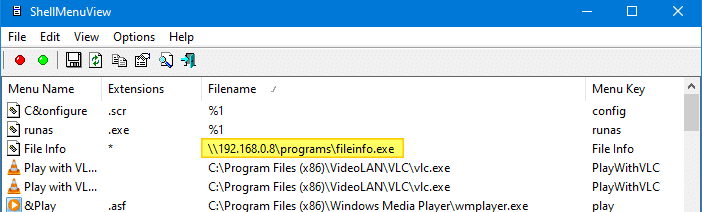
Sort by the Filename column to quickly identify UNC paths pointing to a networked computer or mapped network drive-letters.
Right-click on the entry and click Disable Selected Items to disable the menu item from appearing. To remove the entry altogether, right-click on the item and click Open in RegEdit.
This takes you to the relevant branch in the Registry Editor. Backup the key by exporting to a .reg file, and then delete the branch.
Using RegScanner
Another option is to use the RegScanner utility from Nirsoft. RegScanner is a small utility from Nirsoft that allows you to scan the registry, find the desired Registry values that match the specified search criteria, and display them in one list. After finding the Registry values, you can easily jump to the right value in RegEdit, simply by double-clicking the desired Registry item. You need to search the registry values whose data field begins with the string \\ (UNC path)
Run RegScanner and configure the search options as below:
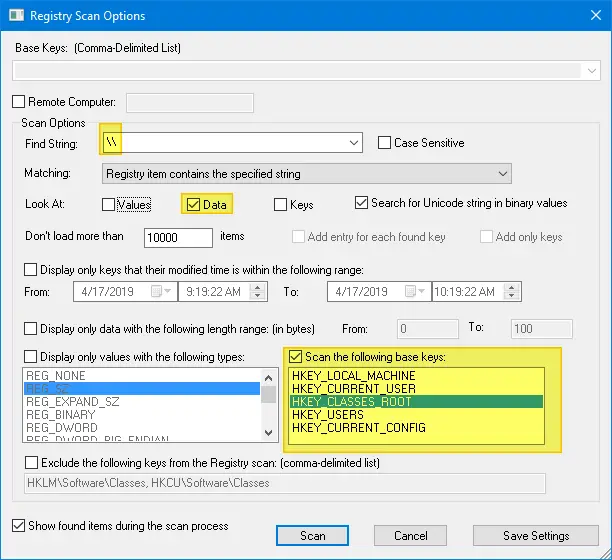
Click the Scan button. Sort the search results by Data column and find entries containing the network share — UNC path or a mapped drive letter.
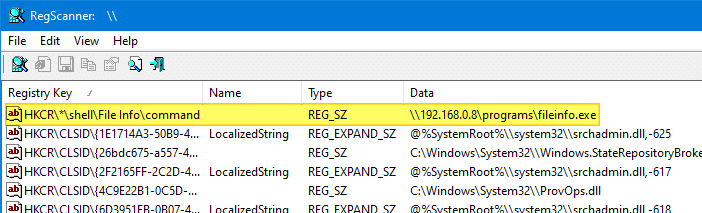
Now you know the entry that’s causing the right-click delay. Go to that particular location in Regedit, backup the corresponding key(s), and then delete the offending key(s).
I hope this guide was helpful for you to fix slow right-click problems, explorer crashes, and other performance issues caused by context menu handlers in Windows.
One small request: If you liked this post, please share this?
One "tiny" share from you would seriously help a lot with the growth of this blog. Some great suggestions:- Pin it!
- Share it to your favorite blog + Facebook, Reddit
- Tweet it!

Shellexview did the trick. Had to disable and reboot several times until I found it was old Western Digital External hard drive extensions. The hard drive still works fine in Windows 10 1903, but apparently the shell extensions do not!
I was able to download a newer version of Western Digital Smartware from their site. I installed this and re-enabled the extensions and all is well.
So: Windows 10 1903 is not compatible with the older WD Smartware software!
Super! 🙂
Where do you look if all 3rd party extensions are disabled and the problem still occurs? It is likely a Micro$oft extension issue, yet there are several hundred and won’t using the disable feature stop Windows from working properly?
Hi,
My problem was with this file from NVIDIA
C:\WINDOWS\system32\nvshext.dll
Thank you so much for your help
Thank you so much! It works for me. I keep on researching how will I fix slow right click.
you are a genius
thanks for your help
it fixed slow right click problem in my pc.
What can I do if I’ve disabled ALL context menu items and still have the same problem? It’s random, random file types and probably happens 7 out of 10 times I right click a file (Windows 10), it can happen on all file types across multiple types of storage drive but does seem to happen more so on .txt files.
@Pete: Can you trace the right-click activity using ProcMon and send me the log file?
Finally, after two years of annoyance and slow explorer .
With my system it was Tortoise.
It`s a petty, that MS does not offer the solution.
Thanks a lot 🙂
Thanks SOOO MUCH! This was so easy to fix with your instructions, the culprit was norton lifelock.
Thank you so much using “[Fix] Right Click Issues Caused by Shell Extensions” solved my problem.
appreciate for ur grat work above
i have problem with right click when network is on Sometimes, i experience a slow right-click, only for the first time after a sceonds if i right click no loading after a minute if i right click again it gets loading
i checked all u methods but i didt find any \\ unc path in any methods i even disabled dhcp
im using i5 processor(no intel hd graphic) with nvidia graphic geforce gtx 1050 1tb hdd 8gb ram win 11 previously used win 10 same problem
Hi Vilas, Is it possible for you to run a ProcMon trace and send me the log?
For me it was the program Winrar
As soon as I disabled it using the ShellExView program, the refreshing situation stopped.
I run regedit and search \\ in HKEY_CLASSES_ROOT and delete registry key which I sure I don’t need and problem gone. Thank you so much.
Unfortunately none of this worked for me. I made a new install of windows 10 on a laptop and ended up finding that it seems to happen on media files (mp4, mp3, wav etc) no matter what.
Thank you for this nice tutorial.
For me the culprit was Adobe Acrobat !
Thanks a lot, your article helped me solve my problem
Thank you!!!! My explorer was always crashing on a right click on a folder.
I had this anoying issue for so long, and now finally I got a cure! I am so happy.
My problem was the program AllDup to find duplicates with the Fast Explorer shell extension FEShlExt.dll
I had the issue where I right-click an image or file and it will load then crash. I installed ShellEX View and Disabled “Acrobat Elements Context Menu” and it worked! Thank you so much.
Works for me too !
ShellEX View is the new king !
YAY!!!
In my case it was WinRAR that caused the “Shell32.dll” to crash and thereby the Kontext menu and Explorer. Strangely, deactivating the process in “ShellEx View” fixed it, but when I deinstalled Winrar it would crash again. So in the end I resulted to deactivating Winrar in the Context menu and installing 7Zip to keep the functionality, while keeping winrar also installed but not using it.
Man what an adventure.
Thanks you all alot for your help in this matter.
This article helps a lot! Thank you bro!
Hello sir!
I tried disabling the Shell extensions one by one and then all at once, the context ones, Icon and property handlers as well. Nothing worked for me.
I can’t open any properties of folders neither I can change the system variables (from there I observed somerthing is wrong with my system), Windows can’t install the update, it fails everytime, unable to open the advanced settings of my computer.
What should I do for this next?
Hello,
In my case it was the “7-Zip Shell Extension” file that was the cause of the Windows 11 Explorer closing when right-clicking on the *.zip files. Now it works ! A big big thank you for this almost impossible to find tip. Long live ShellExview…
Thank you so much. This had been super helpful
I disabled “Bitdefender 2023” the “BdShlExt” extension and it fixed my problem, although slow, I can now open explorer’s windows and zip files.
Right Click Crashing File Explorer.
It really worked and solved the issue.
Thank you so much for your help.