I’d like to share the extensions I made for Internet Explorer, to open current web page in a different browser such as Google Chrome, Mozilla Firefox and Microsoft Edge (Windows 10). This extension works fine in all versions of Windows, including Windows 10.Read more
How to Remove Album Art Images Embedded In MP3 Files?
Have you ever wondered how some of your mp3 files show up with the album art icon instead of the standard mp3 icon when browsing through the mp3 collection on the hard disk? Also, does the cover image appear in the background when playing an mp3 file using Windows Media Player or any other music player?
Thumbnail image of the mp3 files as seen in Windows Explorer.
How to Disable Adobe Flash Animations For All But White-Listed Sites in Internet Explorer 8
You can disable Adobe Flash animations in websites by disabling the Adobe Shockwave Flash Object using the Manage Add-ons dialog in Internet Explorer, or by setting a "kill-bit" in the registry. What if you want to enable Flash animations by default on a handful of sites (whitelist) but not on other sites? In Internet Explorer 7, only the developer of an ActiveX control could configure it as a per-site control, using the SiteLock ActiveX Control Template. In Internet Explorer 8, it’s possible for an end-user to enable ActiveX Controls on a per-site basis, via the Manage Add-ons dialog.Read more
Install MSI Packages With Logging via the Right-Click Menu
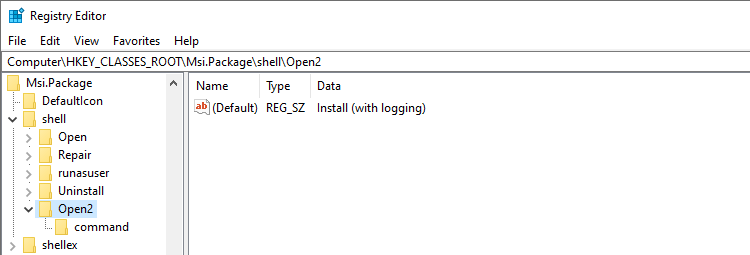
When a software installation that uses the Windows Installer Package fails, you enable Windows Installer logging and re-run the setup to capture the output to a log file for troubleshooting. Logging can be done using the Registry Editor, the Group Policy Editor, or the msiexec.exe command with the required parameters.
The first two methods are documented in the article How to Enable Windows Installer Logging. The third method uses the msiexec.exe command-line parameter. Here is an example:
msiexec /l*v "%temp%\verbose.log" /i "C:\Users\Ramesh\Downloads\7z465-x64.msi"
This starts the 7-Zip .msi installation (7z465-x64.msi) and records all the results, including verbose output, to a log file named verbose.log in the %TEMP% folder.
Do you find it difficult to type the entire command-line every time you need to log application setups? You can implement this in the context menu for .msi files to launch the installation with verbose logging.Read more
How to Install a Desktop Theme For All Users in Windows 7, 8 and Windows 10
A theme is a combination of desktop background pictures, Window colors, sound scheme and a screensaver. Windows 7 introduces a new file format (.themepack) which is basically a .cab file that can contain images, audio files for sound scheme, mouse cursors, icons and the .theme file itself. This file format was introduced so that it’s … Read more
Why Is There a Lock (Padlock) Icon on Some Files and Folders in Windows 7?
Ever wondered why there is a lock icon overlay appearing for some of your files and folders, as in the image below:
And for some folders:
Fix Error “There was a problem starting PhotoViewer.dll” When Editing Image Files in Windows 7
After upgrading your Windows Vista computer to Windows 7, when you right-click on a JPG/JPEG image and click Edit, the following error message may appear:
There was a problem starting C:\Program Files\Windows Photo Gallery\PhotoViewer.dll

The specified module could not be found.
How to Create and Use a Password Reset Disk in Windows 10

You can create a password reset disk so that you can regain access to the system quickly in the event of a forgotten local account password, without having to use third-party boot environment CDs.
It’s suggested that you create a password reset disk after creating the user account and assigning the password. The password reset disk is not applicable if you have a Microsoft account (MSA); it works for local user accounts only.
Here is a walkthrough on how to create a password reset disk in Windows 10.Read more
How to Increase the Taskbar Thumbnail Preview Size in Windows 7, 8 and 10
Until last week I was thinking that increasing the taskbar thumbnail window size is not possible natively in Windows 7 (and Windows Vista). After doing a bit of hacking around the registry, I found that Windows 7 has the ability to increase the thumbnail preview size natively, plus much more, through registry edits which I’m … Read more