When you open File Explorer, you may notice two instances of the OneDrive icon in the navigation pane. The first one may appear as “OneDrive” and the other one as “OneDrive – Personal”, both containing the same set of files and folders. You wonder how to remove the duplicate OneDrive entry.
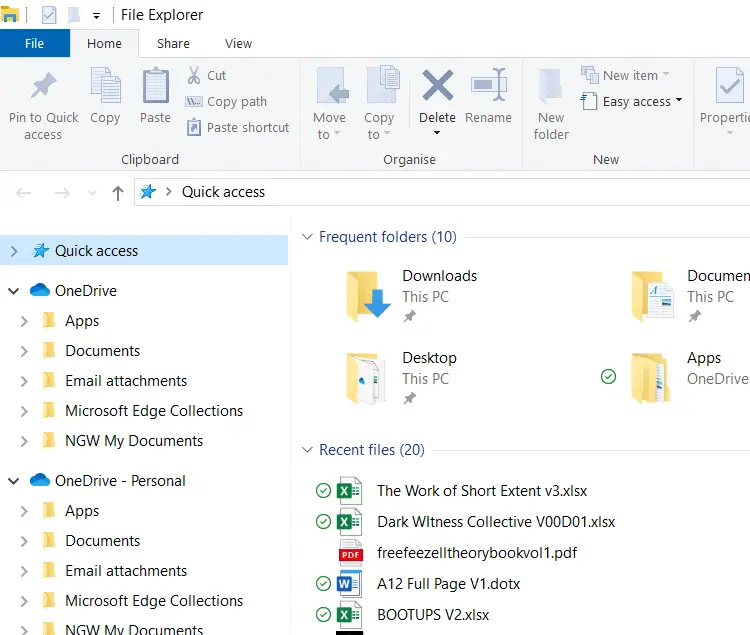
Resolution
Before proceeding, please create a System Restore Point or take a complete registry backup.
- Launch the Registry Editor by running regedit.exe.
- Go to the following branches one by one and delete them:
HKEY_CLASSES_ROOT\CLSID\{04271989-C4D2-33C6-D508-7EACF9214B8E}

HKEY_CLASSES_ROOT\CLSID\{04271989-BBB7-D70C-7DFA-2EBCEEB89D3D}

HKEY_CURRENT_USER\SOFTWARE\Microsoft\Windows\CurrentVersion\Explorer\Desktop\NameSpace\{04271989-C4D2-33C6-D508-7EACF9214B8E}

HKEY_CURRENT_USER\SOFTWARE\Microsoft\Windows\CurrentVersion\Explorer\Desktop\NameSpace\{04271989-BBB7-D70C-7DFA-2EBCEEB89D3D}
Note: If one of the above branches doesn’t exist, ignore and proceed to the next branch. Under the “NameSpace” registry key, you’ll see the
{018D5C66-4533-4307-9B53-224DE2ED1FE6}subkey. It’s the default “OneDrive – Personal” GUID. It should not be deleted. - After deleting each of the above keys, close File Explorer and reopen it.
Using a REG file to automate the above steps
- Download onedrive_duplicates_fix.reg (zipped).
- Unzip and extract the enclosed registry file to the desktop.
- Double-click the file to run it. Click Yes to confirm.
That should remove the duplicate OneDrive entry in the File Explorer navigation pane.
One small request: If you liked this post, please share this?
One "tiny" share from you would seriously help a lot with the growth of this blog. Some great suggestions:- Pin it!
- Share it to your favorite blog + Facebook, Reddit
- Tweet it!
