Windows 10 Command Prompt Can Be Closed using ALT+F4 Hotkey

The much useful ALT+F4 key sequence closes any application, but not the Command Prompt window. Users had to type exit or click the Close button to close the window. This is the case in earlier versions of Windows (up to Windows 8.1), but have you noticed that the Windows 10 Command Prompt duly responds to ALT+F4 hotkey?

Not only that! You can even change the Windows 10 Command Prompt behavior as in earlier Windows versions. Probably the developers at Microsoft had legacy applications in mind. By the way, to make Command Prompt not respond to ALT+F4 key sequence, all you need to do is to edit a registry value.
Changing the Command Prompt ALT+F4 Behavior

Read more

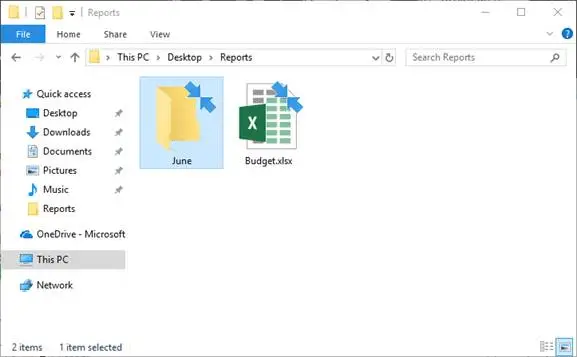
What is the Two Blue Arrows Icon on Folders in Windows 10 and How to Remove it?

After installing Windows 10, you may notice that some of your files and folders show up with a double blue arrows icon at the top. This double blue arrows overlay icon is seen if the files and folders are compressed (NTFS compression), and there is nothing to worry about.

This post tells you how to hide or remove the double blue arrow icons on folders or files in Windows 10.Read more

How to Customize New Folder Name Template in Windows 10?

When you create a new folder in Windows, the default folder name is always “New Folder”. Windows 10 allows you to customize the new folder name template to any name you wish. In previous versions of Windows this could be done by hacking the Shell32.dll using Resource Hacker or similar tools. In Windows 10, this can be accomplished easily using a simple registry edit.Read more

How to Enable Balloon Tips (XP Style) in Windows 10

In Windows 10, application and system notifications are shown as toasts, instead of the balloon-tip style notification we’ve seen since Windows 2000/XP. Toast notifications disappear quickly whereas the balloon tip notifications appear on the screen as long as we have the mouse pointer hovering over the balloon. For some users, the balloon style notification suits well. Fortunately the Windows XP-style balloon tips can be activated in Windows 10 using a registry edit or via Group Policy.

Read more

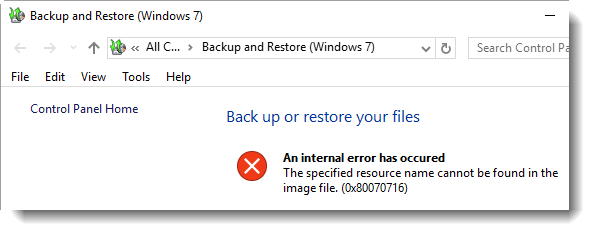
“System Image Backup” Error 0x80070716 After Upgrading to Windows 10

When you click the System Image Backup option in the File History window, Error 0x80070716 may be shown and the System Image Backup page doesn’t open.

An internal error has occured

The specified resource name cannot be found in the
image file. (0x80070716)

This can be fixed by deleting a registry value which may have been carried over from the previous Windows installation. Use these steps:

(Thanks RArandes_91)

Read more

How to Pin Windows Update Icon to the Start menu and Taskbar in Windows 7

Pinning applications to the Start menu or Taskbar is a great way to access them quickly, especially the ones which you use frequently. However the Pin to.. option isn’t available for Windows Update and perhaps for some other special executables in Windows. To Pin Windows Update icon to the Start menu/Taskbar in Windows 7, here are some neat tricks:

Read more