This article explains the different methods to create a bootable USB Windows Setup disk from a Windows 10 or 11 ISO image.
Follow one of the three methods in this article to create a USB Windows Setup Disk from the Windows ISO.
 Ramesh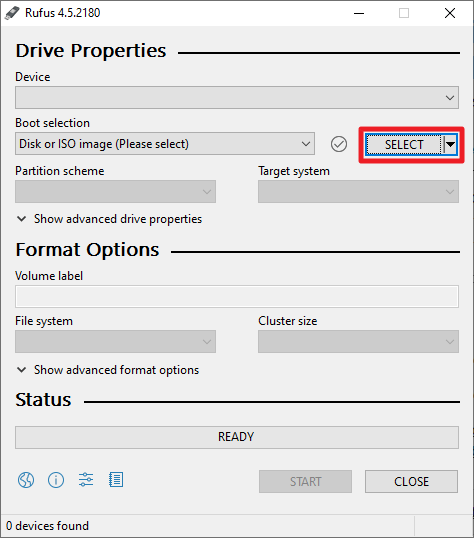
This article explains the different methods to create a bootable USB Windows Setup disk from a Windows 10 or 11 ISO image.
Follow one of the three methods in this article to create a USB Windows Setup Disk from the Windows ISO.

Windows does not have a GUI option to disable the taskbar thumbnail preview feature. I’ve experimented with the registry setting TaskbarNoThumbnail and its equivalent GPO Turn off taskbar thumbnails. That setting seems to apply only to Windows Vista and has no effect in Windows 7 and higher. You can, however, disable the taskbar thumbnail feature … Read more
Microsoft Security Essentials includes a command-line utility which can be used to update the virus/malware definitions, initiate a scan, undo a recent definition update and perform other tasks. To know how to use the command-line utility, open a Command Prompt window (CMD.EXE) and execute the following command: “%ProgramFiles%\Microsoft Security Essentials\MpCmdRun.exe” /? Command Description -? … Read more
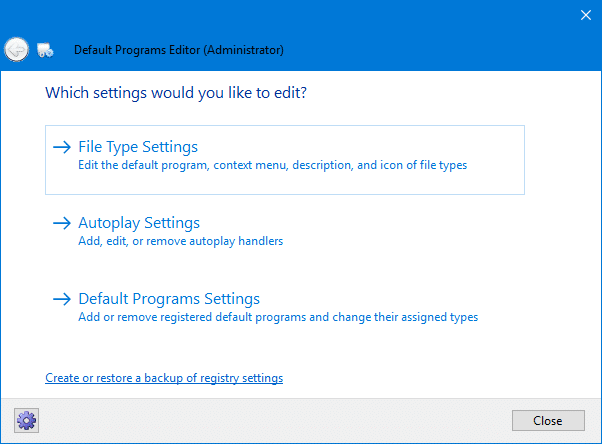
Default Programs Editor is a very useful tool which helps you to edit file type associations, add or remove AutoPlay handlers and static context menu entries. In Windows, there is no built-in option provided to add or edit context menu entries and static verbs. Here is where the Default Programs Editor comes in handy. This … Read more
You can use the mouse to copy Command Prompt text to the clipboard by enabling the Quick Edit option in Command Prompt shortcut properties. What if you don’t use a desktop shortcut to open Command Prompt, and rather run cmd.exe directly? Here is a registry edit which enables Quick Edit option by default for Command Prompt. This works regardless of the methods you use to open the Command Prompt window.
This article was written for older Windows versions. Quick Edit is enabled by default in latest versions of Windows, such as Windows 10.
Here is a compilation of some useful registry fixes for Windows 7/8/Vista/XP. I might add more fixes as more issues come in. If you have a specific request, please be sure to add it in the Comments section. # Description REG Fix OS 1 Error 1719 Windows Installer Service Could Not be Accessed, when installing … Read more
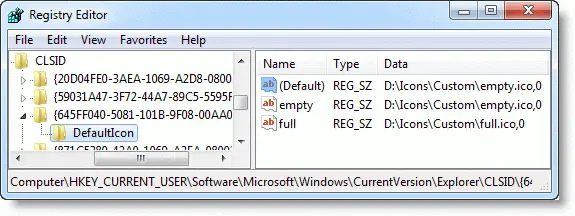
When you use a custom icon (.ico) file to customize the Recycle Bin Empty & Full icons manually or via a desktop theme, the Recycle Bin icon may not update or refresh correctly when emptying the Recycle Bin or when you add items to it. In some cases, the issue may occur even if you’re using the Windows default icons for the Recycle Bin.
There are two variations of the problem:
This post mentions the solution for the Recycle Bin icon refresh problem for all versions of Windows, including Windows 10/11.Read more
Earlier we saw how to clear the search MRU entries in Windows. Are you one of those who finds the Search Box suggestion pop-ups annoying, and want to turn off the feature? Here is a registry edit which disables the search box suggestions in File Explorer. Disable File Explorer Search Box Suggestions Click Start, type … Read more