 Mozilla Firefox®, Portable Edition is the popular Mozilla Firefox web browser bundled with a PortableApps.com Launcher as a portable app, so you can take your bookmarks, extensions, and saved passwords with you.
This article lists two methods with which you can register Mozilla Firefox Portable Edition with Default Apps or Default Programs in Windows Vista through Windows 10/11.
Register Firefox Portable with Default Apps
Method 1: Using a VBScript
- Download the script firefoxportable.vbs.
- Save the script to the same folder as
FirefoxPortable.exe. It’s an important step.
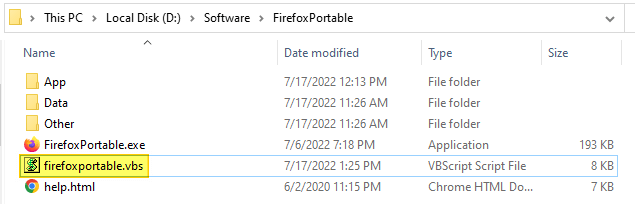
- To add/register Firefox Portable with Default Apps or Default Programs, double-click
firefoxportable.vbs
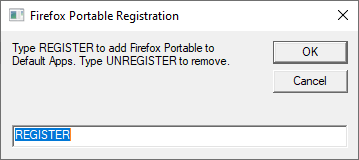
- In the input box, type
REGISTER, and click OK.
That’s it! Firefox Portable is now listed on Default Apps
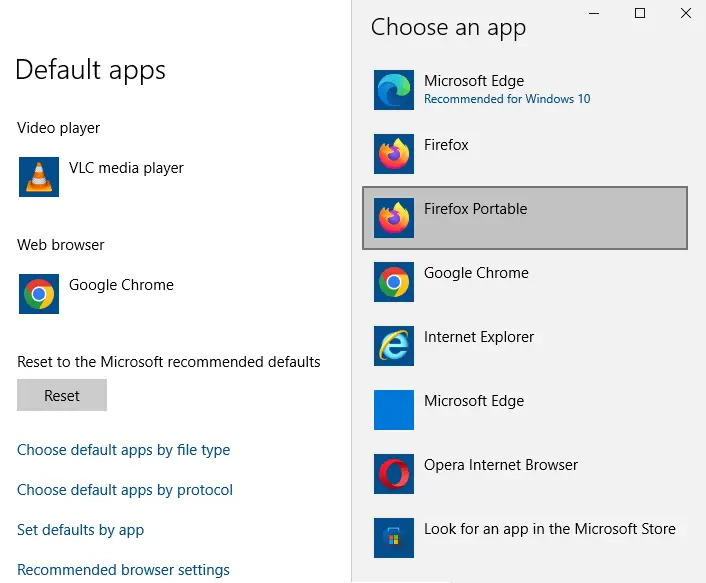
 You can customize the default app name by which the program appears in Default Apps or Default Programs. To do so, use Notepad and edit the
 ApplicationName value data in line 120 of the VBScript.
Method 2: Using a standalone utility
This method was originally written for Windows Vista but works on all versions of Windows. However, you need to install the legacy version of .Net Framework on Windows 10/11 for this program to work.
- Download registerfp.zip and save it to Desktop.
- Unzip the archive and extract the contents to a folder.
- Double-click the file
RegisterFirefoxPortable.exeto run it. - When you see the User Account Control dialog, click Allow.
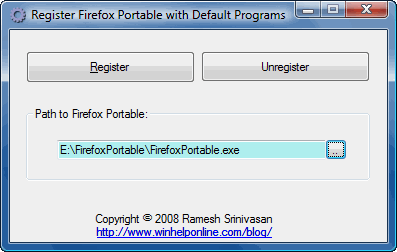
- Click the Browse button and locate the Firefox Portable executable
- Click Register
Firefox Portable is now registered with the Default Programs applet.
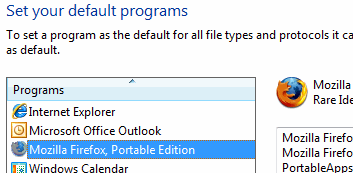
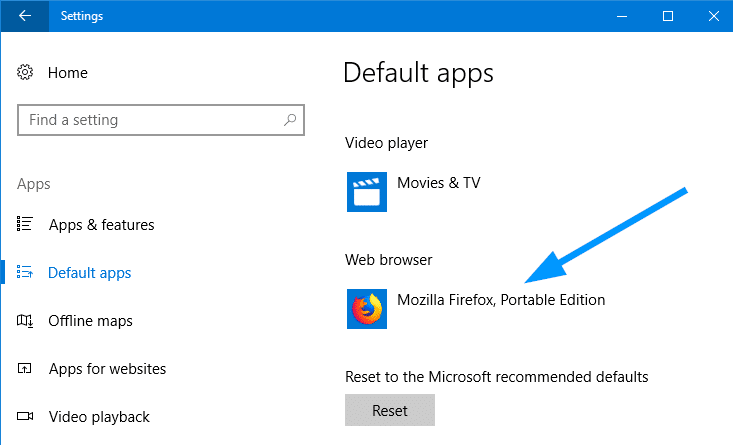
As you can see, “Mozilla Firefox, Portable Edition” entry is now listed on the Default Apps page in Windows 10 Settings. You’ll need to manually click on the web browsers entry in Default Apps and select “Mozilla Firefox, Portable Edition” to set it as default.
Editor’s note: If the drive letter for your removable device (which contains Firefox Portable) changes, you’ll need to re-register the program using the above script or utility.
One small request: If you liked this post, please share this?
One "tiny" share from you would seriously help a lot with the growth of this blog. Some great suggestions:- Pin it!
- Share it to your favorite blog + Facebook, Reddit
- Tweet it!

Thank you very much. I have been using this for many years, working with just one Firefox in a multiboot environment.
No doubt you have spent much time and energy to find out how this works. Could you perhaps use that knowledge to make one for ThunderbirdPortable as well? I think it would be greatly appreciated.
@Rick: For Thunderbird Portable, see:
https://www.winhelponline.com/blog/register-thunderbird-portable-with-default-apps/
Worked, thank you!
You have to point to the launcher for the portable browser not the opera.exe or whatever app, so using say orpera portable you choose launcher.exe not opera.exe, at least it works for me.
Old app an still works on all browsers
when i use this to open certain links, it will says instance of firefox portable is already running, but it is working when i use chrome portable. is there any workaround?
If you run this through VirusTotal it is detected as malicious. DO NOT use!!!
@Joreka: It’s a false positive!
In VirusTotal.com, only one engine “SecureAge APEX” (incorrectly) flags it as malicious. It’s cleared by all other virus scanning engines.
And, I find that the “SecureAge APEX” (a new AI engine) raises false flags for many other programs, too:
https://www.reddit.com/r/Malware/comments/g7rhuo/app_is_marked_malicious_on_vt/
https://www.reddit.com/r/antivirus/comments/et0h4p/secureage_apex_is_fp_or_i_have_problems/
https://www.reddit.com/r/antivirus/comments/iboews/secureage_apex_will_it_give_me_problems_how_do_i/
https://www.reddit.com/r/antivirus/comments/hpmylb/secureage_apex/
https://github.com/molenzwiebel/Deceive/issues/11
“If you see only a handful of positives you can assume that those are false positives.”
I’ve anyway reported the false positive at SecureAge’s website. Shall update once I get a report from them!
RegisterFP needs needlessly an old .NET which needs to be installed. For simple Reg hacks like this no bloatet runtime lib shoud be needed.
Thank you so much for this handy tool! It was indeed the only one, which does the job.
Inspired by this, I coded a new one, with configurable Names, types and protocols, to fit all required needs of you portable users.
Check it out:
https://github.com/sil3nc3/PortableRegistrator
Great. This really worked. Thanks!
@Pete: For Thunderbird, check out this page:
Register Thunderbird Portable with Default Apps or Default Programs:
https://www.winhelponline.com/blog/register-thunderbird-portable-with-default-apps/
This works!
Thank you for providing the solution to get Firefox Portable registered as default web browser.
THanks a million, works perfectly, Win 10 pro 22h2
THANKS MAN YOU’RE AWESOME
= PortableRegistrator
This portable program exist since March, 6 2022 and inspired SiL3NC3 from this website.
You can find it as ZIP on Github:
https://github.com/SiL3NC3/PortableRegistrator/releases
Thanks! The VBS works on Windows 11 24H2, but you still need to manually change the default app for file types such as .html .htm etc. The process to change is to go to Settings → Apps → Default Apps → Firefox Portable → Set defaults
I can’t get this to work, I get the error “Firefox is already running, but is not responding. The old Firefox process must be closed to open a new window.” I’ve tested both with AllowMultipleInstances in FirefoxPortable.ini set to true and false, but it doesn’t work either way. I don’t know what I’m doing wrong 🙁
@Ikindaknow: What’s your FF version? Let me try to replicate the issue.