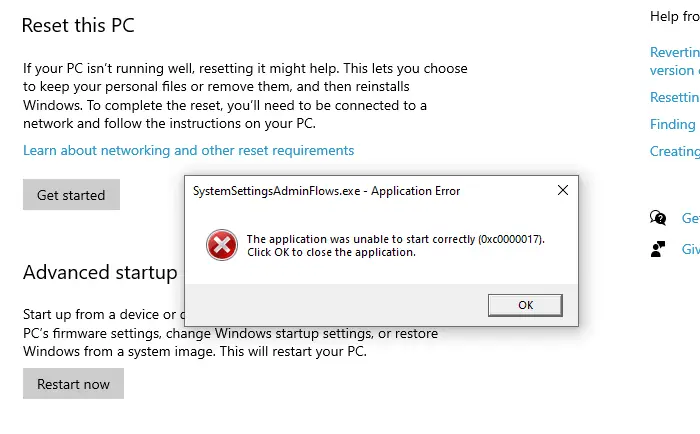
You may encounter the error 0xc0000017 when you access the Recovery options page in the Settings app. Here’s the full error message:
SystemSettingsAdminFlows.exe - Application Error

The application was unable to start correctly (0xc0000017). Click OK to close the application.
Cause
The error 0xc0000017 occurs if malware has blocked SystemSettingsAdminFlows.exe using the “MinimumStackCommitInBytes” registry value located under the “Image File Execution Options” key.
[HKEY_LOCAL_MACHINE\SOFTWARE\Microsoft\Windows NT\CurrentVersion\Image File Execution Options\SystemSettingsAdminFlows.exe]
"MinimumStackCommitInBytes"=dword:41888887
Note that the other executables, such as DISM.exe, SFC.exe, SecurityHealthService.exe, and recoverydrive.exe, may also be blocked in the same fashion.
Resolution
Please create a System Restore Point and do the following:
Option 1: Unblock SystemSettingsAdminFlows.exe using Regedit
Launch Regedit.exe and go to the following branch:
HKEY_LOCAL_MACHINE\SOFTWARE\Microsoft\Windows NT\CurrentVersion\Image File Execution Options\SystemSettingsAdminFlows.exe
Right-click SystemSettingsAdminFlows.exe and choose Delete.
Exit the Registry Editor and restart Windows.
Option 2: REG file to unblock all blocked executables
Here’s a REG fix that bulk-unblocks executables (including SystemSettingsAdminFlows.exe) that are blocked by malware.
Download ifeo_unblock_executables.reg (zipped) and extract the REG file to the desktop.
Double-click ifeo_unblock_executables.reg to run it. Click Yes to confirm. Restart Windows.
Contents of the REG file.
Windows Registry Editor Version 5.00

[-HKEY_LOCAL_MACHINE\SOFTWARE\Microsoft\Windows NT\CurrentVersion\Image File Execution Options\autoruns.exe]
[-HKEY_LOCAL_MACHINE\SOFTWARE\Microsoft\Windows NT\CurrentVersion\Image File Execution Options\autorunsc.exe]
[-HKEY_LOCAL_MACHINE\SOFTWARE\Microsoft\Windows NT\CurrentVersion\Image File Execution Options\bcdedit.exe]
[-HKEY_LOCAL_MACHINE\SOFTWARE\Microsoft\Windows NT\CurrentVersion\Image File Execution Options\dism.exe]
[-HKEY_LOCAL_MACHINE\SOFTWARE\Microsoft\Windows NT\CurrentVersion\Image File Execution Options\GlassWire.exe]
[-HKEY_LOCAL_MACHINE\SOFTWARE\Microsoft\Windows NT\CurrentVersion\Image File Execution Options\GlassWireSetup.exe]
[-HKEY_LOCAL_MACHINE\SOFTWARE\Microsoft\Windows NT\CurrentVersion\Image File Execution Options\MediaCreationTool22H2.exe]
[-HKEY_LOCAL_MACHINE\SOFTWARE\Microsoft\Windows NT\CurrentVersion\Image File Execution Options\mmc.exe]
[-HKEY_LOCAL_MACHINE\SOFTWARE\Microsoft\Windows NT\CurrentVersion\Image File Execution Options\mstsc.exe]
[-HKEY_LOCAL_MACHINE\SOFTWARE\Microsoft\Windows NT\CurrentVersion\Image File Execution Options\PowerTool.exe]
[-HKEY_LOCAL_MACHINE\SOFTWARE\Microsoft\Windows NT\CurrentVersion\Image File Execution Options\PowerTool64.exe]
[-HKEY_LOCAL_MACHINE\SOFTWARE\Microsoft\Windows NT\CurrentVersion\Image File Execution Options\ReAgentc.exe]
[-HKEY_LOCAL_MACHINE\SOFTWARE\Microsoft\Windows NT\CurrentVersion\Image File Execution Options\recoverydrive.exe]
[-HKEY_LOCAL_MACHINE\SOFTWARE\Microsoft\Windows NT\CurrentVersion\Image File Execution Options\rstrui.exe]
[-HKEY_LOCAL_MACHINE\SOFTWARE\Microsoft\Windows NT\CurrentVersion\Image File Execution Options\systemreset.exe]
[-HKEY_LOCAL_MACHINE\SOFTWARE\Microsoft\Windows NT\CurrentVersion\Image File Execution Options\SystemSettingsAdminFlows.exe]
[-HKEY_LOCAL_MACHINE\SOFTWARE\Microsoft\Windows NT\CurrentVersion\Image File Execution Options\tcpview.exe]
[-HKEY_LOCAL_MACHINE\SOFTWARE\Microsoft\Windows NT\CurrentVersion\Image File Execution Options\tcpview64.exe]
[-HKEY_LOCAL_MACHINE\SOFTWARE\Microsoft\Windows NT\CurrentVersion\Image File Execution Options\vssadmin.exe]
[-HKEY_LOCAL_MACHINE\SOFTWARE\Microsoft\Windows NT\CurrentVersion\Image File Execution Options\Wireshark.exe]
[-HKEY_LOCAL_MACHINE\SOFTWARE\Microsoft\Windows NT\CurrentVersion\Image File Execution Options\wuapihost.exe]
[-HKEY_LOCAL_MACHINE\SOFTWARE\Microsoft\Windows NT\CurrentVersion\Image File Execution Options\wuauclt.exe]
[-HKEY_LOCAL_MACHINE\SOFTWARE\Microsoft\Windows NT\CurrentVersion\Image File Execution Options\x32dbg.exe]
[-HKEY_LOCAL_MACHINE\SOFTWARE\Microsoft\Windows NT\CurrentVersion\Image File Execution Options\x64dbg.exe]
[-HKEY_LOCAL_MACHINE\SOFTWARE\Microsoft\Windows NT\CurrentVersion\Image File Execution Options\xcopy.exe]
That’s it. This unblocks many executables that may have been blocked by malware using the “Image File Execution Options” registry key.
Important: Please follow up by scanning with Malwarebytes Antimalware or another reputable antivirus product.
One small request: If you liked this post, please share this?
One "tiny" share from you would seriously help a lot with the growth of this blog. Some great suggestions:- Pin it!
- Share it to your favorite blog + Facebook, Reddit
- Tweet it!
