With the Windows 10 Photos app set as the default image viewer, when you right-click on an image or video file (or a group of files), you’ll see the Create a new video option in the context menu.
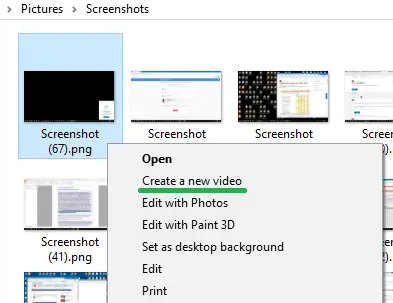
The Create a new video option lets you create a video clip from the list of selected image files, and optionally export the video file or save to your OneDrive account via the Photos app.
This article tells you how to remove the Create a new video option from the right-click menu if you don’t use it and would like to declutter the right-click menu.
Remove “Create a new video” Option from Right-click Menu
To remove the Create a new video right-click menu option, follow these steps:
Note: The Create a new video option doesn’t show up in the right-click menu if you’ve set Windows Photo Viewer or any other app (other than the Photos app) is set as the default photo viewer.
- Right-click Start, click Run
- Type
regedit.exeand click OK. - In the Registry Editor window, go to the following branch:
HKEY_CLASSES_ROOT\AppX43hnxtbyyps62jhe9sqpdzxn1790zetc\Shell\ShellCreateVideo
- Right-click the key
ShellCreateVideoand choose Delete. Click Yes to confirm. - Then, go to the following branch:
HKEY_CLASSES_ROOT\AppXk0g4vb8gvt7b93tg50ybcy892pge6jmt\Shell\ShellCreateVideo
- Right-click the key
ShellCreateVideoand choose Delete. Click Yes to confirm. - Exit the Registry Editor.
Additional note
AppX43hnxtbyyps62jhe9sqpdzxn1790zetc programmatic identifier applies to the following image file types:
.bmp, .dib, .gif, .heic, .ico, .jfif, .jpe, .jpeg, .jpg, .jxr, .png, .thumb, .tif, .tiff, .wdp
AppXk0g4vb8gvt7b93tg50ybcy892pge6jmt programmatic identifier applies to the following video file types:
.3g2, .3gp, .3gp2, .3gpp, .asf, .avi, .m2t, m2ts, .m4v, .mkv, .mov, .mp4, mp4v, .mts, .wm, .wmv
That’s it! You’ve now removed the “Create a new video” context menu option for image and video file types in Windows 10.
See also How to Remove “Edit with Paint 3D” & “Edit with Photos” from Right-click Menu in Windows 10
One small request: If you liked this post, please share this?
One "tiny" share from you would seriously help a lot with the growth of this blog. Some great suggestions:- Pin it!
- Share it to your favorite blog + Facebook, Reddit
- Tweet it!
