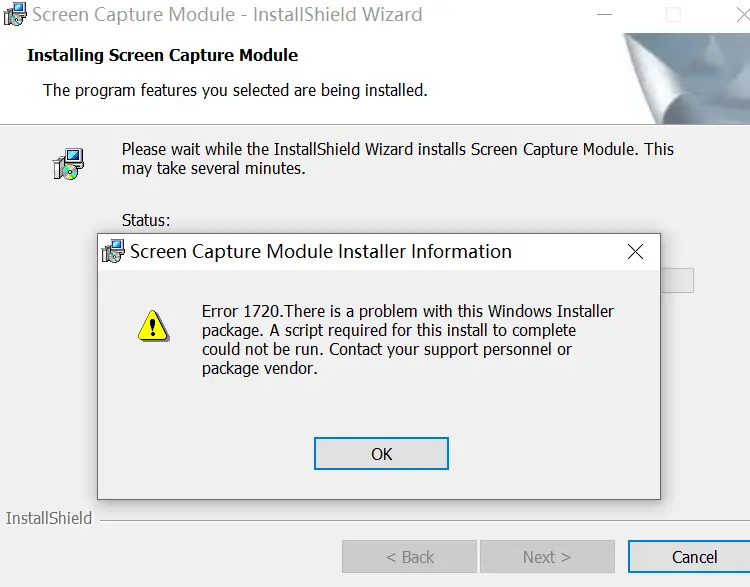
Error 1720 may be shown when you try to install an app using the .msi installer. Here’s the full error message:
Error 1720: There is a problem with this Windows Installer Package. A Script required for this install to complete could not be run. Contact your support personnel or package vendor.
Cause
The above error indicates that a script-based custom action has failed. This can occur with VBScript, JScript, or InstallScript custom actions. Windows Scripting registration may be broken on the computer.
Error code: 1720
Description: There is a problem with this Windows Installer package. A script required for this install to complete could not be run. Contact your support personnel or package vendor. Custom action [2] script error [3], [4]: [5] Line [6], Column [7], [8]
Resolution
Step 1: Install the VBScript FOD
If you’re using Windows 11 24H2 and higher, please install the VBScript Feature On Demand (FOD) package to resolve the issue. You can do so via Settings or using the DISM command below.
To do so, please open Command Prompt (admin) and run the following command:
DISM /Online /Add-Capability /CapabilityName:VBSCRIPT~~~~
This installs the VBScript feature. Restart Windows.
Now that the VBScript FOD is installed, check whether the Windows Installer error 1720 has been resolved.
Step 2: Fix the VBScript and JScript registration
If the procedure in Step 1 doesn’t resolve the issue, please apply the VBScript and JScript registry fixes described in the article “Fix for Windows Installer errors 2738 and 2739.”
Step 3: Contact the software vendor
As far as the Windows Installer error 1720 is concerned, the above fixes are not comprehensive. You may get the Windows Installer error 1720 even after installing VBScript and fixing the VBScript and JScript registration. If the problem persists, you must contact the software vendor to know why their custom action script is failing to run.
For example, if the custom action script fails with error code -2147024894 (hex: 0x80070002), it indicates a missing file is causing the failure.
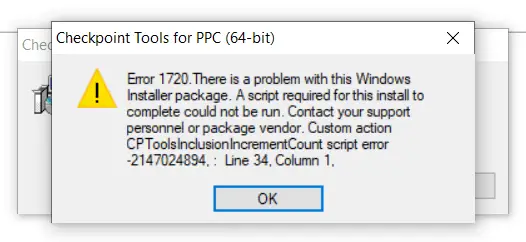
Only the software vendor knows what their custom actions script is trying to run. So, please get in touch with the software vendor with a screenshot of the error message to learn how to remediate the issue.
One small request: If you liked this post, please share this?
One "tiny" share from you would seriously help a lot with the growth of this blog. Some great suggestions:- Pin it!
- Share it to your favorite blog + Facebook, Reddit
- Tweet it!
