When you try to install a program using Windows Installer (.msi) Setup package, you may encounter error 2738 or 2739 and the setup fails.
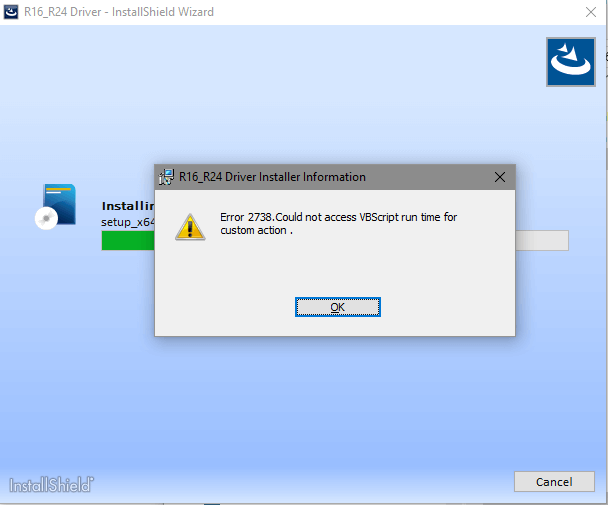
Errors 2738, 2739 occur if the Windows Installer Setup uses Windows Script (.vbs or .js) custom actions, and the VBScript or JScript runtimes are not registered in the computer.
| Error code | Description |
| 2738 | Could not access VBScript run time for custom action |
| 2739 | Could not access JScript run time for custom action |
The above errors occur if the installer fails to run .js and .vbs scripts as the VBScript and/or JScript engines are not working properly.
It’s possible that your anti-virus software has hooked into the script engine in order to block the execution of scripts. For instance, older versions of McAfee anti-virus replace the vbscript.dll reference in the registry to their DLL (the version number suffix varies) below:
C:\Program Files\Common Files\McAfee\SystemCore\ScriptSn.20110222204811.dll
Resolution
Windows 11-specific fix
Windows 11 24H2 (and above) handles VBScript as a Feature-on-Demand (FOD). So, if you’re using Windows 11 24H2 or higher, please check if the VBScript FOD is installed. You can install VBScript using Windows Features in Settings or using the DISM command.
From an admin Command Prompt window, run this command:
DISM /Online /Add-Capability /CapabilityName:VBSCRIPT~~~~
Generic fix for all Windows versions, including Windows 11
Option 1: Registry fix
To automate the steps mentioned in the next section, you can use this registry fix.
To fix error 2738 and/or 2739, download Download vbscript_jscript_2738_2739_fix.zip.
Unzip and extract the archive. It contains the following files:
jscript-fix-32-bit.reg
jscript-fix-64-bit.reg
vbscript-fix-32-bit.reg
vbscript-fix-64-bit.reg
If you have Windows 64-bit, run the two 64-bit REG files, and restart Windows. The fixes apply to Windows 11, 10, Windows 8, Windows 7, and earlier.
Option 2: Manual procedure
To fix the Vbscript error 2738 and/or JScript error 2739 manually:
- (Before proceeding, you may want to create a System Restore Point or take a complete registry backup.)
Fix VBScript error 2738
- Start the Registry Editor (
regedit.exe) - Go to the following branch:
HKEY_LOCAL_MACHINE\SOFTWARE\Classes\CLSID\{B54F3741-5B07-11cf-A4B0-00AA004A55E8}\InprocServer32 - In the right-pane, double-click (default) and set its data to:
C:\Windows\System32\vbscript.dll
- If you’re using the 64-bit version of Windows, additionally, go to the following key:
HKEY_LOCAL_MACHINE\SOFTWARE\Classes\Wow6432Node\CLSID\{B54F3741-5B07-11cf-A4B0-00AA004A55E8}\InprocServer32 - In the right-pane, double-click (default) and set its data to:
C:\Windows\SysWOW64\vbscript.dll
- Go to the following keys (if they exist) under
HKEY_CURRENT_USERHKEY_CURRENT_USER\SOFTWARE\Classes\CLSID\{B54F3741-5B07-11cf-A4B0-00AA004A55E8} HKEY_CURRENT_USER\SOFTWARE\Classes\Wow6432Node\CLSID\{B54F3741-5B07-11cf-A4B0-00AA004A55E8} - Delete each of the above keys.
- Exit the Registry Editor.
Fix JScript error 2739
- Start the Registry Editor (
regedit.exe) - Go to the following branch:
HKEY_LOCAL_MACHINE\SOFTWARE\Classes\CLSID\{f414c260-6ac0-11cf-b6d1-00aa00bbbb58}\InprocServer32 - In the right-pane, double-click (default) and set its data to:
C:\Windows\System32\jscript.dll
- If you’re using the 64-bit version of Windows, additionally, go to the following key:
HKEY_LOCAL_MACHINE\SOFTWARE\Classes\Wow6432Node\CLSID\{f414c260-6ac0-11cf-b6d1-00aa00bbbb58}\InprocServer32 - In the right-pane, double-click (default) and set its data to:
C:\Windows\SysWOW64\jscript.dll
- Go to the following keys (if they exist) under
HKEY_CURRENT_USERHKEY_CURRENT_USER\SOFTWARE\Classes\CLSID\{f414c260-6ac0-11cf-b6d1-00aa00bbbb58} HKEY_CURRENT_USER\SOFTWARE\Classes\Wow6432Node\CLSID\{f414c260-6ac0-11cf-b6d1-00aa00bbbb58} - Delete each of the above keys if they exist.
- Exit the Registry Editor.
Tech explanation about 2738 and 2739 errors
Quoting Raymond Chen [MSFT]
As a security measure, Windows Installer will not load script engines registered in HKEY_CURRENT_USER. As a user-writable store, a normal user could get an elevated install to run their library masking as a script engine if the custom action was not explicitly attributed with msidbCustomActionTypeNoImpersonate (0x0800). This is an elevation of privileges attack; thus, Windows Installer returns error message 2738 or 2739 for custom actions type 6 and type 5, respectively, and returns Windows error 1603, ERROR_INSTALL_FAILURE.
Check that vbscript.dll and jscript.dll aren’t registered in HKEY_CURRENT_USER (HKCU), checking for the registry keys below.
VBScript: HKCU\SOFTWARE\Classes\CLSID\{B54F3741-5B07-11CF-A4B0-00AA004A55E8}
JScript: HKCU\SOFTWARE\Classes\CLSID\{F414C260-6AC0-11CF-B6D1-00AA00BBBB58}
Remove these keys if they exist in HKEY_CURRENT_USER (HKCU).
For Windows 7, Vista, and earlier
- Open an elevated Command Prompt. To do so, click Start, click All Programs, click Accessories, right-click Command Prompt, and then click Run as administrator.
- Run the following commands one by one and press
Enterafter each line:regsvr32 vbscript.dll regsvr32 jscript.dll
For Windows 64-bit editions, run these two commands in addition:
c:\windows\syswow64\regsvr32.exe vbscript.dll

c:\windows\syswow64\regsvr32.exe jscript.dll
You should see the output DllRegisterServer in filename.dll succeeded for each command. In case you get the error
0×80004005, it’s probably because you’re trying to register the DLLs from a normal (non-elevated) Command Prompt window. - Type Exit to close the Command Prompt window.
The Regsvr32.exe method doesn’t remove the redundant HKCU registry key. If this method doesn’t help, follow the registry editing method discussed earlier.
One small request: If you liked this post, please share this?
One "tiny" share from you would seriously help a lot with the growth of this blog. Some great suggestions:- Pin it!
- Share it to your favorite blog + Facebook, Reddit
- Tweet it!

You pushed me just about to my computer limit, but it worked! I was trying to upgrade a computer from windows 7 to windows 10 and it appears to be working fine now.
Hi, your post was a breakthrough for my understanding of what was causing the issue. Mine was due to McAfee which I uninstalled many years ago. Your solution did not work the first time, with an error writing the value’s new contents. Please add the following, which I found on another forum.
For 64-bit
Open up Registry editor.
Go to HKEY_LOCAL_MACHINE\SOFTWARE\Wow6432Node\Classes\CLSID\{B54F3741-5B07-11cf-A4B0-00AA004A55E8}\InprocServer32
Right-click this key and select “Permissions…”
Select the “Administrators” group and click the check-box for Allow “Full Control”
You may see the value is associated with a file from a software vendor other than Microsoft. Edit the “(Default)” key’s value and change it to C:\Windows\SysWOW64\vbscript.dll
If the above do not work, additionally go to Advanced\ Permissions and uncheck box “Include inheritable permissions from this object’s parent”. Delete any accounts which you do not recognise.
For 32-bit
Open up Registry Editor
Go to HKEY_LOCAL_MACHINE\SOFTWARE\Classes\CLSID\{B54F3741-5B07-11cf-A4B0-00AA004A55E8}\InprocServer32
Right-click this key and select “Permissions…”
Select the “Administrators” group and click the check-box for Allow “Full Control”
Edit the “(Default)” key’s value and change it to C:\Windows\System32\vbscript.dll
If the above do not work, additionally go to Advanced\ Permissions and uncheck box “Include inheritable permissions from this object’s parent”. Delete any accounts which you do not recognise.
@ST: Excellent, thanks for posting that info. Will help other users.