You may have created a new video project and exported it to a Video Project Backup file (.vpb) using the Photos Legacy app in Windows 10. However, you’re unable to import the .vpb file on a Windows 11 computer, even after installing the Photos Legacy app.
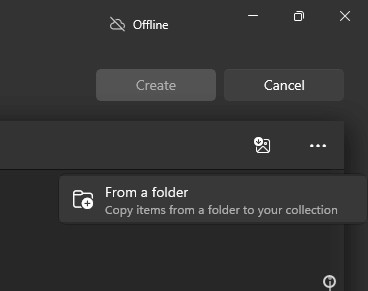
On Windows 11, the Import backup (“Import a video project backup file”) option doesn’t exist. Instead, you see the “From a folder” submenu when you click Import. However, the .vbp files are not seen when you use that option.
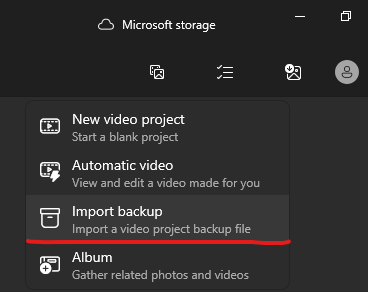
On a Windows 10 PC, you’ll see the Import backup option to import a video project backup file (.vpb).
Resolution
The Video Project Backup files (.vbp) are simply zip files with a different file extension. You’ll find the following files and folders inside a .vpb file.
ProjectDuration
ProjectName
ProjectState
RpmData
To extract files inside the .vbp archive, please do the following:
- Make a copy of your .vpb file.
- Change the extension of the file to .zip
- Now, you should be able to extract the contents of the .zip file to a folder. See How to Zip and unzip files.
- Your files will be located inside the ProjectLibraryPhotoVideoItems subfolder. If you backed up multiple files, each file may have its own subfolder. You can list the items or flatten them using a file search. Reference: How to Copy Files from Multiple Subfolders to a Single Folder.
Alternatively, you can open a .vbp file using 7-Zip or WinRAR and extract the files to a folder.
One small request: If you liked this post, please share this?
One "tiny" share from you would seriously help a lot with the growth of this blog. Some great suggestions:- Pin it!
- Share it to your favorite blog + Facebook, Reddit
- Tweet it!
