When you start the Diagnostic Policy Service in your Windows 10 or 11 system, the following error may occur:
Windows could not start the Diagnostic Policy Service service on Local Computer:

Error 5: Access is denied.
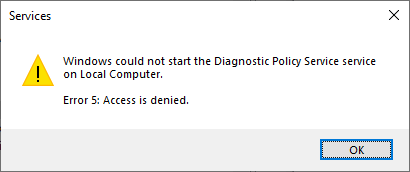
When this occurs, the following entry is logged into the System event log.
Log Name:      System
Source:        Service Control Manager
Date:
Event ID:      7023
Task Category: None
Level:         Error
Keywords:      Classic
User:          N/A
Computer:
Description:
The Diagnostic Policy Service service terminated with the following error:
Access is denied.
The Diagnostic Policy Service enables problem detection, troubleshooting, and resolution for Windows components. If this service is stopped, diagnostics will no longer function.
Resolution
The Diagnostic Policy Service error code 5 occurs due to incorrect registry permissions. Please follow the steps below to resolve the issue:
- Start the Registry Editor by running regedit.exe.
- Go to the following branch in the Registry Editor:
HKEY_LOCAL_MACHINE\SYSTEM\CurrentControlSet\Control\WDI\Config
- Right-click Config and click Permissions…
- Click Advanced.
- Click Add.
- Click Select a principal.
- In the Object name text box, type NT SERVICE\DPS, and click OK.
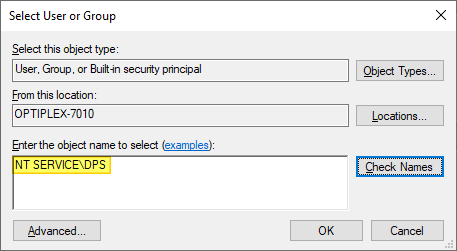
- Click Show advanced permissions.
- Enable the following checkboxes:
- Query Value
- Set Value
- Create Subkey
- Enumerate subkeys
- Notify
- Read Control
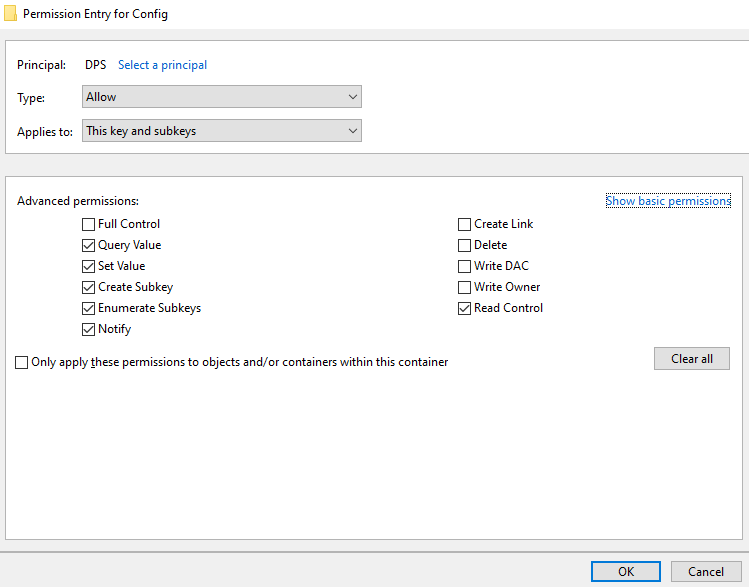
- Click OK.
- The DPS account should now have write access (special permissions) for the Config registry key. Click OK, OK to apply the changes and close all the dialogs.
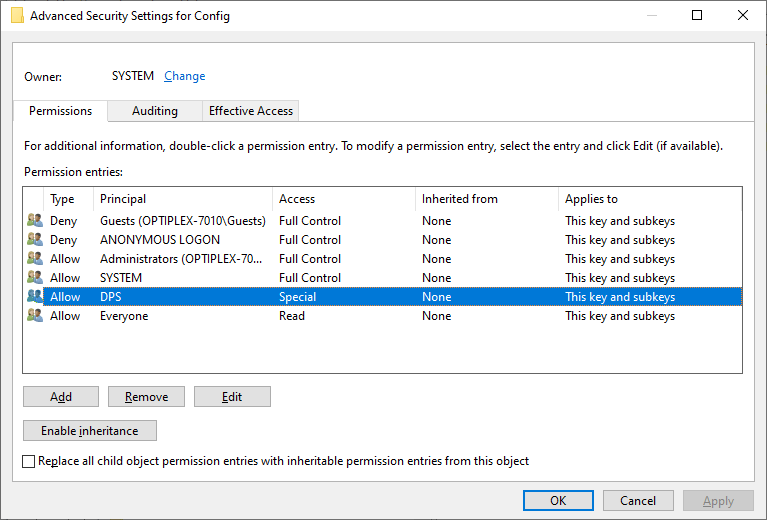
- Exit the Registry Editor.
You should be able to start the Diagnostic Policy Service service now.
One small request: If you liked this post, please share this?
One "tiny" share from you would seriously help a lot with the growth of this blog. Some great suggestions:- Pin it!
- Share it to your favorite blog + Facebook, Reddit
- Tweet it!
