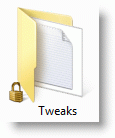
Ever wondered why there is a lock icon overlay appearing for some of your files and folders, as in the image below:
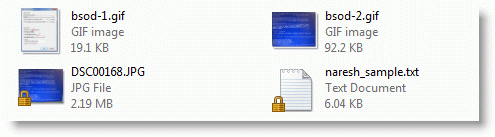
And for some folders:
 Ramesh
 Ever wondered why there is a lock icon overlay appearing for some of your files and folders, as in the image below:
And for some folders:
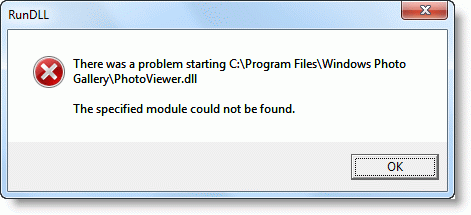
After upgrading your Windows Vista computer to Windows 7, when you right-click on a JPG/JPEG image and click Edit, the following error message may appear:
There was a problem starting C:\Program Files\Windows Photo Gallery\PhotoViewer.dll

The specified module could not be found.

You can create a password reset disk so that you can regain access to the system quickly in the event of a forgotten local account password, without having to use third-party boot environment CDs.
It’s suggested that you create a password reset disk after creating the user account and assigning the password. The password reset disk is not applicable if you have a Microsoft account (MSA); it works for local user accounts only.
Here is a walkthrough on how to create a password reset disk in Windows 10.Read more
Until last week I was thinking that increasing the taskbar thumbnail window size is not possible natively in Windows 7 (and Windows Vista). After doing a bit of hacking around the registry, I found that Windows 7 has the ability to increase the thumbnail preview size natively, plus much more, through registry edits which I’m … Read more
We’ve covered the excellent multi-purpose command-line tool NirCmd from Nirsoft earlier. This post talks about the new command-line switches added in the current version of NirCmd. Earlier this month, I sent a NirCmd feature request to Nir Sofer, asking to include an “elevate” switch, which should launch an application elevated (Windows Vista, Windows 7 & 2008.) Nir was kind enough to incorporate this feature in the immediate version update (v2.40). Later another update, to fix a bug I reported, v2.41 was released.Read more
 I’m writing this article specifically for Windows 7, because the FullRowSelect registry value that you used in Windows Vista, doesn’t work in Windows 7. (REF: Enable or Disable Full Row Select feature in Explorer in Windows Vista). After some of our readers reported that setting FullRowSelect to 0 doesn’t do anything in Windows 7, I decided to have a look at this issue. Playing with different bitmask values, I finally got what I wanted – to disable full row select feature in Windows Explorer (Details mode) in Windows 7, but with a minor side-effect which is explained in the later part of the article.Read more
In Microsoft Knowledgebase article KB978980 Microsoft states that when there are more than four broken shortcuts on the desktop, the System Maintenance troubleshooter automatically removes all broken shortcuts from the desktop. It implies that it only removes "broken" shortcuts.
Well! Look at this screenshot.Read more
As we recently saw the Aero Shake feature can be disabled by enabling the “Turn off Aero Shake window minimizing mouse gesture” option in the Group Policy Editor, or by creating the NoWindowMinimizingShortcuts registry value. Here’s another way to disable Aero Shake using the registry.Read more
Desktop Background Slideshow is a neat little feature in Windows 7 which helps you shuffle your desktop background from a image file store folder, at predefined intervals. But, as Windows doesn’t show the file name of the currently displayed wallpaper, it becomes a problem if you have thousands of images in a store folder and you need to find the file name and the directory location of the currently displayed wallpaper.
Here is a small script which adds the Desktop Background File Location option in the Desktop context menu, which opens the current wallpaper file’s target folder and selects the file.Read more
Aero Shake is a feature introduced in Windows 7 using which you can minimize all other open windows, by clicking on the title bar of an application and shaking it using the mouse. This causes all other applications (except that application window) to minimize automatically. This feature is available in Home Premium, Professional, Ultimate, and Enterprise editions of Windows 7.
If Aero Shake has stopped working on your PC all of a sudden and you’ve tried running the Aero Troubleshooter, here are some other things that you can try.Read more